How to Password Protect and Encrypt Microsoft Office 2010 Documents


Password Protect Excel 2010, Word 2010 and Powerpoint using built-in Microsoft Office 2010 Encryption Features. Just follow this how to guide with screenshots.
Encryption Features come built into all the Microsoft Office 2010 Suite of applications including Word 2010, Excel 2010, and Powerpoint 2010. This feature is a nice improvement over password protecting documents under Office 2007 since it is also password-protected – but the new process for Office 2010 is consistent across the core Office suite (Word 2010, Excel 2010, PowerPoint 2010, etc.) I’ll demonstrate the process just once using Microsoft Word 2010.
Editor Update 7/25/2012 – I recently documented the same process here for Office 2013 users. Enjoy!
How To Password Protect A Word or Excel Document Using Built-in Office Encryption
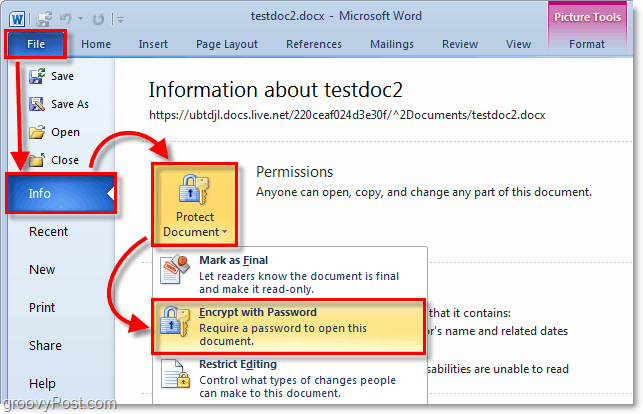
Step 1 – Click the File tab, then click Info. On the menu to the right-click Protect Document and click Encrypt with Password.
Step 2 – The Encrypt Document dialog will appear, type in a strong password and then click OK to finish.
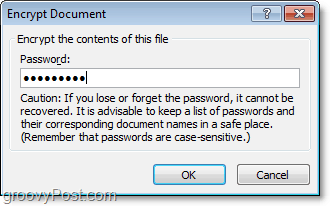
Please note – It’s critical to use a strong password or passphrase in step #2. Yeah yeah… you don’t need to get crazy here with wild $ymb0ls and upper and lower case characters which you will forget in 10 minutes. However, using a simple dictionary word will allow anyone with a $100 password cracking app to gain access to your document. Using a long passphrase, however (IE: my house is yellow) with 10 or more characters will significantly increase the encryption strength of the document. This method will decrease the likelihood that someone will be able to break the encryption and gain access to your document. I’ve written a detailed article on strong passwords and passphrases so be sure to check it out before you choose a password for step 2.
Select a password to protect your document!

If you’re looking to password-protect your document for sharing purposes (Set a Password to Open or Password to Modify option), you will have to use the old Password Protection dialog used with previous versions of Office. For that step-by-step, take a look at this article I wrote for Office 2007.
94 Comments
Leave a Reply
Leave a Reply



Amy
November 26, 2009 at 11:03 am
I'm really liking office 2010 however so far I can't say I would pay for the upgrade yet.
Thnx for the recent articles on 2010 tho. Would Luke to see more for outlook tho.
Kym
September 1, 2010 at 4:24 pm
Sorry, but the above password protection is not available on Outlook 10 without special keys, etc. Any other ideas?
MrGroove
September 26, 2010 at 6:12 pm
Outlook 2010? Are you trying to encrypt emails before sending them?
krunal
September 29, 2011 at 1:56 am
i have office2010 strat…. 1 que how to proctect my word fiels min ( password my word file)
LAURA KELLY STRAIT
November 11, 2011 at 2:02 pm
insert resume i would like to do
Ann
December 9, 2011 at 6:55 am
I recently got a new computer and it has office 10. I use win-zip to pw protect all attachments in my out going mail. I have installed the new win-zip but the pw protctions doesnt work. Ihave a 64 something or another and it only works with a 32. As you con tell I am not and IT person. Do you have another suggested for pw proctecting this data before sedning? It can be an word doc, exl doc of even a PDF doc.
Thanks for your help.
Robert
September 29, 2010 at 1:00 pm
I’ve encrypted an Excel Workbook in Excel 2010 and wonder how to un-encrypt or un-protect it. My intent was to email a document and have it password protected like in Excel 2003. I don’t want the users to have to provide a password to open the document, just not be able to make changes to it.
How do I get rid of the encrypted / protected status I already have? Providing the password just allows me to open the document…not get rid of the protection status.
Steve Krause
June 20, 2012 at 11:09 am
There should be an option when you add the password to either password protect it to open or modify.
Alok ranjan
October 12, 2010 at 1:31 am
how to open the password protected word 2007 file in word 2010 software
MrGroove
October 12, 2010 at 10:27 am
Should be pretty straight forward. Just open it and use the password. Do you have the password?
Nikunj
April 11, 2013 at 3:41 am
What is the problem with this??? I look at my schools computer it has this encrypt password feature i learned it from my computers teacher i was studying it at home but my word doccument wont even have this feature can you please telll me if it doesnt have the protect doccument feature how else i can save the password i may ask?
craig87
December 15, 2010 at 12:57 pm
I’ve found a soft called Winsesame it’s a encryption software wich work with all sorts of files (doc, xls, pdf, jpg, avi ..) and even folders. It seems to be ok with office documents. http://www.winsesame.com
MrGroove
July 8, 2011 at 10:04 pm
Is there a reason you don’t want to use the built-in encryption with Office 2010?
Rick
May 1, 2012 at 3:11 pm
Is there a way to password protect an entire folder rather than individual files?
Steve Krause
May 1, 2012 at 10:27 pm
Hi Rick — There is however it all depends on what you’re trying to accomplish. Using Office 2010 you cannot however. It’s single file specific. What you can do however is use EFS encryption to encrypt both files and folders. Here’s an article I wrote that takes you through the step-by-step: http://gpo.st/1rg (yes, that’s a safe link).
Just remember, the difference between DISK encryption like EFS and FILE encryption like Office 2010 is with Disk encryption, as soon as you copy the file off the disk and into Email for example, the file is no longer encrypted. With Office 2010 and 2007 however, when you put a password on the file the encryption will follow the file so no one can open it without the password. That being said, with EFS as explained in my article, it will encrypt ALL files if you choose.
A last option would be to use something like 7ZIP or WinZip and compress an entire folder then put a password on the file. http://gpo.st/25g
That’s another option that will let you encrypt a lot of data and email it or copy it to someone. Just give them the password and they can decrypt it.
It really just depends what you want to do.
Reezna
May 13, 2012 at 9:37 pm
Hi Steve,
Can you help me, i have opened the new workbook and i want to save the file with the password. but when i click general option, the button password to open was grey (disable) the option for setting a password for modifying it is still there
Then i’ve to try to click file >> info >> protect workbook but there is no option Encrypt document.
Any ideas ?
kim27
January 4, 2011 at 3:57 am
To decrypt, go back into the File tab > Info > Permissions and click on Encrypt with Password. Then delete the password that has been automatically filled in, click OK. That should remove the encryption. Thanks!
stevetaormina
October 13, 2011 at 7:33 pm
Thanks, kim27. That worked for me. I wanted to lock the data and formulas from any changes, not require a password to open the dern thing. Didn’t know how to un-encrypt until reading your reply. Thanks again.
Jess
March 11, 2011 at 3:02 pm
i dont have that option on mine. it does say ‘protect document’
so i cant password my file.
MrGroove
July 8, 2011 at 10:06 pm
Hi Jess,
Check to make sure your running the latest copy of Office 2010. I think I remember the BETA version had the options to “Protect” vs. the steps I showed in this tutorial.
Alan
August 28, 2011 at 11:36 am
Is there a way to lock a page so that I can fill in blanks and not affect the basic page?
MrGroove
August 28, 2011 at 12:00 pm
I think your talking about Templates?
Create a template / form and let others just fill in those areas of the form right?
AC
August 29, 2011 at 10:05 pm
have an wxcel 2007 password protected file. opened it once on my new macbook with office 2010. the same file when trying to open in ms excel 2007 at office says “the encryption type used is not avaible”. i never encrypted the file in 2010 jut using the same old 2007 password .. pl help
Debra Cardosi
August 30, 2011 at 12:19 pm
Thanks…I don’t think I’ve ever spend less time finding the answer to my question and executing the command. So very grateful for your help.
Carol
September 19, 2011 at 10:33 am
I have frequent problems with the encryption function in office 2010. I get a message at the point of saving changes that says that the current encryption is not available or something like that. Sometimes it works–in fact I’ve encrypted hundreds of docs but again today I have that message. Is it a version issue? Do I need to save my doc in word97-2003 or whatever that ancient thing is. What’s the problem?
Kris
September 24, 2011 at 3:43 pm
I just upgraded from MS Office 2007 to 2010, and now one of my password protected documents will not open in MS Word 2010. After I enter the password click OK, I get the following message: “Word cannot open this file. The encryption type used is not available, contact the author of the file. More encryption types are available using the High Encryption Pack”. I’ve tried everything I know to correct this, but still no go. Any ideas?
Kris
October 29, 2011 at 5:31 am
Still hoping that you or someone else here can provide a possible solution. Looks like there are a few others that are experiencing this exact problem.
Carol
September 25, 2011 at 12:47 pm
I have the same problem. My solution–totally unsatisfactory to me–is to revert my files to 97-2003 versions and then encrypt. Works fine. But the process shown above does not work for me either.
Steve Krause
June 20, 2012 at 10:36 am
@12dd1ec3263baaf7c3a7296af643fa2d:disqus be sure to save the document in Office 2010 format first. Then add the passwords.
Stephen Hart
September 27, 2011 at 2:45 pm
Thanks – couldn’t find it for looking! Slightly embarrassed that it was right in front of my nose the whole time!!
Thanks for a clear article.
Regards
Stephen
Steve Krause
June 20, 2012 at 10:36 am
You bet @085f97fdf7d5bb573b9649bd9054e778:disqus ! Welcome to groovyPost.
Bill
October 4, 2011 at 1:31 pm
Hi,
I also all of a sudden out of the blue have “Word cannot open this file. The encryption type used is not available, contact the author of the file. More encryption types are available using the High Encryption Pack”. showing when I try to open a file I have opened dozens if not hundreds of times before with no problem.
I haven’t been able to do anything with it in terms of reverting to 2003… as it says it is a 2003 word doc. Any ideas?
Milan
October 25, 2011 at 1:25 am
I have the same problem: password protected document in Office 2007, cannot be open under Office 2010… :(
DrScott
November 2, 2011 at 1:36 pm
What file tab? I don’t have one, now what?
DrScott
November 2, 2011 at 1:38 pm
Never mind, I was told it was Word 2010 but it’s not, it’s Word 2007.
Steve Krause
November 3, 2011 at 7:39 am
No problem. I wrote another how to for password encrypting office 2007. Did you find that article? Here is the link just in case — https://www.groovypost.com/howto/password-protect-encrypt-microsoft-office-2007-excel-word-documents/
Lisa Hochhauser
November 6, 2011 at 2:25 pm
Do you have any suggestions for setting passwords on multiple files in a folder? I have a requirement to set passwords on 20 or 30 files containing review data and I am looking to avoid having to set the password on each individually.
Steve Krause
June 20, 2012 at 11:06 am
Hi @f6e8e8f0cd1d3910b7b1bd005800e30f:disqus multiple files or folders, this is not the solution. I answered this questions already in a comment below — https://www.groovypost.com/howto/geek-stuff/password-protect-encrypt-microsoft-office-2010-documents/#comment-561786286
Give that a read. It should answer all your questions.
Dana
November 21, 2011 at 8:14 am
I am wondering if i can password protect only a embedded excel workbook inside the word document. Many people can view the word doc, its not an issue. But only a select group should be able to view the excel doc, which could contain sensitive information.
Steve Krause
June 20, 2012 at 11:08 am
Sure – You should encrypt the excel workbook first using the steps in this article then just embed it into the word document. Should not be a problem.
Emmy
November 27, 2011 at 6:48 pm
For some reason, after I put the encryption, then save the document, then reopen it, there’s no password box? does that mean it’s not encrypted? Because I rechecked the encryption and then it was gone….I’m confused
Benjamin
February 16, 2012 at 7:00 am
@Emmy
I had the same problem and realized that I was trying to put a password on an older microsoft word document format. Look at the top of your document window where the title of your document should be to see if it says [Compatibility Mode] anywhere. That will indicate that Word 2010 is dealing with an older word document version, thus it can’t encrypt it.
Just create a new Word 2010 document and copy and paste everything from your old document to this new one. Then you should be able to put a password on it just like described here.
amit
March 17, 2012 at 3:39 pm
i forgot my password for one of my Msword 2010 doc..is there is any solution to crack it or to recover the password…
pls reply
Steve Krause
August 1, 2012 at 9:25 am
There are several apps out there that can break password encryption on Office Documents IF (big if) you used a weak password.
If you used a long and strong password with special characters, it will be very difficult to brute-force your way into the office document Amit.
Hanna
December 5, 2011 at 1:05 am
Hi,
I have a new computer with office 2010. One of my very old files has an encrypted password. I know the password and I can open the document, but I’m working now on that story and I want to cancel the encryption. I can’t find anywhere instructions as how to cancel it…
Hanna
Lisa
December 5, 2011 at 2:48 am
Fastest Solution…. copy the text into a new document.
Word 2010
1 Open the document and enter its encryption password.
2 Click “File” to view a menu.
3 Click “Info” from the “File” menu list.
4 Choose “Encrypt with password” from the “Permissions” section of the resulting “Info” menu. A dialog box appears.
5 Highlight the placeholder text in the “Password” field and delete it. Leave the field blank.
6 Select “OK” to finish removing the encryption.
Steve Krause
August 1, 2012 at 9:24 am
Hi @1ecaf2dd8bc8efb94690bc1295d0b987:disqus — To remove the password, just follow the steps above and in Step 2, just delete the password and click OK with no password. That will remove the password from the document and you will be good to go.
VJ
December 13, 2011 at 8:53 am
Hi,
Is there a way to just password protect an embedded word document which lies in a word document. I want to let people open the main word document, but restrict opening the embeded word doc by password which I will share with select people. Thanks for your help
Steve Krause
June 20, 2012 at 10:34 am
You should be able to encrypt the word document first before you embed it yes. Should not be a problem to do that.
Jennifer
January 14, 2012 at 6:37 pm
What do I do if I forget my password to it? I encrypted a document that is really important but I forgot what I used as my password, what should I do?
Steve Krause
June 20, 2012 at 11:05 am
The options are very limited @f11e7641083e87c8f5ce06b85dee185f:disqus There are a few sites that sell software to break into Microsoft Office documents but if you used a STRONG password, you probably won’t get in. If you used a simple password or dictionary word then the chances are good that you can get in. I’ve used lostpassword.com in the past. You could try them but it’s not cheap.
Casie Viebrock
February 29, 2012 at 1:52 pm
I have find out some great stuff here. Undoubtedly worth bookmarking for revisiting. I’m amazed just how much effort you put to deliver a great helpful site.
a'marie
March 1, 2012 at 11:13 am
i’m trying to encrypt a document but for some unknown reason i can’t seen to find my “picture tools”button.help please!!
jqg
March 16, 2012 at 1:23 pm
I’m using excel 2010. I can see File/Info, then Protect Workbook, not Protect Document. the trouble is Encrypt with password is gray and I can’t set up a password. what should I do?
amit
March 17, 2012 at 5:11 pm
i forgot password of my Msword2010 doc…pls show me some way to crack it or to recover my password…
BobC
March 26, 2012 at 1:58 pm
Steve,
Does Word/Excel encrypt the entire file and contents or is just the password encrypted?
Would you consider a file “encrypted” in this manner as safe as WinZip, 7ZIP, etc. to send out by internet email?
What is the level of encryption over the entire file (i.e. 64bit, 128bit)?
Thanx,
Bob
Steve Krause
June 20, 2012 at 10:32 am
Hi @83db04886a96832b504b834a3b2ee89c:disqus – Sorry for the late response.
If you use a strong password as I outlined in the article (and linked to an article talking about strong articles) then yes — I would consider this strong encryption which is as good as Winzip or 7zip and good for emailing it over the internet.
The default encryption is AES encryption. I spoke about this a bit here in this comment here: https://www.groovypost.com/howto/geek-stuff/password-protect-encrypt-microsoft-office-2010-documents/#comment-561786286
ingkie
May 5, 2012 at 9:07 pm
i cant make it.. i have Microsoft excel starter 2010. please help i really need to put a password of these documents. super thanks and best regards!
Steve Krause
June 20, 2012 at 10:30 am
Are portions of the menu not there @09b351835d34171f7c4ea2b25d3331b7:disqus or are you getting an error? What is your issue?
Faisal
May 7, 2012 at 3:11 pm
I have just acknowledge the method is described above by the provider is the best and simple solution and understanding of documents encryption. Thanks for your help!!!!!!!!!!!
osetleo
May 15, 2012 at 11:32 am
I have a full version of Office 2010 and when I am trying to password protect the file in Word or Excel, the message come in:
Word is unable to encrypt your file. Please contact your system admin. to resolve the problem. do you wish to remove encryption and try to save again?
Any ideas what could be an issue? Permissions-I checked, settings in Word 10?
Thank you.
Steve Krause
May 23, 2012 at 5:52 pm
Are you using Password protection like I demonstrated above or are you trying to use RMS protection?
dwilson
May 23, 2012 at 9:04 am
I’m having the same problem. What was the solution?
Bea
June 20, 2012 at 10:12 am
Thanks!
Steve Krause
August 1, 2012 at 9:28 am
@e25abef4fd9b25f40fa05502cc81e209:disqus Yeah you bet! Welcome to gP.
eRic
June 20, 2012 at 12:10 pm
It is a shame that they didn’t think of a way to protect “Design View” in Access so others can’t change the set design; they must have been taking lunch during this topic…
Steve Krause
June 20, 2012 at 12:33 pm
Indeed… .and honestly, I am “not” an access guy so I’ve not even played with the Password and Encryption features in it… not sure what you can or can’t lock down so thanks for the info @25c74ea2f9a07fd978e10a31465feabb:disqus.
PDM
June 25, 2012 at 2:03 pm
I’m having trouble with password encryption in Word 2010. After going to file, info, permissions, and encrypt with password, and confirm, the document can’t be saved! Is anyone else having this same problem?
Steve Krause
August 1, 2012 at 9:27 am
Is this a brand new document created in Office 2010 or is this an older document? Be sure you’re not saving the document in compatibility mode.
Click, File -> Save-As -> Save as Type -> Word Document (*.docx)
This way it will be saved in the new Office 2010 format and encryption should work just fine.
Bobby
August 1, 2012 at 12:51 am
how do you reverse this process and un-encrypt a file?
Steve Krause
August 1, 2012 at 9:27 am
Just reverse the process. In step 2, just delete the password in the box and click OK then save it. Password should be gone.
Tony Wright
October 20, 2017 at 7:42 am
My mother-in-law has somehow encrpryted all of her excel docs , when you open the excel file it just shows encryption, no error messages. It does not look like it is password protected, she is not computer savvy and I don’t know how to remove the encryption either. She says it is windows 2007, but I think she had microsoft 2010 when she purchase the computer.
Steve Krause
October 21, 2017 at 9:53 am
IF “All” of her files are encrypted, it sounds like she got a virus / ransomware… Doesn’t sound like an excel password issue to me. Do you have a backup? I highly suggest backblaze get setup on home computers to solve issues just like this one.
Sorry friend…
Tony Wright
October 23, 2017 at 6:31 am
She was using a flashdrive to backup her files, but when she goes back to them on the flashdrive it still shows it is encrypted, does a virus transfer to her flashdrive?
We had a neighbor “clear the virus” should we reload the excel program and start over?
CJ
August 2, 2012 at 7:36 pm
Is there a way to encrypt a Microsoft OneNote 2010 document?
fiona
October 9, 2012 at 3:15 am
i have entered a password to lock my file, but it doesnt seem to have worked. It still opens with it. Does it lock if you send it somebody else?
byan dejavu
October 9, 2012 at 6:56 am
thanks bro, this is important
Malka
March 2, 2013 at 5:46 pm
Thanks
CENA
April 3, 2013 at 12:19 pm
I HAVE FILE XLSX OFFICE 2010 AND HE IS ENCRYPT AND I WANT TO DECRYPT IT BUT I DON’T KNOW THE PASSWORD
ANY IDEAS
Linda
April 15, 2013 at 10:13 am
When you say “encrypt”, what exactly does that mean? Working in healthcare, we must transmit patient (federally Protected Health Information [PHI] for simplicity) across the internet, mostly through email. There are laws that govern that. We are looking for HIPAA acceptable methods of “encrypting” PHI so that we, nor the recipient, are at risk for exposing PHI. Does this qualify as an acceptable method of transmission? If so, it would be a blessing vs. having to enter into an expensive programs that are out there. Any adivce?
Steve Krause
April 15, 2013 at 9:34 pm
Hi Linda,
Yes. The default encryption is 128bit AES encryption. Here’s more information regarding Office 2010 and Encryption from Microsoft:
http://technet.microsoft.com/en-us/library/cc179125(v=office.14).aspx
This should be just fine from a HIPAA compliance standpoint in order to protect PII or PHI data. Granted, I would still confirm this with your HIPAA Privacy Officer. If you need more help or more questions, feel free to drop me an email.
-S
Linda
April 16, 2013 at 5:39 am
Thank you Steve! Greatly appreciated. One quick follow up, regarding transmitting an attachment with PHI in an email…. In your opinion, sending the password in a separate email before or after would be acceptable? Example-
1st message: George, in a separate (to follow) email you will receive a password protected, encrypted, Word document identifying the patients involved. The password to that document is “PtLt0726#”. Let me know if you have questions.
2nd message: George, attached is the word document with the patient list. To access, please use the password sent to you previously.
Is this your understanding of maintaining the integrity? Linda
Jeanine Mollica
May 23, 2013 at 7:15 am
I cannot open my password protected document with the “password” I’ve been using. Why all of a sudden can’t I open it? Help!!!! Stupid me I didn’t save a hard copy of the document. Message says password is incorrect. How can that be. It’s been the same forever and I have not changed it.
robert
May 29, 2013 at 2:34 am
Is there a way to make encryption the default for saving files – rather than specifying for each file in Office 2010?
Thanks
robert
May 29, 2013 at 3:50 am
PS I am using Win7/64 Home which I believe makes life just a tad more difficult.
kartik
August 27, 2013 at 5:43 am
i have encrypted my macro enabled excel with password protection in excel 2010. And now every time i open it asks for the password. But the problem is when i copy and send the same excel file to my friend’s pc having excel 2007 then on opening it, it just does not show the password prompt for opening the file. It just opens up excel 2007 without opening any file. What should i do to open that file with password.
Mach
September 6, 2013 at 3:57 am
This is true but the problem is I forget my passwords so I cannot view my Excel so is there any option which I can view my excel or copy in that excel please help!
Saiama
February 21, 2014 at 1:28 am
Actually to password protect Microsoft Office 2010 document, there is another method written by a smartkey page, you the guys can read it in http://t.co/41VE3pwelY
lina
May 2, 2014 at 8:52 am
I need to secure with at password the excel files already existing without doing one by one.. its that possible?
rashid
July 4, 2014 at 2:02 pm
I learnt how to password protect file
Thank a lot
Bob
July 10, 2014 at 10:55 am
Hello. I have a 2010 Word document that I want to protect to keep people from changing it. It contains several imbedded docs (pdf files and excel sheets) that I want people to be able to open within the document. Is this possible?
mario
October 11, 2014 at 11:32 pm
Hello,
I have 2007 word document which is password protected. When I copy it, I can’t open it anymore. It just show blank words, without page and without box “enter the password”. I have try open it several times and it’s useless. Plz help me.
Jet
January 25, 2016 at 5:35 pm
Password does not work well since people can pass it around without your knowledge. A more simple and effective way is put a watermark on the attachment. I use this DodoShare secure email attachment gmail plugin and it takes care of it for me. Give it a try.
https://chrome.google.com/webstore/detail/docoshare-secure-attachme/nopoijcbmkhjclfcadaonjdmepgkabme
Darcy
January 27, 2016 at 5:13 pm
I’ve password encrypted a whole range of docs, but now I have to remove the encryption to import the files into a data analysis program. With some of them it has worked to go back into the Filel>Protect Doc->Encrypt with Password and then delete the password. With some, however, that’s not working. After I do that, and save the document. When I open it again, it still requires a password (says the doc is “reserved by…” and gives me the option to open with a password or open in read only mode. So now, when I open the doc and go to File, next to the Protect Document button, it says it’s not protected – that anyone can open, edit, etc. But it’s still not letting me open the doc without the password.
I can do a “save as” and slightly change the name of the doc, and that seems to work, but is a pain because of how I have the names coded.
Any ideas??