How To Permanently Delete Your Facebook Account

How to permanently delete your Facebook account vs disable or deactivate it. Simply follow this tutorial with screenshots to easily delete your account.
Are you looking to delete your Facebook account permanently? Not surprising. Over the years, Facebook has seen its share of controversy in regard to the privacy of its users. It’s hard to say what sparked all the excitement: Rapid growth of its service? Parents growing awareness of the site and how their kids were using it? The media? Or perhaps it deserved it based on its unethical business practices, privacy policy, or terms of service updates?
Whatever the reason, it’s obvious some no longer trust the social giant, and I keep hearing the same question over and over again from my readers:
“Is it possible to delete my Facebook account?”
and
“I managed to deactivate it, so it’s deleted, right?”
You would think the answer would be fairly straightforward. But it took a lot of digging to come up with the solution surrounding account and profile deactivation — and full-blown account removal from the service. After doing the research and walking through the deceptive complex process, it is apparent that Facebook has done its very best to prevent its customers from leaving. Because if that happened, it would, of course, limit the amount of customer data they can scrub from its service.
Personally, I feel Facebook has crossed the line of unethical behavior on this. After all, Facebook doesn’t truly provide an interface to delete your account quickly and end your agreement with them regarding the use of your personal data per section 2.1 in its terms of service:
Facebook Terms of Service Agreement – Sections 1 & 2 – Sharing Your Content and Information – (updated 11/10/2017)
- PrivacyYour privacy is very important to us. We designed our Data Policy to make important disclosures about how you can use Facebook to share with others and how we collect and use your content and information. We encourage you to read the Data Policy and to use it to help you make informed decisions.
- Sharing Your Content and InformationYou own all of the content and information you post on Facebook, and you can control how it is shared through your privacy and application settings. In addition:
- For content that is covered by intellectual property rights, like photos and videos (IP content), you specifically give us the following permission, subject to your privacy and application settings: you grant us a non-exclusive, transferable, sub-licensable, royalty-free, worldwide license to use any IP content that you post on or in connection with Facebook (IP License). This IP License ends when you delete your IP content or your account unless your content has been shared with others and they have not deleted it.
- When you delete IP content, it is deleted in a manner similar to emptying the recycle bin on a computer. However, you understand that removed content may persist in backup copies for a reasonable period of time (but will not be available to others).
- When you use an application, the application may ask for your permission to access your content and information as well as content and information that others have shared with you. We require applications to respect your privacy, and your agreement with that application will control how the application can use, store, and transfer that content and information. (To learn more about the Platform, including how you can control what information other people may share with applications, read our Data Policy and Platform Page.)
- When you publish content or information using the Public setting, it means that you are allowing everyone, including people off of Facebook, to access and use that information and to associate it with you (i.e., your name and profile picture).
- We always appreciate your feedback or other suggestions about Facebook, but you understand that we may use your feedback or suggestions without any obligation to compensate you for them (just as you have no obligation to offer them).
There is plenty there to chew on, especially the areas I’ve highlighted. I’ll speak a bit about this later; let’s continue with account deletion and deactivation.
Deactivating Your Facebook Account: Is it the same as Deleting your Account?
Users can deactivate their Facebook account from the user interface without too much trouble. Facebook will ask you to confirm your decision by displaying one of your friends and telling you, “Your Friend will miss you.”
I’m pretty sure it took at least a few days for “P-Diddy” to get over losing me as a FaceBook friend. :)
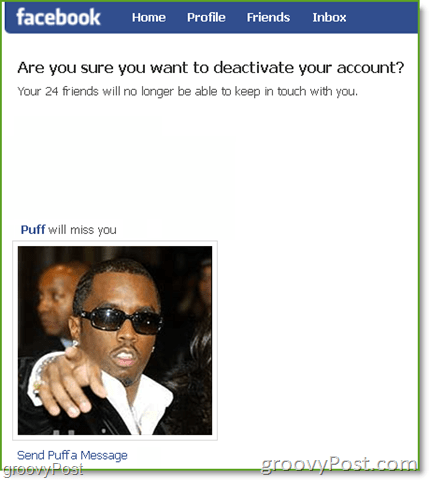
Once you confirm you want to deactivate your account, be sure to read the fine print. It clearly outlines that account deactivation is not the same as deleting your account/profile. By deactivating your Facebook account, you’re merely disabling your ID. However, all your data remains on Facebook servers.

What surprised me was the fact that even after the account deactivates, you can still be tagged in photos, invited to events, etc.. With this in mind, be sure to opt out of emails if that’s the path you’re going down.

So in short, deactivating your Facebook account is almost worthless. It’s Facebook’s deceptive and clever practice of luring you into a false sense of security by making you think you’ve removed your account, personal data, and license to your IP (intellectual property) from the service when you haven’t. The wrong part about this is even after your account deactivates, the license granted to Facebook in section 2.1 of its terms…
Section 2.1 of the Facebook Terms of Service
You own all of the content and information you post on Facebook, and you can control how it is shared through your privacy and application settings. In addition:
- For content that is covered by intellectual property rights, like photos and videos (IP content), you specifically give us the following permission, subject to your privacy and application settings: you grant us a non-exclusive, transferable, sub-licensable, royalty-free, worldwide license to use any IP content that you post on or in connection with Facebook (IP License). This IP License ends when you delete your IP content or your account unless your content has been shared with others and they have not deleted it.
It is still in effect! And, being that pretty much anything you plug into Facebook is immediately shared with your friends, per the Facebook Terms of service (see highlight in bold,) the license you grant Facebook stays in effect indefinitely even if you do manage to delete your account permanently.
Oh, and it gets better. To re-activate your account, all you need to do is sign in to Facebook or use your Facebook ID to sign in to another service (or post a comment on some sites), and everything is right back where you left it as if you never left – pictures, friends, posts, your IP…
So, I think everyone will agree with me that the Facebook Account/Profile deactivation process is worthless if your goal is to delete your account and remove some of your data or IP from the service. Seriously, the “real” good news is there IS a way to delete your account.
How to Really Delete Your Facebook Account
Deep in the bowels of the Facebook help center, you can find the URL that will permanently delete your Facebook account.
Before I show you the link, however, please read the following carefully:
Deleting your Facebook will delete all of your account information and remove your ability to log in to the service. No photos, friends, messages, status updates, etc. According to Facebook, once your account is permanently deleted, there is no way to restore your account or your data. With that in mind, please move forward reading all large and fine print.
So let’s get started on permanently deleting your profile.
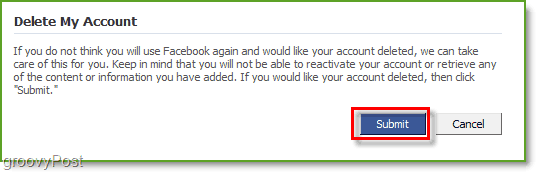
Visit https://www.facebook.com/help/contact.php?show_form=delete_account, click Submit
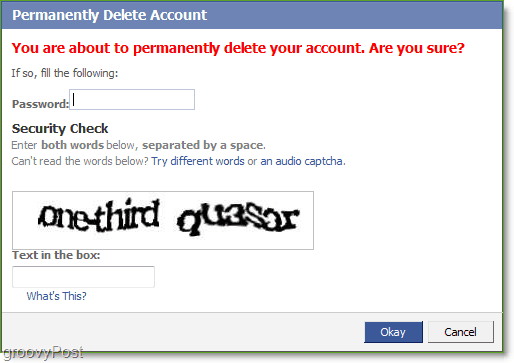
You’ll be asked to confirm. Type in your password and solve the Captcha. Click Okay to continue.
All done, sort of.
How to Make Sure Facebook Permanently Deletes Your Account
Even after confirming the deletion of your account, Facebook will only deactivate it, leaving you 14 days to log back in and cancel the entire deletion.
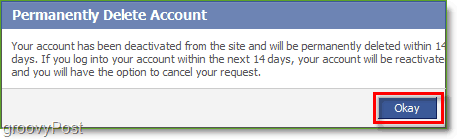
I know what you’re thinking: “Really? Fourteen days to delete my data?”
- I completed the scavenger hunt and found the Delete link.
- I saw the big red text warning me my account would be permanently deleted.
- I entered my password.
- I helped translate a book for Google by solving the Captcha puzzle.
- Lastly, I clicked the Okay button.
I think it’s pretty obvious by now Facebook doesn’t consider you a customer from a customer service point-of-view. Facebook is in the data business — more specifically, your data, and it will go to great lengths to keep the information, including your employment, school history, friends, network, photos, tagged face, etc., which it managed to collect from you over the years in its social web. The 14-day grace period is Facebook’s last-ditch attempt to lure you somehow back into the service, either accidentally or from some subconscious Facebook addiction, in order to abort the account cancellation process.
With this in mind, here are a few tips to make sure you don’t “accidentally” log in to Facebook, thus aborting your account nuke process.
- Clear your browser cache and delete all cookies – Firefox / Internet Explorer / Secure Wipe w/CCleaner
- Delete the Facebook Application on your iPhone (don’t worry, it’s free if you ever want to add it again…)
- Avoid clicking the Facebook Share button on any websites you read, such as the button below (sorry, I couldn’t resist)
- 5/5/2010 Update: Reader UXP made a good point in his comment below, reminding me that Facebook is also used by many people for single sign-on for commenting on blogs or logging into websites (like digg.com, for instance.) Other examples – are Facebook chat clients like Pidgin or Adium. If you use these services, post a comment on a blog using Facebook Connect or log in to a site using your Facebook account during your 14-day waiting period, and your FB account will be reactivated.
Now, I can’t make any promises that after all this work (and 14 days, of course), Facebook will delete your account because it’s not my company. This is, however, the process that is laid out on its website (if you managed to track it down). Good luck; unfortunately, you’ll need it.
613 Comments







1upMushroom
November 11, 2009 at 12:29 am
Woah, that is a little scary. I really don't like Facebook's policies, time to wait 2 weeks so I can delete my account…
Mirza
April 13, 2011 at 4:14 am
I have just permanently deleted my facebook account, and the procedure is, after I have done some thinking, the best one! The thing is you should write a very complicated password, including numbers and Big letters, at least 20 letters long, and you should change the password on your facebook account, to the new, complicated one… After you have changed the password to an unmemorable and impossible one, delete your account immediately, read and type your new complicated password in the process, and, after that is done, burn the little paper or delete an SMS containing the new and impossible password… Now your account is deleted, because not in a 100 years could you remember that complicated code, and log on to facebook again… Good luck!
Mirza
April 13, 2011 at 4:21 am
And, of course, one must not be willing to retrieve the password, but have a stronger wish of quiting facebook…
Common Sensel
May 13, 2011 at 1:10 pm
I did what was suggested by making a very large password with mixed letters and numbers. But, and this is very important. You can change your name so no one can find you on FB. Just go to your profile, and change your name from John Doe to anything you want, they will ask you if this is your name and of course you will say, “YES”! I mean if they can keep your info, why not take some leniency with their rules. If you do not follow their rules of service, then they can cancel your account, well…HELLO!? No one finds you and you have a fake ID and always use an email address you are willing to cancel after this. So set up with hotmail or yahoo, not your primary address.
Now if they want to play games to keep you on FB, they have built a wise trap for all of us, so we have to outsmart them to win. In changing your name, go to some worthless name or pick some criminal or nut case, like the Unabomber, Osama bin Laden, or Charlie Sheen. Won’t that screw with the twitters, too. Just change the spelling slightly…for example Charley Sheen, Charley Shean, Charley Shine and so forth. Once FB has enough of these useless names, they will stop the BS. And we thought AOL was bad…MUHAHAHAHAHA. One other caveat, make sure you can delete your email account after doing this name change and using the very large password. Hey what can I say, it worked for me. I cannot logon, and they cannot use my email address to find me and my name is useless. So FB, build it better and we will build it smarter.
maggie
July 18, 2011 at 6:55 am
my account was deactivated by facebook without warning and i still dont know why, i would like to delete it for good but as i am blocked from getting back in to delete the thing…. what else can i do….
MrGroove
July 19, 2011 at 7:59 am
You can send an email to privacy@facebook.com and ask them to delete your account. Hope that helps!
Rebecca Resurreccion
October 19, 2011 at 2:28 am
Please help me to delete my son’s account in facebook.. apparently he cannot open his account , he already forgot his user name and password..hope to hear from you asap..
carl edward
December 2, 2011 at 5:45 am
Everyone here is overlooking the fastest way to delete your account. All you do is edit your birthday to something below 10 years old. This will violate fb’s terms of service and your account will be deleted in 2 days, it works!!
Steve Krause
December 2, 2011 at 9:50 am
@Carl – Wow… really? That’s a great idea.
Need to test that out. Thnx for the tip.
Deletiana Converta
April 5, 2012 at 5:05 pm
Maybe not as fast as changing your birthday, but how about using an obviously fake name? My account was randomly disabled for using a fake name (which included an apostrophe in it) and I had to send in a clear copy of my government ID to prove it was a real account and get my account reinstated. They promptly reinstated my account with my (unchangeable) real ID name assigned to it.
There’s also the option of converting your page into a fan or business page. This way, you can wipe your slate clean (remove all status updates, likes, pics, posts, comments, etc. and everything you’ve ever done on your and other pages) but without losing your friends (which will all turn into “Likes” or “Fans” of your fan/business page.
You could even convert your page to a fan page to erase all your data then close your empty fan page once you’re done converting. If you plan on using your fan / business page, be sure to change your name to a name you’d want to use on your business / fan page BEFORE converting! …
Mr. Deletiana Converta
April 17, 2012 at 1:23 pm
Never mind. My theory on facebook page to fan page conversion no longer works. It used to wipe out everything you’ve ever done on facebook (private messages, likes, posts, etc.) upon conversion, but I just realized upon experimentation that converting your profile (or closing it) no longer wipes out whatever messages you’ve left in OTHER people’s inboxes. There was once a time when converting your profile into a fan page also wiped out all private messages you’ve ever made across the board. Now your name (or facebook email) remains in the other person’s inbox in unclickable bold black print along with an empty photo followed by whatever full message you’ve sent to that person (along the entire conversation history of everything you’ve talked about with that person since your first chat).
The dumbest part of all this is that now people can even REPLY to a message from a closed or converted page. Obviously, no one will ever get that reply.
john doe
May 5, 2012 at 4:24 pm
they have records of all your previous names as well.. it makes no difference
i did find this helpful and hopefully my accnt is gone in 2 weeks
Ugine Buttlips
March 19, 2016 at 11:23 am
Win what exactly? A chicken dinner? My point is Facebook is as truly anti social as a human can be. Delete it, dont,make a long password…it’s not herion. Just stop using the service U signed up for.
Ajulie
October 3, 2011 at 11:16 pm
Wow. Thanks for the article and this response.
I did all of the above steps because I thought I “deleted” my Facebook account about 6 months ago. When I logged in it was like nothing happened. They REALLY want to track you and save your information. I can’t believe the lengths they go to so that it is almost impossible for a novice or intermediate internet user to “delete” their account. The internet is getting really, really scary. The biggest necessary evil in my life besides my divorce.
Sarah
October 12, 2011 at 1:41 pm
oh my gosh!that same thing happened to me!
a little over 6 monthes ago, i decided to get rid of the thing once and for all
and i distinctly remembered the message that was sent about the waiting 2 weeks before it’s permanantly deleted
and i logged back in today because i was curious if it really got deleted and it REACTIVATED my account!
_aleph_
November 7, 2011 at 1:52 pm
Same thing happened to me just now, Sarah!
saseel
January 16, 2012 at 7:11 am
Hi steve, i delete my facebook account my 14 days grace period is going it going to finished on january 25th. after the complete deletion can i get the username for new account. because i am drop to time line i hate that that is why i delete my account and i want the same username so please let me know that all way to get back my facebook username.
thanks
Steve Krause
January 17, 2012 at 8:42 am
Hi Saseel,
From my experience yes. You should be able to re-use the username however depending on how long it takes Facebook to purge the system you might need to wait longer than 14 days for that.
Keep us updated here what you experience as that’s a great question!
-S
Wed
February 29, 2012 at 7:36 pm
What about my comment on my friends photo ,wall ,vid,…ets ,is gonna be deleted or not on there wall and their photo???????????
Robert
September 19, 2015 at 7:06 am
I deleted my account details 3 to 4 years ago, but just found out it is still active in facebook.
Mary
January 3, 2016 at 5:08 am
The same thing just happened to me. Did you find a way to permanently delete it?
Shana
November 29, 2015 at 8:44 pm
Go to google images. Find a pic with the facebook logo with a bullet hole on it. Put it up as your profile picture. They will delete your account for hate speech.
Mary
January 3, 2016 at 5:09 am
Does this actually work?
atom egoyan
December 21, 2017 at 1:45 pm
i almost thought all hope is lost,because i couldnt remember all my husbands password,i had to hire a professional Hacker, who is FIRMHACKER @ GMAIL .COM, contact him incase you need the services of an experienced hacker.
shalinee
April 4, 2012 at 9:24 pm
delete my fb account
Steve Krause
April 16, 2012 at 7:37 pm
Yup – did you have a question we can help with?
harshil
May 5, 2012 at 3:38 am
follow the steps:-
1) create a note pad file and close your eyes. now type any thing on keyboard
2)copy that thing
3)log on in your account
4)change your password by that unknown copied password.
5)go to this link “http://www.facebook.com/help/contact.php?show_form=delete_account”
6)and follow the steps provided on the link
your account will be deleted and you will never know the password
wendy
June 8, 2012 at 11:54 am
Facebook is a joke. My nieces/nephews are ADDICTED…it controls their lives….just as it does alot of users. I have hired many young adults at my company and they are continuously on facebook, during work. It’s like a drug. Unfortunately, I have had to fire several employees for this. Do it on your break….but they continue to “sneak” it during working hours. Seriously, is this what our society has come to? Geez, if I want to communicate with someone, I will call or write to them and them alone, not post it on facebook where everyone/anyone can see it. COME ON…..
On another note, one of my 155 year old neices was absolutely stalked on facebook by a predator with a false identity. It happens all the time, folks. GET YOUR KIDS OFF FACEBOOK AND GET YOURSELF OFF AS WELL. If millions of people would do this, facebook would become obsolete and the world would be a much better and safer place. Want your identity stolen? Just open a facebook account. What a joke.
Ugine Buttlips
March 19, 2016 at 11:28 am
Agreed. What a great World when everyone is possibly a Rapist and Terrorist, so don’t travel, don’t talk to Anyone! Except on Social Media,then Rant like an A hole. It’s tragic and sad. I truly can think of no use for facebook besides the new Sell Junk option. Ebay has me covered thanks Mark. I was out year ago. Made froups,no one posted…attempting anything not argumentative on Space book is a up hill battle. A rename to Trollbook, or Big Brothers Book of Nonsense may be slightly more appropriate.
Jane Gennaro
April 12, 2013 at 9:46 am
Thanks for doing all the work Steve! I’m a free woman now… well, atleast in two weeks, I hope!!
Ellla
November 7, 2013 at 4:22 pm
wow thank you so much!!!! weight off my back!!! I would rather wait 2 weeks. I ind of screwed p my account so I decided to delleeete. THANK YOU
taggart
April 7, 2016 at 9:37 am
I’ve been trying all week jay
emily ott
October 3, 2016 at 7:33 am
i had to go off social media and this was kind of all since usually most people join them and not to delete them,i had to see the help of an ethical elite hacker my new boss introduced me too,i tell you, in a week all my social life was like it never existed , eliterealhack(((at))gmail(((dot))com they simplify solution.
Amanda
December 20, 2018 at 8:36 pm
Thanks for the great post. This made it easy to “delete my account”, however, as of December 2018 the wait time for the account to be deleted is 30 days!!!!
Brian Burgess
December 21, 2018 at 4:41 am
Yes. It appears Facebook has changed its terms and has moved the 14-day period to 30. We will be updating this piece soon.
MrGroove
November 11, 2009 at 5:39 am
I think if used responsibly, services like Facebook have their place so hopefully you’re not deleting your account because of my article. That being said, if you found my article because you were looking to delete your account then hopefully it helped inform you regarding Account Deactivate vs. Account Delete.
Simon
May 4, 2010 at 8:56 am
Thanks for posting that link to permanently delete my account. I had “deactivated” my account for a year and was shocked to log back in as if nothing had happened. What most people don’t realize is that with such an intense level of detail being put into ones profile, you are litterally signing away the rights to your own identity. It’s absurd.
Thanks again,
S.
MrGroove
May 4, 2010 at 9:15 am
@Simon – Not only that but if you take a look at the terms of service section 2.1 – http://www.facebook.com/terms.php you will note the word “sub-licensable”.
Facebook can’t “sell” your data/content however they can “license” your content. I would assume this would include everything from access to your data (marketers) to photos (iStockphotos.com does pretty well licensing photos….).
And since the terms also use the word – royalty-free, Facebook doesn’t have to pay you anything for that data/content.
Sarah
June 15, 2010 at 5:21 am
Mr. Groove
I want to delete a FB account because I messed it up, and don’t want the email address to be connected to the profile. ( I was trying to create a page for my church and screwed it up) So the ? is after I delete the account will I be able to use that email for another FB account
Animis
June 15, 2010 at 5:32 am
@Sarah
Yup after the two weeks deletion period is over you can reuse the same email address to make a new account.
Sarah
June 15, 2010 at 9:32 am
thanks Animis
Katie
July 30, 2010 at 2:48 pm
So will Facebook let me delete and Nuke my facebook account and then re-establish a fresh new account with the same email address or will it re-vive my old account? Thanks for your help.
MrGroove
August 2, 2010 at 11:54 pm
@Katie
Hi Katie, If you delete your account (and wait the 14 days) you will have no problem re-creating a NEW account with your old email address.
mandy
August 16, 2010 at 8:43 pm
not true…. I am on day 15 and it still won’t let me recreate an account with my email :(
Tia Kamon
July 30, 2011 at 8:03 am
Hi there – i wondered if i could get an absolutely precise answer to my query – i have previously had facebook but had to delete it before my parents could find out – i’ve left my account alone for months, so would i be able to get a new account with all of the same information? and if so, will it be a completely new account or will it contain my old data?
Tia Kamon
July 30, 2011 at 8:04 am
Hi there – i wondered if i could get an absolutely precise answer to my query – i have previously had facebook but had to delete it before my parents could find out – i’ve left my account alone for months, so would i be able to get a new account with all of the same information? and if so, will it be a completely new account or will it contain my old data?
Jazmeen
April 29, 2012 at 3:57 am
How will I know if my facebook account is deleted already? It’s my 14th day. I want to create a new account using my old e-mail address. Just discovered this article. A great article :)
Tiffany
December 2, 2010 at 1:43 pm
i followed you instructions to delete my account and when I try to go to the lnk it takes me to the facebook login page……PLEASE HELP ME. IM SO FRUSTRATED.
Thanks in advance!!!
MrGroove
December 3, 2010 at 10:06 am
Were you logged in when you started the process?
Mr. DitchFB
January 5, 2011 at 11:13 pm
Thank you MrGroove, I really do wish to delete my FB account I set up like a naive little fool. lol I have certainly felt the effects (negative ones) from using FB, and now realize EXACTLY why I always did think it was stupid. I’ve only used it for a few months. They really are manipulative about it. It is really disgusting. Anyhow, thank you MrGroove, (I do believe this site is by MrGroove, I apologize if I’m mistaken) for providing this. I hope this does it. Good RIDDANCE, facebook!
Mr. DitchFB
January 5, 2011 at 11:17 pm
Dahgum, I tried leaving a comment, but somehow it got messed up. Damn technology. lol. Anyhow, I wasn’t inspired by this page; I sincerely wish to end my FB account. Delete it for good. I always did hate it…now I know why. And I’ve only had it a few months. lol Anyhow, thank you to the creator of this page, I truly appreciate the help. Good RIDDANCE facebook!
yagga
November 12, 2009 at 4:32 am
The two week wait is completely reasonable.
If someone else maliciously deleted your account, or you change your mind, you can recover. Also, do you think that they don't have redundancy on their systems to avoid data loss? There are valid reasons to build a system such that bulk deletes happen on a staggered basis and not on demand.
Hiding the true DELETE link is the inexcusable part.
aimy
July 30, 2016 at 4:49 am
after deleted my acount can masseges will be display in other user inbox which i had sent?
Steve Krause
July 30, 2016 at 8:32 am
Yes…. I think… That’s actually in the Terms of Service. I would need to test it out to be 100% sure but, that’s my first guess because once you send something on the service, you give a license to Facebook to use/keep it.
MrGroove
November 12, 2009 at 9:03 am
You make a good point, if someone were to steal a facebook account and delete it, this might be the grace Window Facebook offers for someone to come back from vacation and login thus aborting the delete process. I think this is an edge case but, it “might” have been what they had in mind. It would be interesting to get metrics on “stolen” accounts.
In regards to data redundancy I'm not sure I follow you. I have no issue with Facebook building redundant systems and taking backups not to lose data. That's the norm for any data center so I'm not sure I follow that part of your comment.
eckstee
May 8, 2010 at 12:30 am
If I were going to maliciously delete someone’s facebook account, the first thing I’d do is change their password and password recovery info, assuring that they can’t log in and abort the deletion during the 14 day grace period.
The whole thing is stupid.
MrGroove
May 9, 2010 at 11:18 am
@echstee – I wonder if they reconfirm account changes like that through email. In that case you would need to know their email address and the password. That being said, if you have their facebook account…. I’m going to guess there’s a 50-75% chance you have their email account PW as well. ;)
zacharydl
May 10, 2010 at 1:01 pm
Of course you have full access to their account. You have to enter their password to delete the account. If somebody were to leave their facebook acccount logged in at a library, you wouldn’t be able to delete the account, therefore that rationalization for the grace period is not legitimate.
rjfromnz
April 2, 2012 at 9:21 pm
If FB were a customer oriented company they could use the same process but rather than autolgging you back on after deletion before the 14 days were up they could prompt saying ” This Account Has Been Deleted, Do You Want To Recover It”. That way you could if you wanted but it could not accidentally or programatically be recovered.
Mr. Deletiana Converta
April 17, 2012 at 12:44 pm
I always thought they did the 14 Day Grace Period for the people who are quick to overreact based on emotions or do things they later regret. A lot of people delete their accounts then regret it, so I thought this is why they gave the 14 day grace period to give people a chance to reconsider. Imagine if every decision in life had a 14 day grace period. I believe they also did it this way because it not only benefits the user, but mainly benefits facebook. Facebook does not want to lose any people so they’ll surely leave the chances to reconsider wide open and try to emotionally provoke you into not leaving (although they also tend to do things that make you want to consider leaving as well).
EssaJetticks
March 12, 2013 at 2:24 pm
Hey Steve,
I was wondering if the “file” that facebook allows you to upload with all of your photos/history and that they email to you would be deleted if i deleted my facebook?
AlexMVP
November 12, 2009 at 11:33 am
Just take note that pretty much all big sites have the same kind of “terms of service”…. if we all knew what was happening to our data we probably wouldn't use the internet anymore hehehe.
MrGroove
May 5, 2010 at 8:47 am
Microsoft actually has the best terms of service (no, I don’t work for microsoft). I’m working on an article now to compare all the various terms of service agreements between the large social network, im, email networks. Stay tuned.
Jonathan
November 25, 2010 at 3:49 pm
Am very much looking forward to reading it!
Thanks for the info MrGroove. Most helpful. Though I wonder, perhaps the 2 week “grace period” is for Facebook to inform any companies (ie: 3rd parties) using our info/pics/etc that the account is ending and hence their rights of usage?
MrGroove
November 25, 2010 at 5:45 pm
Hmm… probably not… I think the real reason is just in case your account was stolen by someone however the primary reason is to not lose you as a customer hoping you will come back.
Good thought tho.
lakehn.
January 5, 2012 at 10:17 pm
but, think about it. if you simply delete the email you used for your account, you never even CAN make the mistake of falling back into their trap. That’t what I did, just in case that helps someone.
AlexMVP
November 12, 2009 at 11:36 am
I don't agree. It's my job to protect my password. If I choose a bone head password or let my PC get hacked and they delete my facebook page, hack my gmail account or get into my banking info. Shame on me. It's not the job of my Internet providers to “protect” me.
I do agree with you tho regarding bulk deletes of accounts. With 300+ million accounts, depending on how many accounts are deleted (I'm going to guess not many since it's so hard to find the delete link) that's probably something you want to batch delete.
AlexMVP
November 12, 2009 at 11:37 am
If you read the rest of the terms, it says they have backups and the data will be purged “eventually” once you delete your account (not deactivate it).
http://www.facebook.com/terms.php?ref=pf – Section 2.2
“When you delete IP content, it is deleted in a manner similar to emptying the recycle bin on a computer. However, you understand that removed content may persist in backup copies for a reasonable period of time (but will not be available to others). “
ShockerSH
November 13, 2009 at 4:53 pm
you know the saying – “Nothing is free”. there's a reason Facebook, gmail, yahoo etc…. are all free services. take a little, give a little… the important part is keeping track of what your giving and to whom.
good read groovydude and good comments.
FacebookFree
November 19, 2009 at 11:58 am
Thanks, I just wanted a “business” page and got sucked into creating a “profile” to link to Twitter and BAM I've got a “personal social profile”. I had no interested in all that warm-and-fuzzy-human-bonding-getting-stalked-by-people-I-didn't-like-in-High-School crap but did want to use the same email and username. By Zeus they make it hard. Only 14 days to go…BTW you instructions were crystal clear and the editorial delicious. Thanks again.
Sarah
June 15, 2010 at 9:41 am
Ya that is exactly what happened to me, I already had a profile (I like all that bonding with people who didn’t even know my name in HS, haha ;0) ) So I want to create a page by using the business link, but then they make you have a profile with it, Sooo I guess you have to use the normal page to create it, is that what you did Nov 09 your two weeks is up, is it done did it work for you?
MrGroove
June 16, 2010 at 7:43 am
FYI – I created an anonymous account on Facebook then used that to create my facebook.com/groovypost business page. ;)
Mr. Deletiana Converta
April 17, 2012 at 12:47 pm
Me too.
MrGroove
November 19, 2009 at 6:06 pm
They make it easy to get tangled into their web don't they. :)
Thanks for the comments and welcome to groovyPost!
Genis
January 14, 2010 at 7:00 am
Anybody knows that after you delete an account, can you register a new profile to facebook with the same email?
Thanks
MrGroove
January 14, 2010 at 9:23 am
First, make sure you delete the account and don’t just “disable” the account as mentioned above. Second, if they truly do delete your account, I would assume you COULD register a new account with a different name, identity etc… using the same email address.
It would be a good test actually. Keep us looped in if you give it a try!
Vijay
May 3, 2010 at 11:12 pm
I actually deleted my account with above mentioned method couple of months ago. Then waited patiently for 2 weeks.
During those 2 weeks I got more then average requests/newsletters from facebook in my mail as compared to earlier.
However, my account got deleted after 2 weeks. I verified this by trying to log in with original email/password and it refused to let me in.
After reading you comment, I thought why not test if I could register with same email and other information again. I tried and it allowed me to create a new profile which contained same information as previous one.
The conclusion is, they allow you to register using same email and information.
P.S. – I deleted my account again :)
MrGroove
May 3, 2010 at 11:39 pm
@Vijay – Thanks for sharing your experience. I setup a test account last year when I wrote this post and I had a similar experience. They do let you delete the account however, with my account disabled I still was able to send friend requests to the test account I was deleting and I receive emails for those requests. Soo…. Yeah. They REALLY don’t want to lose any data stored with Facebook accounts so when you delete your account you need to be very careful to let the 14 days pass.
Now that being said, I can also understand the 14 day waiting period. Imagine if someone figured out your password and then logged in and deleted your account… If you had hundreds of photos, friends, blog posts, business pages etc…. this could be a VERY bad thing. The 14 days is probably a reasonable period to allow a person to return from vacation, realize they have been hacked, login again and change their password.
That being said, I would prefer they use a “secret” word or email confirmation to delete the account instead of the 14 day wait period. Then again, I’m sure another 50 ppl would disagree with me :)
skipper
October 24, 2018 at 7:29 am
“I tried and it allowed me to create a new profile which contained same information as previous one.”
Vijay, I’m curious – do you mean that after re-registering with the same email address, that EVERYTHING was there, just like before you deleted it?
Tray
January 20, 2012 at 5:33 pm
I noticed someone said they were able to reuse their name and other info on a new account after successfully deleting the old one. This is encouraging. I have just set up a business account(not a page) (without having a personal account/page) and realized it is kind of useless because it can’t be searched (so how will anyone find it?)
I want to delete it, create a personal account, then create a business page (not account). But I am worried that I might not be able to reuse my company name. Has any one tried this with a business account? I am guessing it wouldn’t make a difference, but still…
John
August 28, 2018 at 9:09 am
my facebook is deactivated, locked and security code blocked too. i thought i deleted it 6yrs ago. i forgot about it but got a message from them about attempts to access ‘my account’ which i thought was long dead. i spent a year trying to delete it many years ago too. i made mistakes and it re opened i guess, but thought i dealt with that. i’ve written email too and it is still there. they want to text me, but i no longer have any textable phone, only 2 options they provide are upload a picture or text. i never gave them any pictures in the first place . i opened up the account the first year facebook existed by accident and that is a long time ago ;have nver been able to get out of it in double digit years i forget. never submitted anything
Amy
February 23, 2010 at 5:16 am
This didnt work.. :( I copy and pasted the link and it just went to the help page with no cancel account option!! PLEASE HELP!!
Helen
September 1, 2010 at 9:13 am
I have tried to delete Facebook for ever and a day, the more i try, the more it keeps me busy trying to get read of it. Dose that make sence? I hate facebook to where i never want in my life again. Please can you help
Amy
February 23, 2010 at 5:25 am
Never mind, done it! :o)
sullymandias
May 3, 2010 at 6:49 am
they seem to have made it a little easier to find the link to delete the account. i cant tell you where it is now, because if i go back there to try to find it again, my account will be reactivated. but i remember not having too much trouble finding it.
siegfried
May 3, 2010 at 12:40 pm
Tip: Of course there are usually issues with application sites, forms, and web browsers. The Facebook form submit button did not work with Firefox 3.6, but did successfully submit with IE8. (I just deleted an account and had to go thru IE in this case).
So, if something fails on one browser, try another ;)
MrGroove
May 3, 2010 at 3:32 pm
@Siegfried – Super…. Nothing like making it easy. ;)
WSz
May 3, 2010 at 4:33 pm
That’s awesome! Thanks for the link. I had enough with their raping of my personal life and selling my soul to the highest bidder. Hopefully they’ll actually delete my data, not that it’s that big of a deal. I was never honest about all the demographic or personal information anyway. Other than using my real name so people could find me, I never had anything remotely accurate in there ;)
Anyway, thanks for sharing this invaluable information!
MrGroove
May 3, 2010 at 5:03 pm
@WSz – It was my pleasure and thanks for the feedback!
Kate
May 3, 2010 at 10:22 pm
My partner has tried to do this repeatedly, and all that happens is he keeps getting bounced back to his login page.
I successfully gave my FB account the flick over 6 months ago, but it seems to have a sleeper hold on my partner… Any other hints?
MrGroove
May 3, 2010 at 11:41 pm
@Kate – Very odd…. Tell your partner to try this.
Step 1 – Login to Facebook and verify they are fully logged in and everything works.
Step 2 – Click the DELETE Link: http://www.facebook.com/help/contact.php?show_form=delete_account
Step 3 – Report back here if it worked! ;)
Step 4 – If it fails, try a different browser. Could be your cookies are not enabled properly or???
Kate
May 6, 2010 at 11:21 pm
Thanks for that – it turns our Firefox doesn’t like deleting Facebook so I used IE and the deed is done! My partner is very appreciative!
MrGroove
May 7, 2010 at 9:09 am
@Kate – Aye… I’ve heard that a few times about Firefox. Glad to hear IE worked out for you! I’ve actually been using Chrome quite a bit lately. Doesn’t have all the plugins I love with Firefox but overall, it’s not bad (especially since Google fixed the EULA license….) ;)
Jeff
May 4, 2010 at 3:42 am
Deleted.
Pietro Speroni
May 4, 2010 at 4:15 am
I don’t see the whole panic about all this.
Why not just delete the information manually. I mean:
delete your interests, delete your friends, delete your picture, untag yourself from all photos, delete all applications, change your name into something anonymous: john smith or so;
Just add the phrase: account deleted on the info. Make the privacy settings as strict as possible.
Once you have done all this… who cares if facebook still have an account that belonged to you.
Vijay
May 4, 2010 at 4:42 am
@Pietro
Agree that this can be done. But the point is why do you have to go through this pain? Why can’t they provide a simple link which is obvious? As a user it’s my right. I should be able to delete my account whenever I wish.
Facebook wants to take total control over users and their data (their privacy policy verifies it) which I personally don’t like.
angry-fb-acct-holder
May 17, 2010 at 11:58 am
@Pietro: Unfortunately, it’s not enough to do everything you mentioned in your post – delete all your posts, pictures, friends, photo tags, links to Flickr, change all of your privacy settings to “Only Me” (well, except those options that force you to select “Friends of Friends” and similar), etc. In fact, my friends have sent me direct, non-FB-based emails telling me that Fb is still posting automatic updates that I updated my Flickr account (yes I removed my Flickr username from my Facebook account). And, just logging in now still gives me “Like” suggestions for the items my Facebook friends “like”, even though I removed all friends from my friends list. It’s aggravating.
Jamie F.
May 24, 2010 at 7:33 am
Pietro I think your suggestion should be followed by everyone who wants to delete his or her profile on facebook. Combining your insight with the link posted by pk below, I would say STEP ONE is to complete bugger your account, delete photos and untag photos and revise the demographic info, change your name if it lets you. THEN after a month or two to give google and other search engines a chance to forget the old fb data STEP TWO is to delete the account. This strikes me as something similar to a naval crew scuttling the ship before surrendering.
AlanH
May 4, 2010 at 4:38 am
All lies.
I went back 2 months later and the account was still there after “deleting”. Well beyond the 14 day statement.
Helgen
May 4, 2010 at 8:25 am
What? I deleted my old account simply by clicking delete account, asked for my password, and it was deleted.
Brian
May 4, 2010 at 8:32 am
Deleted mine 10 days ago. Can’t wait for it to finally go through. What is most disappointing to me is that FB is no longer the same product I signed up for. What I originally liked was the ability to have a (semi) private conversation with just invited friends/family. Now they’ve changed the rules (repeatedly) to try and dupe me into giving that information to everyone. The most recent change was the last straw for me because it proved to me that they won’t stop until everything is public and I just can’t trust what they’ll do with my info. What bothers me most is their completely arrogant claim that they’re just reflecting the general trend in society that we all want everything to be public.
pk
May 4, 2010 at 10:40 am
Actually, according to this interview with an anonymous facebook employee, even if you DO “delete everything”, facebook hardly deletes ANYTHING on its end.
http://therumpus.net/2010/01/conversations-about-the-internet-5-anonymous-facebook-employee/?full=yes#author-bio
MrGroove
May 5, 2010 at 8:45 am
@Pk – Thanks for the tip. That was an interesting read.
Gopal
May 4, 2010 at 10:46 am
Thank you!
Moved from ‘De-activation’ to ‘Delete’.
MrGroove
May 4, 2010 at 1:30 pm
Your welcome!
Welcome to groovyPost!
Anonymous
May 4, 2010 at 10:54 am
To easily never access facebook after deactivating & deleting the account add
127.0.0.1 www.facebook.com127.0.0.1 facebook.com
To you’re host file for PC
MrGroove
May 4, 2010 at 11:00 am
BUT BE CAREFUL!
Most systems, you can find the host file at: c:\windows\system32\drivers\etc\hosts
And, don’t put http:// into a host file. just domain names and sub-domains.
You
May 5, 2010 at 7:34 pm
Are you sure you meant “you are?” ;)
shockersh
May 4, 2010 at 3:22 pm
This thing has gone viral. nice
daklo
May 4, 2010 at 3:58 pm
Oh for gods sake, you are all so lame.
Just login, change your name, age country and anything to a load of rubbish and do much more then remove your data, CORRUPT THEIR DATA ON YOU.
Then input an email address that doesnt work and update the account.
et voila. A BS version of you.
MrGroove
May 4, 2010 at 10:48 pm
The first time I “disabled” my “real” account on facebook I did something similar. First deleted all my friends then my data since I couldn’t find a way to delete my account. With a full delete option available now (if you can make it through the labyrinth) that’s the way to go I think.
TaosJohn
May 4, 2010 at 8:26 pm
I’m deleting my account tonight. Today was the last straw, when three of my outgoing links were marked “abusive” and blocked. I don’t care who did it, I’m not putting up with this. I have my own damn blog where I can speak my mind and no one can shut me up. Facebook thinks they can: two of the blocked links were to articles mildly critical of Facebook, and the other was to an article about the oil well disaster in the Gulf! Can you believe this crap?!?
I’m a true patriot. Thomas Jefferson wouldn’t have a goddamn thing to do with Facebook, and neither will I any more.
MrGroove
May 4, 2010 at 10:45 pm
@TaosJohn – Thanks for the comments John. I think FaceBook is great for some things, not for others as you can testify to. Good news is you have a great blog. I took a look and it looks great. Great layout and a good read.
Thanks for stopping by!
Fiona
May 4, 2010 at 9:57 pm
Being given a fourteen day grace period to rethink your decision to delete your account isn’t because they don’t care about you.
They don’t.
But that doesn’t mean they’re evil or even dangerous and it doesn’t mean that everything they do ignores your wishes. They are a product. The way they work is multifaceted.
The grace period is pretty common place and, I think, pretty fine. This is standard on most blog hosting websites and pretty much any social networking site. This is not a sign that facebook is working behind the scenes to sell all your information to the internet mafia. Stop jumping at any opportunity to be afraid of big things.
How about before you start freaking out at the power someone or something has you find out how much damage they’ve caused so far. Looking at facebook I’d say their track record is pretty clean. This is the kind of information I would take into account when deciding what to be afraid of. Are they actively harmful vs. are they potentially harmful. I find it works well.
But thank you for finding out how to delete accounts and providing a good analysis of the difference between “deactivating” and “deleting.” That information was very useful. Your opinion on any of it being bad I completely disagree with.
grooveDexter
May 5, 2010 at 6:47 am
I wouldn’t call Facebook evil, but their policies are somewhat evilish. The 14 day grace period isn’t necessarily “bad” but the fact that it is INSANELY easy to cancel for the deletion during those 14 days (like other comments on this post have stated) does make it very very shady.
MrGroove
May 5, 2010 at 8:44 am
Agreed. As noted by another reader in the comments here, just by simply commenting on another blog that has Facebook Connect enabled (Facebook blog integration) can cancel the delete process and I’m going to guess you won’t get an email telling you the process was cancelled… There should at the very minimum be a confirmation email to confirm that you don’t want to cancel the account delete.
uxp
May 5, 2010 at 12:20 am
Might want to add an update: If you log into any of the services during that 14 day waiting period, you account will not be deleted. So if you have an IM client configured for FaceBook Chat, like Pidgin or Adium, that will reactivate your account.
Same thing with commenting on a Blog using FaceBook Connect (OAuth).
grooveDexter
May 5, 2010 at 6:44 am
Very true! Like you said, using any part of Facebook at all during the 14 period will void the deletion. They really want to keep you hooked in there!
MrGroove
May 5, 2010 at 8:42 am
Facebook connect…… That’s a VERY good point that I hadn’t tested. Thanks for the heads up. Will update the article.
Janet
January 31, 2012 at 3:59 pm
Somwone more talented than me needs to help closed this F-ing-Face-book Blob creature that is devouring all our privacy, its as bad as SOPA, maybe worse! I so despise facebook, I have gone through this process including the one you just referenced 4 TIMES, hope this last one works, I am so sick of being f-booked!
Thank you for keeping this topic out there, its too easy to coast into the Blob FaceBook tentacles & be absorbed!
MrGroove
May 5, 2010 at 6:47 pm
Article updated (see #4 at the bottom of the article). Again, great tip!
TaraKK
May 5, 2010 at 7:36 pm
Oh crap…
Pedro
May 5, 2010 at 5:47 am
I never signed up on facebook and one I received an email from them saying someone has accepted my friendship… Sorry? I didnt ask for anything! After that I tried to signup and received a message saying my email was already registered… After a password reset I logged in, and I had already a bunch of friends I didnt know! WTF? Can someone tell what just happened??
grooveDexter
May 5, 2010 at 6:43 am
Sounds like someone may have used your email to register you and create a Facebook for you!
barbecuesteve
May 5, 2010 at 1:57 pm
Has anyone attempted to log in after 15 days and made sure that the 14 day deletion was actually honored?
I’ve encountered places where an expiry window was stated but loosely enforced… we had a “gone after 30 days” policy which was accomplished by a monthly SQL script that looked for items >30 days…. thus you might be in there actually 61 days!
cestmoi
September 27, 2010 at 3:46 am
I just tried to login after 2 months, it’s still there…like nothing has happened. This is the 2nd time i tried to delete. the first one was beginning at this year, i waited for 1 month…and same thing..it’s still alive. facebook is such a liar….
MrGroove
September 27, 2010 at 10:13 am
@Cestmoi – I would first login, delete all friends, photos, profile info etc… Once that is done, go through the deactivation process again then send the email to privacy@facebook.com.
Let us know if that works. I’ve heard about the email address working but no one has came back and officially confirmed it yet.
Marc
May 5, 2010 at 3:28 pm
Even if you successfully delete your account, and wait the 2 weeks for confirmation, it doesn’t matter. Facebook employees have anonymously stated that they never, ever delete anything, ever. So they will always have all the pictures you post or messages you’ve written. If you don’t want it saved somewhere, don’t put it online.
MrGroove
May 5, 2010 at 3:39 pm
@Marc – I’ve always said – Once on the internet, ALWAYS on the internet…. If it’s not cached in one place, it will be cached or backed up on tape somewhere else.
BFF
May 5, 2010 at 4:09 pm
You overlooked the “Yahtzee” option shown in a recent Southpark episode. I went through the 14 day option a few months ago and have not attempted to sign on since. I hope my account is gone. My family and friends who still have facebook no longer see me on their pages so I think I’m OK.
kazta
May 5, 2010 at 5:38 pm
I think it’s quite funny that this article is all about deleting Facebook. But right at the bottom of your article it says “Share and Enjoy” and Facebook is the first icon. :P
BFF
May 5, 2010 at 6:13 pm
Pasted from the instructions at the start of this thread. It’s meant to be funny.
3.Avoid clicking the Facebook Share button on any websites you read such as the button below (sorry, couldn’t resist )
TaraKK
May 5, 2010 at 7:35 pm
I’m choking on the Irony! An article about How-To delete your facebook account and it has over 1000 facebook diggs!
LOL – Just awesome!
MrGroove
May 6, 2010 at 8:32 am
@TaraKK – Aye… I’ve enjoyed that as well. ;)
Ryan
May 6, 2010 at 10:30 am
Yeah, the delete account option is actually pretty easy to find now, which is nice.
All you do is go to the help centre and search for “delete account.”
They give you the link inside the answer to the fifth FAQ entry.
krumpir
May 7, 2010 at 6:48 am
what about the case when Facebook decides to kick someone out? Do they delete her/his profile? For instance you could just put up a bunch of porn photos and copyrighted material, and wait for them to delete your stuff. Do they deactivate it or delete it then?
MrGroove
May 7, 2010 at 9:12 am
@Krumpir – Hmm…. My guess is they probably won’t delete your account. Why would they delete a good email address which they can later sell. I’ll be they just deactivate it with a flag on the account so you can’t re-enable it.
To test it out you could get yourself banned, wait a month then try to create another account with the same email address. ?
Henry
May 7, 2010 at 11:58 am
yagga is a paid employee of Facebook. Ignore him.
Angi
May 7, 2010 at 11:58 am
I was on facebook for a little over a month when I got friended by a very close relative of a man who molested me as a teenager. I couldn’t get my account closed fast enough. I simply googled how do I permanently delete my facebook account and I got a wikihow which I printed out and followed the directions. It was exactly what you posted. I couldn’t believe how many people got pissed that I was no longer listed as their friend. I got nasty e-mails from people sent to my personal account which all of them had even before I joined facebook. I thought this was funny because it proved that if you really wanted me to know every single detail about your life you could just sit down and write me. But instead I was nothing but a number to you all along. In this instant information world not everybody cares about what little Suzy did last week in gymnastics. Not everybody wants to help you find a fish for your unicorn farm or whatever stupid game you are playing. So if they decide not to participate in facebook anymore because of whatever reason please respect that. It’s not personal.
Alex
May 7, 2010 at 7:54 pm
Thanks a lot for this post, very helpful.
Angi
May 7, 2010 at 8:51 pm
I am glad that helped you in any way. Not many people realize that people you thought you knew and loved would get angry at you because you don’t want to participate in a program that they use in place of real contact with you. I really tried but no matter how many comments I made about their special little children or tried to have a true friendship with them using facebook as a contact they always ignored me. I got tired of that and decided to make a stand. If you know me then you know how to get in touch with me. I am a good person and I deserve to be acknowledged as a good person and I don’t want to offend anyone. But if I am to get an e-mail every time you find a gold brick in your outhouse and I am supposed to be happy then I have better things to do. Like raising 4 kids without forcing their accomplishments on you. My kids could put most parents to shame with what all they have done. So yeah, I am done with facebook, I am done with fake a$$ people who I found out never really cared about me and my family and I feel so f-ing good. I feel as if I have my life back to myself. Thank god for that.
MrGroove
May 9, 2010 at 11:20 am
@Angi – I’ve heard that a lot. It’s almost information overload and a few friends of mine say they actually feel like busy bodies because they know so much about the lives of their “friends”. Spend time with real people face to face is my opinion…
MrGroove
May 9, 2010 at 11:20 am
Your welcome! Thanks for the feedback!
chosenson
May 8, 2010 at 8:15 am
Thanks for the informative and helpful post. You are a blessing for me and all who use the web.
Before I completely read through your article I passed on your page link to friend and family along with why I am sharing this with them.
I started us FB with the intentions of most other FB users – to connect with friends and family. But after a little time of seeing posts from friends of friends who I didn’t know, receiving un-solicited emails, and finding I couldn’t find any way to control ‘My Account’, I got fed up and quit using it. Then I noticed more and more articles about Fb’s security problems and bugs (accidental or purposeful), I decided it was time to completely get rid of it, but could not find a way to do it.
I am usually against ‘Big Brother’ intervening or controlling business, but they still need to lay out some firm guidelines as to what is proper, ethical practices and information dissemination.
Personally, my FB experience has detered me from ever using any social networking site of the type. Largely due in part to the fact that most of the user content is just mindless. I don’t want to know that you had prime rib for dinner at some chic restaurant, or that you just earned a ‘gold star’ with some silly game-like app.
Good riddance FB.
Again, Thanks for bringing this Valuable information to light. Keep up the good work.
chosenson
MrGroove
May 9, 2010 at 11:23 am
@Chosenson – LOL I hear ya. I personally have come to enjoy StumbleUpon. It helps me find new websites but allows me to stay anonymous and only interact when I want to. I can build a network of people who like similar websites and recommend good sites as well.
I think it’s a good alternative. Look me up if you try it out – http://www.stumbleupon.com/stumbler/groovypost/
btw – I had prime rib last night and it was undercooked…. :)
JustAGuy
May 9, 2010 at 9:43 pm
FYI, I believe another trick to prevent accidentally logging in is to change your password prior to deactivation.
Also, One could do any of several things that are prohibited by FB, that would get your account shut down ;)
MrGroove
May 10, 2010 at 8:50 pm
Changing your PW… Good point!
rabia
May 10, 2010 at 4:42 pm
i just want to remove my account from face book.
chosenson
May 10, 2010 at 5:00 pm
Just follow the steps above. Be sure to keep in mind the advice from everyone here also.
One more week and mine Should be gone for good. Although, I am still very curious about their data retention. With everything Facebook has been doing, I worry that deleting the account may not guarantee Facebook deleting all data associated with me/my account.
We’ll see.
Good Luck.
richard
May 10, 2010 at 9:20 pm
thank you soooo much for this.
any idea if using Pandora might re-trigger the account in the 14-day period?
also this link says something about Facebook getting rid of the “suicide” option, has anyone had success deleting in the last couple days/weeks?
http://www.wired.com/epicenter/2010/05/facebook-rogue
MrGroove
May 11, 2010 at 8:22 am
@Richard – If your using Facebook to authenticate with Pandora (Facebook Connect) then probably yes… You should login to Pandora and kill the connection before deleting your account.
Or…. I think you can also go into Facebook and kill the access for Pandora. I’ll have to play with this. I use Facebook ONLY for the FAN PAGE so I haven’t played around much in the settings.
Anyone else out there able to answer Richards question?
Melissa
May 25, 2010 at 6:08 pm
How are you able to use it only for the fan page now that it seems impossible to have an “invisible” personal profile? Do they still have the option to create a private profile just to admin a page? … or did you just create a new (virtually empty) personal profile and add no one to ensure no one would try to add you?
Perhaps I’m answering my own questions here, but I’d still like to hear how you are using the site post personal account deletion (and how that’s working out for you/whether you think the response/traffic/interest generated via your fb page is worth it to your site/business). Are you interacting with those that “like” the page via comment discussion or simply feeding links to it automatically to draw traffic to your own website? (I’m considering some of these options myself, hence the 20Q interest.) Thanks!
MrGroove
May 25, 2010 at 10:31 pm
Hi Melissa,
So yea, I have a facebook page at http://facebook.com/groovypost. The traffic I get from facebook is about 3% of my total traffic per month. What I do is each time I make a post on groovypost.com, I post a link to the article onto my groovyPost page on facebook as well. They have apps which can do this for you automatically however I like to have more control over how the link is posted to the page.
Now in regards to my personal privacy, my account at facebook is 100% anonymous. You can find me there at http://facebook.com/mrgroove.org. The only reason I have an account on facebook is to drive traffic to my site groovyPost.com and to administer my page groovyPost. Being that they have 350+ million users, I think it would be silly for me to ignore this userbase.
So, with that in mind, i guess that’s why I write articles like this one. Use Facebook if you want but just be educated about how the business is using your data. If enough people are educated however and demand that their user data not be shared, sold, etc… then you need to be prepared to start paying for the service. I guess that’s the trade-off… Nothing is free and Facebook is in the business to make money. If they don’t get your data for free they will need to make money another way.
Personally I hope they go the Apple App Store route. Sell games and apps to their 350+ million users. Facebook takes a 50% cut so now they can get out of the User Data Auction business. ;)
Jonathan
May 13, 2010 at 7:04 pm
Some of the accidental login problem could be avoided by changing your password prior to deletion. Most extentions (like a mobile app) wouldn’t be able to login. I think cookies are still an issue though.
MrGroove
May 14, 2010 at 10:55 pm
@Jonathan – Yup – that’s always a valid one. I think a few ppl might have mentioned this in the comments. Still, thanks for the input Jonathan.
Katy
May 15, 2010 at 12:56 am
I don’t want to delete my account exactly… I just want a really fast way to delete all my pages.. I have over 2,500.. and now with the new facebook, it’s giving me hassles.. I really want them ALL GONE! pleeeeeeeeeease help me if you can!! thanx!
cihanimparatoru
May 15, 2010 at 6:13 am
thenks for the greate article
janet
May 15, 2010 at 6:41 am
I don’t understand – just because someone wants information doesn’t mean that you have to give it. Learn from politicians (especially the UK Labour ones), they NEVER answer a question directly, and frequently answer with something entirely different.
If it’s in an ‘obligatory’ field, then who says that you have to give true information?
Birthday: 01/01/1900 for instance, name: John Doe, location: North Korea – who cares?
There is no legal comeback after all. And you can use a hotmail or gmail email address as well.
Then just add the few people who you actually want to know about, or want to make contact with you, and resist any other friend request. And only put up stuff you don’t mind leaking out to people you don’t know.
Yes, FB is intrusive and attempts to be controlling, but we’re smarter than them, aren’t we?
lame_saint
May 19, 2010 at 7:02 pm
The public at large is not. Your granny who just decided that she wants to be “techno-savvy” and trusts that she really did win a free laptop every 5 minutes cannot fathom the idea that someone is taking advantage of her ignorance. Facebook should be stopped to protect anyone who is unaware of their shady activities.
P.S. I tried to post a link to this page on facebook. It got deleted. :)
Anna
May 20, 2010 at 3:01 pm
Classic that your link was deleted…what a bunch of hacks facebook is!! I’m still trying to delete my account and my first attempt was in November 2008. Hows that for perseverance!!!
Stefan
May 17, 2010 at 12:01 am
Hi, many thanks for this excellent post. I’m the editor of Computerworld Hong Kong and wrote a blog-entry on how to delete your Facebook profile. Found your link from comments in The Register and added it as a comment to my own blog-entry, feel free to comment, even if you don’t live in Hong Kong (yes, FB is popular here and handles Chinese).
Thanks!
Stefan
MrGroove
May 17, 2010 at 8:08 am
@Stefan,
Hi Stefan, thanks for the mention in your blog post even if it is in HK. I’m glad you enjoyed reading my article. Hope to see you around more in the comments here on groovyPost.com!
-Mrgroove
Yonli
May 17, 2010 at 5:41 am
Alternatively, you can just upload porn to any area where there’s alot of traffic – instant ban!
chosenson
May 17, 2010 at 6:49 am
You’re idea would work, but it could bring more trouble than worth. Although I doubt Facebook would do anything more than to ban you, they could turn it over to law enforcement.
And what if your family, friends, employer,… found out about it?
I think you will be better off deleting your account.
MrGroove
May 17, 2010 at 8:10 am
Agreed. Just delete the account and you should be good. Plus, I’ve not looked in the terms of service yet on this however I’m not sure if any of your personal data is purged from the facebook system when they BAN you…. So, that could be even worse if you think about it.
Now you could be locked out of facebook unable to delete your personal data or your account….
Like I said, you would need to read the Facebook Terms of Service to be sure however I’m going to bet they don’t address that scenario / loop-hole.
Daisy
May 18, 2010 at 9:08 am
Great! Thanks for this. After all my group postings were all over Google not to long ago, I decided to deactivate and make a new account and start from scratch (and not share personal info, not post in groups, etc). I’m glad I finally am able to delete the old account!
chosenson
May 18, 2010 at 10:10 am
Has anyone seen this story http://www.pcworld.com/article/196506/facebook_users_warned_of_sexy_candid_camera_prank_attack.html
Looks like some rogue spyware is running around Facebook. Read the story then ask yourself why Facebook is so useful.
Dmitry
May 18, 2010 at 12:06 pm
Great Job man!!!!!! thanks a lot!
Anna
May 18, 2010 at 12:36 pm
Hi – thanks for the information. Unfortunately, about 3 weeks ago, in conversation with several friends, someone asked why I didnt have a Facebook account. I explained my reasoning and 3-4 of my friends said ‘yes you do, you’re on my page.’ I argued that I had closed the account over a year ago. However, upon checking, ‘voila, there I was!!’
I then followed the steps to PERMANENTLY close the account. Upon doing so, i felt confident all was fine. About a week later I received 3 text messages and an email from friends saying I had ‘spammed’ their walls on Facebook. WTF??? So now, here I am again, trying to delete my account and feeling like its going to be ongoing.
I tried to find a ‘contact’ email or phone number for Facebook to get this resolved once and for all, but alas, nothing. I dont know if this final deletion will work, but I’m still hoping.
chosenson
May 18, 2010 at 2:02 pm
@Anna
You won’t find a contact for Facebook. That would subject them to way too much email/phone traffic from many upset users.
Judging from what you say, I wonder if someone has your account credentials.
If you find the account has not been deleted after the obligatory two weeks wait, follow the recommendations of other posters here at Groovypost; delete as much info as possible, change the login/password, then follow the account deletion steps.
Good Luck!
Anna
May 20, 2010 at 2:58 pm
Thanks! I’m so frustrated. I just received another text message today from a friend who said she’s getting spammed again by my account. I went back in just now, changed my password, and deactivated again. We’ll see….
great fun putting the reasons WHY i’m leaving facebook!!
chosenson
May 20, 2010 at 3:10 pm
Changing your password before deleting the account is good. If a friend tells you about spam again, tell them to quit Facebook. It may be happening from any of the so-called services that Facebook will automatically sign up their users for. Don’t sign in again. As long as you followed the account deletion process, wait a couple weeks and then see if your friends are being spammed by you. If so, tell them it is from Facebook, not you.
MrGroove
May 20, 2010 at 6:16 pm
The countdown has begun :) – 14 days and counting!
Tom
May 19, 2010 at 5:24 am
All I can say…is…. hallelujah!!!! I deleted mine back in January…. Thanks for the posting! :) It should be boycotted….was getting spammed constantly about so-and-so who won a sheep on farmville etc… who needs em!
calandria
May 20, 2010 at 2:57 pm
i don’t want to be on facebook
calandria
May 20, 2010 at 2:59 pm
bye
akshath
May 22, 2010 at 1:37 am
hi i know my facebook password but forgot the answer for my facebook security question
i’ve tried all answers but it is not opening.please help im in level 40 in farmvilla ,i don’t want this hard work to go because of this security question.pleaseee help
MrGroove
May 22, 2010 at 2:30 pm
Eek… Can you try the Reset Password process?
Winsan
May 22, 2010 at 4:31 am
This certainly is some comic relief after spending most of the night and morning trying to understand why all the sudden Facebook is requiring for me to “Register my computer” before I can even login! It has always been a choice when other websites have offered it. You crack me up, but there is a serious side to all this control…way to much control and no royalties to boot! Lol! Plus, I cannot delete a Facebook cookie from my cache/temporary files. Actually it states the cookie will expire on 5/21/2012 at 3:07 AM. Well that’s 2 YEARS from now! I don’t want to register my computer because Fb insists that all the sudden I must do it. And in the years I have been using Fb service I have never been asked to register it. Even if I were on a public computer it still insists I register it. What has been fun, entertaining, and sociable makes me now wonder…is Big Brother watching…or is it only Little Brother, Face Book? These grown up college boys might have a rude awaking someday. Trying to control the Baby Boomers, once they realize the control, while the younger generation seems to care less at this point! Well it just might backfire like what happened to Roman, in a sense. It is the boomers that make Fb the success it is today and we are still yet viable today. Frankly, I’d like to see a successful website with integrity as its backbone, run by an older peer group and the rest can have ‘Phasebook’ and MySpace! You made my day Sir!
chosenson
May 22, 2010 at 5:11 am
Facebook’s requiring you to register your computer is their attempt to make users think Facebook cares about your privacy. Yet, this is a security measure. Not privacy. By registering your computer, they associate it to the account, meaning that if you, or anyone, tries to log into your account from another pc, you will have to anwser further verification questions before gaining admittance.
I enjoyed your comparison of Facebook and the Roman empire. This holds true; history repeats itself.
I have used the same analogy in reference to Facebook over at PC World – http://www.pcworld.com/article/196700/how_to_stop_worrying_about_privacy_and_love_facebook.html
chosenson
May 22, 2010 at 9:37 am
Hey all,
I keep seeing many forum posts from people not knowing how to delete their facebook account; only deactivating. And many of them are complaining about deactivating/deleting the account only to find they are reactivated in a short time. Probably has to do with using facebook credentials to log into other connected sites.
Anyways, whenever I see such posts, I respond with the address to this page on groovyPost along with advice about what to do to avoid the re-activations.
Being a regular PC World reader, I have posted a link to this page many times.
So I ask, if you see a post or hear a friend/person talking about the problem of deleting their facebook account, provide them with the address to this page; or at least help them with deleting their account.
If we all help others, maybe we can force facebook to go away, or change thier ways. (Firing Zuckerburg would be a great start!)
Thanks.
Richard
May 22, 2010 at 2:08 pm
If you dont want these networking sites to know your details. then why join in the first place. I mean come on, you dont have to smell a cake to eat it now do you? you do know that these sites are out to gain info about you. ” BIG BROTHER IN ALL SITES ” think about it. But never the less. What people should do. is expose Facebook on the news, and on otehr sites, of how they are treating your privacy. the more media, tv and radio and other sites gets to know, then Im sure facebook will get a little edgy and start to think about doin something about the site.
MrGroove
May 22, 2010 at 2:29 pm
@Richard – I think when people originally chose to join a site like Facebook, they were doing so because it was 1: Fun 2: They could keep in touch with friends 3: They could find new friends and 4: They could share data/pictures/thoughts etc….
I think for me where things go sideways is when Facebook started changing the privacy / terms of service so they could begin to monetize the site using both their customers data (you and me) rather than just monetizing their customer traffic.
Now… Do I blame them? Not really. Facebook probably never expected the level of growth they experienced. That includes both TRAFFIC and DATA STORAGE. Imagine how much drive space is needed for Facebook to store ALL THOSE PHOTOS! Most likely, Ad Revenue like Google Adsense or other Click Revenue was not going to be enough so they probably figured out they needed to start digging deep into other ways to make revenue JUST TO KEEP THE SITE RUNNING…..
So…. Yeah, if people don’t like being exploited then don’t use a FREE service with a really bad Terms of Service. Shop around and find one that meets both your Privacy and Social requirements.
I think this will make for a really good article! I’ll have to write something up on a GOOD facebook alternative!
limerockcodger
September 18, 2010 at 9:07 am
Well, Richard, I suspect there are others who, as I did, join out of professional obligation to understand the functioning of the system, rather than to join in the fatuous colloquy that comprises 90% of what I see.
Never did I give any data other than my email address, and just having that bit of data in the Facebook database became problematic over the last several months. I essentially gave the bad guys a line in to my inbox.
Thanks to Mr. Groove for the easy to follow steps to delete this security nightmare from my daily workflow.
dlm
Winsan
May 25, 2010 at 1:32 am
Did anyone read or see the following page link from yesterday? Not sure if we can copy/paste a website page here, but I did. It is an article about Facebook CEO Mark Zuckerberg and he is explaining his intentions about Facebook privacy policy, plus there are videos also from news media.
Contrite Facebook CEO promises new privacy controls:
http://news.yahoo.com/s/ytech_gadg/20100524/tc_ytech_gadg/ytech_gadg_tc2204
MrGroove
May 25, 2010 at 10:35 pm
@Winsan – Yeah I read that and I hope FB does make it easier to control users data and more public regarding how they are using/selling/licensing their customers data. Time will tell!
vignesh
May 31, 2010 at 12:10 pm
hi guys. i saw ppl talking abt someone else deleting ur FB acct. my prob is someone has hacked my acct and used it to send abusive and unwanted posts. i deleted my acct using the link provided above but this f-ing b-trd activated it again using my old password probably. this is happening for the third time now. note: the old password works even after u change the password. so is there any way out from this? hope u guys got wat my prob is.
Sandra
May 31, 2010 at 2:35 pm
If I were to delete my facebook account I would probably start with actually removing all of my friends on my own, I would delete ALL of my photos myself, my posts, EVERYTHING (i’m very paranoid, can you tell?) i would probably also un-tag myself from photos my friends tagged me in.
However, another issue I have is that some of my friends post photos of me. I wish there was a way to stop that, but I suppose there isn’t. And they never really listen when you request to have it removed!
james ulrey
June 2, 2010 at 7:37 am
I am selling my computer and i will no longer have one
Sushant
June 2, 2010 at 10:37 pm
Thanx … It ruined my Life … FACEBOOK SUCKS!!
Will
June 16, 2010 at 9:37 am
THANKYOU!
Those sneaky f**ks at Facebook.
I’ve now OFFICIALLY deleted my account.
MrGroove
June 17, 2010 at 12:30 pm
Well…. if you just went through the process, technically your account will be gone in 14 days. ;)
BTW – Welcome to groovypost!
Just sayin'
June 16, 2010 at 6:57 pm
So how do I know if it is really gone? I deleted mine (permanently) 16 days ago. Are they going to send me an e-mail or do I have to try and log in to find out? I f-ing hate fake book and I just want it to be freakin gone!
MrGroove
June 17, 2010 at 12:29 pm
DON’T test it by trying to login…. What I would do to confirm your account is deleted is create a NEW account using a fake name but the SAME email address. If it will let you just abort the new account creating (if you can…?).
Let me know how it goes!
Just sayin'
June 17, 2010 at 3:38 pm
Well, it let me make a new one with that same e-mail address so I guess it’s really gone. *fingers crossed* Now I have to get rid of this new one LOL!
Thanks for the help though :)
winsan
June 20, 2010 at 1:32 pm
Since you mentioned the ‘fake account’…I have wonder how many ‘fake accounts’ are already established by unknown persons or online website administration to make it look like Face Book is perhaps more prosperous with member list, as alleged? There have been names that I’ve researched and it appears there are many…many names that are listed with no actual account activity attached to them…it is all blank except for the name and I doubt its activity validation.
Ted
June 21, 2010 at 9:44 am
Sandra, that’s what I did before deactivating my FB account. I just deleted everything, removed friends, changed a bunch of info into BS and deactivated the damn thing. Facebook is going to hell.
MrGroove
June 23, 2010 at 7:00 am
You should be able to go through the password reset process which will send an email to your email address which is set on your facebook account. If that is your Yahoo! account however you don’t know your Yahoo! email address password…. then you should try to go through the password reset process on your Yahoo! email account. If that won’t work…. your a bit stuck unfortunately.
DRAGONOUS
July 3, 2010 at 1:05 am
Hey man I was surfing for the same and i found a link which directly deleted my profile instantly.
And I was also able to make a brand new one.
For the rest of the comments, they should go to kindergarten to learn this”DEACTIVATION”
Maria
July 6, 2010 at 9:28 pm
I just deleted my facebook account cause of old comments i wrote that i dont want people to see, i know i know i should have just deleted them but the wall stories were too long! I was wondering since i deleted it will all the wall posts, picture comments, emails i made be permanently deleted?
MrGroove
July 7, 2010 at 5:15 pm
Hi Maria – Yikes… that is a really good question… can you ask one of your friends if the comments on the wall are gone?
katy lusk
July 7, 2010 at 8:33 am
all i wanna do is delete all my facebooks i have 4 or 5 facebooks and well i just want them all gone every single one of them gone.
– katy lusk
MrGroove
August 17, 2010 at 2:23 pm
Wow… you have been 1 busy facebook user!!! :)
I’m curious, did you follow the process and nuke them all?
Katie
July 7, 2010 at 5:00 pm
Okay soooo.. It’s been 2 weeks today I deleted my Facebook, I want to make sure it worked but I am scared to attempt to sign in and it “re activate” my account, how can I tell if I am deleted. My friends haven’t had me on their list since the day I did it and when you searched for me I wasn’t there, but I want to make sure for sure since that happens when you deactivate as well right?
MrGroove
July 7, 2010 at 5:14 pm
Hi Katie – Just go ahead and try to create a new user account with a bogus name but the same email address. If it allows you to create the account, abort the new user setup. If it does not, then you know you need to wait longer until the account it nuked.
Make sense?
Katie
July 7, 2010 at 5:18 pm
If i attempt to make a new account with the same email address then I will have a new account.. I don’t want that!
MrGroove
July 11, 2010 at 10:21 pm
Use bogus information or try to abort the new user login before it completes..??? One option anyway.
Or, perhaps create a new email address using GMAIL or hotmail then try to friend your old email address??
Just a few thoughts.
eddie weaver
July 18, 2010 at 9:25 am
dont want anymore
Sylvia
July 25, 2010 at 2:56 pm
I’ve had a messed up personal experience with Facebook and I just don’t want anything to do with it anymore, I’m done with it, and wanna get it out of my life for good. I’ve been trying to find a way to permanently delete my account, but I thought it only gave me the option of deactivating it, so thank you so much for the pointers. Cheers.
MrGroove
August 3, 2010 at 12:12 am
Anytime! Do you think you will be moving to another “Social Network”?
arafat
July 28, 2010 at 7:42 am
hi mr groove..
i wana delete my fb accunt ..but i frgot the password..
now what should i do..my fb password nd yahoo passwrd were the same but now i dnt remember my fb nd mail password..wat should i do
plx reply..ill be very gr8eful 2 u
MrGroove
July 28, 2010 at 11:02 am
Well… you don’t really have a lot of options Arafat. You might try trying to reset your Yahoo email password first and get into that account. If you can, then you should be able to also reset your Facebook account password.
Like I said, not a lot of options as I believe your FB account PW reset process uses email to reset the account. You should try it anyway as it might have changed since the last time I tried it. It might use other info now like Birth date and other things.
Keiko
August 5, 2010 at 7:57 pm
I deactivated my account and of course it did nothing .. i found this page Thank YOu so much for figuring it out !!! it was really frustrating . 14 days is what it takes for tabacco cravings to leave your system so i guess they figure you wont last that long away lol. anyway i dont know how you found the link to this but thank YOU !!!!! now i am going to wait 14 days and pray it is delelted ~!
winsan
August 6, 2010 at 12:08 am
Have you read this about Zuck? Looks like we’ve all got privacy issues…even the Rich Boy! I sure wish I had a million or two dollars…and that rich boy has billions! Heck, I’d even settle for about $200,000, that would just about get me out of debt! I could be his Friend…I could love him!!! LOL!
http://www.foxnews.com/scitech/2010/08/04/facebook-founder-facing-personal-vendetta-privacy/
Richard L. Reed
August 11, 2010 at 10:46 pm
On July 23, 2010, I followed the instructions contained here to permanently delete my Facebook account. That same day, I received an email from Facebook, offering a link for me to use to undo that decision. Today is August 12, 2010, some three weeks after asking that my account be canceled. I attempted to sign in to my Facebook account, hoping that it would no longer be active or recognized, and was provided with a message box that informed me that my account was scheduled for deletion, and would I please either confirm the deletion or undo it. Now I was under the impression that after two weeks my account would be deleted, based on what I read within this blog. Anyway, it has been THREE weeks, now, and it is still pending deletion. I guess Facebook are dragging their feet, wanting to hold on to my personal info as long as possible. Yes, I did hit the button that said, “confirm deletion.” I just wonder how long it will take for that confirmation to take effect — the year 2215, perhaps?
Thanks for this info and place to vent my dissatisfaction with that squirrely service!
Richard L. Reed
August 11, 2010 at 11:03 pm
Please forgive me! I made a mistake in my last post.
The two-week timing was not from your blog, it was from the email Facebook sent me:
——-
Hi Richard,
We have received a request to permanently delete your account. Your account has been deactivated from the site and will be permanently deleted within 14 days.
——–
That email was dated Friday, July 23, 2010. Oooooh, I wanna throttle someone! They lied to me! The account was NOT deleted, and they’re still trying to get me to undo the deletion! I am so mad I could chew nails and spit out tacks! Doesn’t the FTC have some sort of jurisdiction here?
MrGroove
August 17, 2010 at 2:20 pm
Well… it is a private business and you never actually gave them any money either. Free is Free. :)
You could try to email privacy@facebook.com and ask them to delete you account. Some are saying that it actually works however I have yet to confirm that.
Nikhil
August 14, 2010 at 7:20 am
Thnks groovypost-keep up da gud work
lets not b the slave of social networking life was indeed much simpler before.wasnt it?
we dont need it.
MrGroove
August 14, 2010 at 3:57 pm
A good friend of mine said she feels like a busy-body after catching up on Facebook in the morning since she feels like she knows what all her friends are doing etc…
R. Koehn
August 17, 2010 at 1:45 pm
So, after finding and reading this article I logged onto facebook under my sister’s account to see if mine was still active. I THOUGHT I had deleted mine three years ago. However, it is still readable and I am still listed on several people’s friends list. I tried logging back on, however, the email I had used to make the account is no longer active and I could not remember my password.
I found some instructions for accessing your account if your email is no longer valid. I received an email from “The Facebook Team” asking me to reply to them and indicate that I am the user of this account etc. I did so hoping they would grant me access so I could once again go in and delete it properly. However, 12 days have gone by and I haven’t heard a word. They made a point in their email to state that, “Finally, note that writing in multiple times will not result in a faster response. Once you submit your initial request, it is placed in a queue and responded to accordingly.” Is it just me, or does this imply a bit of a wait?
When do I try again if I don’t hear from them? Who do I contact? It has been over three years since I have even looked at my account. I would really like to be done with this.
MrGroove
August 17, 2010 at 2:19 pm
You could send an email to Privacy@facebook.com and see if they respond any faster. That being said if you don’t have the PW or the email address it might be harder than you think to get it deleted.
In regards to the time it takes for them to get back to you…. I don’t think that is all that bad actually. Don’t forget they have ??? 500 million users now??? Just imagine how many people a day ask them for help to delete, change, update their account etc… With that many customers it is actually amazing that they will have a human respond to you in the first place.
So give it some time or send an email to the privacy@facebook.com address and cross your fingers!
MrGroove
August 17, 2010 at 2:16 pm
ANDREW WROTE:
Hi there. Thank you so much for you article on removing a Facebook account permanently. However, I am finding that after two weeks went by, I went to try to login to make sure that my account was deleted — only to find it reset once again. This is very infuriating. I was wondering if you knew anything about this in your experience with writing the article that you did — is Facebook making it literally impossible to delete one’s account? I’ve tried emailing them, but no response.
Thanks in advance
MrGroove
August 17, 2010 at 2:16 pm
Hi Andrew…. Yeah not surprising… Not that Facebook is evil, they just don’t want to lose customers.
One thing you can try is sending an email to privacy@facebook.com. Apparently you can send them an email asking them to delete your account and they ill get back to you in a few days. Then again, I heard from a few people that although this worked for them, for others they just send you to the link to deactivate your account again…. So hopefully it will work for you.
Sorry AND welcome to the blog :BTW ;)
harry
December 1, 2010 at 2:07 am
Thank you very much for showing me how to delete my account. It has been approximately 4 months since I last logged in after COMPLETELY removing my account. At the time having facebook was just too much of a distraction and hassle for the particular work rate I was at, and I really should have temporality deactivated it. Instead I referenced from here and thought I would be better off without facebook completely, and permanately removed my account. Now I really regret this, and with free time and friends to catch up with living far away, facebook could be quite useful. I was just wondering if anyone knew how I could possibly bring back a permanetly removed account, and if so would they be nice enough to tell me : ) ?
Regards, Harry
sara
August 22, 2010 at 5:10 am
i want to delete ny facebook account
Helen
August 28, 2010 at 4:11 pm
Deactivateing facebook has been a problem before i signed up?
My account information, pass word, and E-address is not working?
I like yahoo, only i will not use facebook due to faulty erroneous action.
What/ how/permanently delete do you not understand??
BLUNDER. Please Lapse this facebook account. I’m getting conspiracist.
I have exhausted all extra optison to enhance improvements.
It has become to illicit??? Please edit/ cancel/delete. Any different available
courses of action will do.
Sincerely Helen Theresa Grant
georgina gadd
August 31, 2010 at 6:19 pm
can u deleit mine plz thanks
MrGroove
September 21, 2010 at 4:32 pm
Sorry. I’m not affiliated with Facebook. You will need to follow the steps in the article to delete you account.
;)
Richard L. Reed
September 2, 2010 at 9:28 pm
Hi, all!
MrGroove wrote, “Not that Facebook is evil, they just don’t want to lose customers.”
I understand your point, MrGroove, which I think amounts to, “It’s just business; it isn’t personal.” Well, in the world I inhabit, lying in any form is evil, and such things as misdirection and obfuscation of intent are the same as lying. Facebook have demonstrated time and again that they care nothing for their members’ privacy, and may have violated privacy laws (e.g., Canada). The very fact that a subscriber must go to such enormous trouble to delete his account that a forum such as this is needed to help him do it, strongly suggests that Facebook’s practices with regard to their members are suspect.
Good grief! With a public addiction to the service that has garnered half a billion members, one would think that Facebook wouldn’t need to inhibit the occasional rebel from seceding. One would think that they would modify their practices so as to appear more accomodating, at least publically, by offering more flexible and responsive options to those who want to rethink their involvement.
No, MrGroove, Facebook ARE evil, because they lie and care nothing for their subscribers, except what those subscribers give them — personal, detailed information which they can then sell for money.
Disclaimer:
This opinion is personal, and may or may not reflect the views and opinions expressed by the owners or operators of GroovyPost. It is my personal opinion only, and is not shared by anyone else connected with this forum, unless they say so. So there!
TimO2020
September 2, 2010 at 10:17 pm
Lol awesome! Agree 200%. Facebook Corp. Are idiots. Take the 500 million members and call it good. Why screw around with these deceptive gymnastics to leave the service????
Great write-up mr reed.
jos01
September 9, 2010 at 6:54 am
I deactivated my account and went to log in the following day, only to find that I have been permanently deleted. My friends say that, where I had left comments on their photo’s before i deactivated. They could still see those comments (in their album) even though I had deactivated. Apparently those no longer exist.
When I try to log in, it tells me the email address doesn’t exist. Even though it did the night before. I don’t expose anyone else has experienced this? Also, is there no way of actually speaking to someone from facebook? Or is it all automated these days?
PeterPan
September 9, 2010 at 9:45 am
Sounds like Facebook banned your account or something.. Did you upload porn?
jos01
September 9, 2010 at 10:17 am
Hah, no I didn’t upload porn – surely there would have been some form of contact should they have received a complaint or something. Although I find this highly unlikely. I can’t think what it could be, it’s just highly irritating that there isn’t a customer services team! Or is there…(?).
MrGroove
September 9, 2010 at 12:48 pm
Customer service team for 500 million users…….
Yeah, that’s one problem online providers like Google, Twitter and FACEBOOK won’t be fixing anytime soon. Say hello to the Self-Help-Forums moderated by out of country support teams.
Alan
September 18, 2010 at 2:07 am
Thank you whoever u r.
Name Withheld
September 21, 2010 at 2:37 am
I have several facebook accounts. One is the real me with my real name and photo, age, location, etc., and I actually know most of my ‘friends’ in that account. I hardly ever say or post anything there, even though I did at first, before I realized ‘delete’ is meaningless on facebook.
I have a second account, using a fake name, address, photo, etc. That account is used to admin pages and groups, and to participate in other pages and groups. This account was ‘disabled’ last week. My wall, info, all my posts on pages that I didn’t admin, all the pages I do admin, everything disappeared completely from view. Logging on with the first account, I found that everything I had created in the second account was gone. There were gaps on pages where I remembered posting. Peoples’ responses to me on those pages still existed, but my posts didn’t. All the groups I admin were unaccessible and did not appear when I typed their names into the search box. I wrote to disabled@facebook.com asking why I had been disabled, and requested to be un-disabled. They actually responded and re-enabled the account, within 2 days. Everything came back – my pages and groups, previous posts in other groups, and all the other info. Then today, they disabled me again. I don’t know why. They don’t tell you why. The why isn’t even important – all that matters is that facebook has shown itself to be unreliable. So I started looking into how to just shut everything down permanently and never use facebook again.
I don’t want to quit and then find out facebook is using all the creative work I put into those pages. And continuing to use my photos, and keeping my email on file. I insist upon destroying everything rather than letting facebook have them. There must be a way to do this.
I’d like to know, what is the difference between getting disabled and deletion? Because when you get disabled, you become invisible, but facebook keeps everything you’ve put there, and can make it reappear whenever they want. Would they do the same thing with a full deletion? Does deletion just make you invisible? I have a much better understanding of what facebook is about than I did when I first signed up, and would like to remove permanently nearly everything I have ever posted in my personal account. I would delete both the personal and the fake account if it would completely erase everything – otherwise, what’s the point. I want the dictionary definition of ‘erase’, not the facebook version of ‘erase’.
Your blog post is very informative.
MrGroove
September 21, 2010 at 4:30 pm
Thanks for the feedback and the story.
Now to your question…. When you actually look at the TERMS OF SERVICE and read the fine print there is actually little difference between the Deactivation and the Delete process and this is why.
The Delete Account process will actually tell Facebook to go and delete all your posts, photos etc… There is an exception however as stated in the Terms of Service:
You see, the terms say that your IP license ends when you delete the IP content or when your account is deleted UNLESS you have shared your content with other people and they have not deleted it….
So, it’s hard to say “exactly” what this means. Perhaps they are talking about messages you post on other peoples WALLS or perhaps they are talking about photos you have shared with other people. It’s hard to say.
My suggestion would be to try to get logged back in, delete everything possible on your account, un-friend all your friends, delete all your apps, then start the account deletion process.
Good luck!
whizzy
September 21, 2010 at 1:14 pm
Someone used my email address for facebook I managed to deactivate it but can i make a new account with the same email address??? please help me as no-one seens to know.
MrGroove
September 21, 2010 at 4:31 pm
You need to follow the process laid out in the article to DELETE your account. Wait 14 days then you should be able to use your email address to create a new user ID.
Make sense?
Michael Angelo
October 19, 2010 at 11:09 am
If I want to reuse the username I used on an account I permanently deleted on another account, do I have to wait 14 days after request to delete account was made? Is it still possible to reuse username?
MrGroove
October 19, 2010 at 9:36 pm
Yes, you can re-use usernames and passwords on facebook. You do however need to follow the steps above to deactivate and delete your account then wait the 14 days for the actual delete to take effect. Once that happens you should be able to re-use everything.
nomorefacebook
October 25, 2010 at 7:10 pm
thanks that was so easy
Madhan
October 31, 2010 at 9:49 pm
Thanks for the person who helped me to delete my facebook account permanently! By posting a procedure in this site
ste
November 7, 2010 at 7:06 am
facebook sucks dude 14 days to delete is crazy!! they really don’t want ppl to leave all they care about is the £££! or $$$$ its mad dude thanks for this article :)
MrGroove
November 7, 2010 at 8:54 am
My pleasure! Thanks for the feedback and welcome to groovyPost!
facef***
November 11, 2010 at 9:47 pm
that is over 9000 % BULL****
is there anyway to just delete it without waiting 14 days? :'(
MrGroove
November 12, 2010 at 9:13 am
I dont think so. You can try the email address mentioned here in the comments but, your mileage may vary….
Tom
November 13, 2010 at 1:40 am
I deleted my account over a month ago and it still let me go to the page ‘are you sure you want to log back in or continue deletion’ and I did so and it said it would be another two weeks until it was deleted??? This is crazy, I’m thinking about taking action. Because I deleted it earlier in the year and 3 weeks later it was still there. I am not happy at all. Does anyone know the reason for this? Or have had the same problem? P.S Yes I have followed every instruction above and everything has happened except for the actual deletion!!!
MrGroove
November 13, 2010 at 10:29 pm
@Tom – Well…. You could also try to send an email to them as I mentioned here: http://gpo.st/mz perhaps that might help as well…..
bridget
November 17, 2010 at 6:02 pm
LET PRIMARY SCHOOL (YR 7) HAVE FB ON THE SCHOOL COMPUTER!!!!!!!
Bob
November 19, 2010 at 11:44 pm
If we delete our facebook account, Do facebook still hold our database like photos, comments (maybe for their internal research) ? I mean deleted not mean “Real Delete” ?
i dont know detail of facebook TOS.
jackole
November 20, 2010 at 4:06 pm
If you read the terms of service, what it says is if you SHARE anything with your friends like photos, wall posts, etc… Then Facebook will NOT delete that data from their services.
goLfie
November 20, 2010 at 7:03 pm
Basically BEFORE you try to delete your account you need to go through and MANUALLY delete EVERYTHING, comments, tags of you in photos, applications, yes – EVERYTHING!
It states in their ToS that their royalty-free license of your IP ends if you delete it, so that is the only way… Heck you might as well changes your personal information too, make your name John Doe, birthdate 1/1/1950, bio, status… CHANGE IT ALL! Then delete your account.
ryan
November 20, 2010 at 1:32 pm
thx dude for posting this man i think this proves that facebook sucks :) ha ha
John
November 26, 2010 at 1:20 am
Great article. Fingers crossed I am out – or will be in 14 days
My question is on false Facebook profiles.
My son got hit with a false profile.
We notified Facebook and it eventually seemed to disappeared from the web.
No email from Facebook – no word at all.
What are the chances it has been permanently removed? Could it have been revived within the 14 day period?
MrGroove
November 26, 2010 at 11:25 am
Hi John. Can you explain what you mean by a fake facebook account? Did someone setup the account as your son or?
John
November 26, 2010 at 12:05 pm
Sorry – false profile might be local term. Yes that’s right. Someone set up a Facebook page under his name using a false email account – without my son’s knowledge. Then accepted friends without my son knowing – including relatives who thought it was real. Later posted porn – racially offensive material. I sent complaint but could not discuss with Facebook. The page disappeared after a week but despite attempts by his school to track, the person who created it was never revealed. I am wondering if it was likely to have permanently deleted or just disabled and could be revived again at a later date.
Kind regards …
chosenson
December 1, 2010 at 1:53 pm
After many months of having followed the advice here to remove myself from facebook I received an unsolicited, unwanted, spam email from facebook.
The email address is: invite+kr4mn4sxg4bn@facebookmail.com with a reply addy of: noreply@facebookmail.com
The email contents (I can’t show the facebook graphics):
Hi,
Paper Memories Plus is inviting you to join Facebook.
Once you join, you’ll be able to connect with the Paper Memories Plus Page, along with people you care about and other things that interest you.
Thanks,
Paper Memories Plus
This is the first time I have received an email from facebook or facebook related, but apparently they do not remove the information they collected and still make use of it.
I may be wrong, but it appears that facebook will never get rid of a persons info.vMust be far too valuable.
Sajid Mulla
December 3, 2010 at 12:30 pm
I wanted to delete my account and just deactivated by mistake thank you I remember when I deleted a myspace account awhile ago that was easier then this.
I had to read two to three articles before I found a link to permanently delete my account and this is the one of those articles i consulted. Even if I want to communicate with my best friend its not worth having this account to do so he has all my contact info already.
Burwell (Buck) Buchanan
December 4, 2010 at 7:29 am
Since imade erroes in signing up I don,t know whatn PW I used nor do I have a confirmation code. I need to delete what is in the system and start over.
Buck Buchanan
MrGroove
December 5, 2010 at 1:11 pm
Hi Brad. Do you remember your Password? You should be able to reset your password as long as you remember what email address you used when you created the account the first time.
Sid
December 5, 2010 at 5:43 pm
I have permanently deleted my account. After 14 days, I still couldn’t use the email address associated with the deleted account. Anybody has the same experience and if so, were you able to eventually re-use your email address associated with the account you were trying to delete?
Brrrrrrr
December 5, 2010 at 6:34 pm
I want to delete my Facebook. I noticed that some posts that I posted in a few Facebook Groups that I belong to are showing up on my Google Search. (I’m not the administrator of these groups, so I cannot delete them myself) Do my posts in groups get deleted from Google Search when I delete my Facebook account? Or must I message the administrator(s) of these groups and ask them to delete them?
Rand Noel
December 6, 2010 at 2:30 pm
About a year ago My wife (who is Chinese) had to go Back to China because of an Illness in the family. (She is still there). She could not access Facebook in China where she lives so I set up an account for her in the US using my ISP/and set her up with and email via my domain name as well. After about 2 or 3 weeks the “hassle wasn’t worth it and the Chinese harmonizers (read censors) “suggested” she not use Facebook any longer. So I deleted her account; went through the entire rigmarole of the Deletion process much the same as you described above. BUT because I have my own US account via the same ISP and domain and email (I use he@mydomain and she uses she@mydomain) the account is still there and still gets friend requests via email (even with the Opt out option ticked) If you put her name in the search on ‘your’ Facebook her name and account will appear. After many attempts including a call to Cust. service (being assured that the issue is resolved) one year later it is not. to say this compromises her (Chinese security) and my IP security is an understatement. Funny I have had several Facebook “fan pages” over the years and deleted them with no problem and any attempt to recover data from them is lost forever. Also my OWN data once deleted cannot be recovered (They say it is gone forever) I wonder if I deactivated and/or deleted my account for a week and reactivated it if I could recover my own lost data????
Richard Reed
December 6, 2010 at 5:21 pm
This is not in reply to any particular post, but to everyone who has visited this discussion, or posted to it, or who may be having problems accomplishing the deletion process that it addresses.
Using the instructions provided above, I successfully deleted my FaceBook account. The information provided in this forum is sufficient to accomplish that task. Thanks to groovyPost and its FaceBook gurus for helping me do this!
As the experts in this matter have said, there are pitfalls that can cause your deletion process to fail, and I would like to offer a couple of things that might help prevent that failure.
First, for Firefox users, there is an add-on for your browser that can prevent any connection to FaceBook, or any other service that you want to block. It is called “Ghostery,” and it blocks tracking cookies and other stuff that invades your privacy. Find it at http://www.ghostery.com/. Check it out and see whether it might possibly help you.
Second, you might want to consider installing an IP blocker. IPs are the Internet numbers that belong to the web sites you connect to. Think of them as phone numbers for the Internet. When you type, “stuff.com” into your browser, a DNS server somewhere translates that request into a number, for example, “192.168.0.0,” to take your browser to that site. Some sites are malicious, and will harm your computer. So it would be really good if you had a program for your computer that would simply block the numbers that are known to be bad, right? Well, there’s an app for that! (And you don’t have to have an iPhone to use it.)
The basic program that permits this IP-number-blocking can be found here:
http://www.peerblock.com/
But wait, there’s more!
Go to https://www.bluetack.co.uk/forums/index.php to find the blocklists that make this software work at its best. While you’re there, look around and discover everthing there is to know about personal Internet security.
And how does this relate to deleting your FaceBook account? Well, you want to make sure, after you’ve found the “delete” key, that simply visiting a web site doesn’t, without your knowledge, re-activate the account. The best way to do that is to block any and all attempts by FaceBook to access your computer. And the best way to do *that* is to block all their Internet “phone numbers.”
Give it some thought.
The Netweasel
Miriam Olivares
December 8, 2010 at 12:14 pm
i cant reactivate my account it tells me to comfirm my email and i do and it still wont allow me to activate it.. what can i do or how can i completly delete it to start a new one
MrGroove
December 10, 2010 at 3:28 pm
Try the email address as I explained here: http://gpo.st/fbemail you might be able to just shoot them an email and have facebook delete your account. Another option is to use the password reset option at facebook. Reset your password, (which will send an email to your email address) then login, delete all your friends, messages, everything etc…. then go through the deactivation / delete process again.
Keep us updated on your progress!
deletemyfacebook
December 15, 2010 at 6:52 pm
i deleted my account on the 1st of december.
I logged back in to see if it was really deleted and it said “your account is scheduled for deletion. deletion date is december 15th”
does this mean that i can login today no worries and it is deleted? or does this mean that today I can still login and undelete it?
MrGroove
December 16, 2010 at 7:55 am
Wow….. it should be long dead by now however…. your guess is as good as mine. Would you mind taking a screenshot of what you see and post it in my forum? I’d love to see what your talking about because that just sounds crazy… “deletion date IS december 15th….” That almost sounds like its not been deleted.
kathleen schiavo
December 18, 2010 at 9:59 pm
I don’t know how to delete an old Fb account, I lost my password for my old email. So I can’t get into my old fb account to deactivate it. I have a new fb account now but show 2 accounts. Can I ever get rid of the old account??? Can you help ??? Thanks. I tryed everything to get back my old Yahoo email account back —someone must have put someone elses answer. That is why I can into my old FB acount.
Samer
December 19, 2010 at 2:33 am
First I want to reply to MS Schiavo, you can reactivate your old account by writing only your username then Fb will ask you if you forgot your password and if you are “some one” when you authenticate your old Fb account’s name, it will ask you if you want to reset your password after you pass the security check “letters you need to type in”, then it will ask you about your email address that you put once in your old Fb account, where it’ll send the reactivation code to, after providing that you can reactivate your account, sadly also can any one who knew your Fb name and the email address you put in it.
Second I want to thank who ever wrote this article because I really thought that I’ve got rid of my account by deactivating it a year ago, so thank you for showing me how :)
limerockcodger
December 19, 2010 at 10:09 am
Getting an email to a human at facebook support is a VERY problematic task. For what is worth, appeals+0zevrfe@support.facebook.com worked for me back in June. Yes, believe it or not I actually got a meaningful reply from this email address! That was the key to deleting my account, in that it gave me the correct username/pword/email combo to begin the very precise steps outlined in this marvelous article.
kathleen schiavo
December 19, 2010 at 2:16 pm
My problem is , is that I lost my password for my old Yahoo email. Now I have this old account with FB and can’t get rid of it due to not having a password with the Yahoo. I just want to get rid of the old FB account. My old FB account is connected to my old Email account. Will I ever be able to get rid of the old Fb account?? Help Please. Thanks
Samer
December 19, 2010 at 9:43 pm
In this case MS Schiavo I would recommend clicking the “I cannot access my account.” link which you can find under the password area in the yahoo mail page “https://login.yahoo.com/config/login_verify2?&.src=ym”, this will take you through three steps to reset your old yahoo account’s password, that requires your old yahoo account’s username of course, and then they will walk you through the three steps to reset your old password.
I hope I added something new to your knowledge, if not I’m truly sorry and please keep me informed about this situation of yours.
Panini..x
December 21, 2010 at 8:50 am
Hey
thanks for the link
your awesome!
WE HATE YOU ZUCKERBURG YOU FRICCKIING RETARDED LOSER!!
Thanks again Dude-Who-Posted-This-Awesome-Page!
From Panini =]
janet
January 1, 2011 at 8:01 pm
I do not have access to email listed on facebook and I cannot log in to facebook because i forgot my password. I want to delete my facebook account but it won’t let me because i cannot reset my password because the email is an old college email and it has been deactivated and can not be reinstated….what can i do to delete my facebook….
shockersh
January 17, 2011 at 7:40 pm
You should try to get that email address re-enabled. Call the IT department from your old university and see if they will help.
If not, you could try to email privacy@facebook.com and see if they will help you.
My guess is your out of luck. facebook does NOT want you to delete your account because they will lose all your juicy personal data and connections. So they will probalby stand behind a policy of “You need to make the request using the email associated with your account”.
Either-way, please post back here and let us know what happens. I’m curious if they will let you delete it by knowing just personal info on the account.
Lily1
January 5, 2011 at 2:26 pm
Ok, I know this is a stupidly long shot. I created a separate facebook account for myself about a year ago because I thought you had to do this to make a group (ha). I don’t remember which of my 1,000s of email addresses I created it under.
Does this mean I cannot delete that account?
MrGroove
January 5, 2011 at 6:49 pm
Hi Lily,
So I take it you don’t remember the password to login to it with? If you don’t know the password for the Facebook account and you can’t remember the Email address you set it up with then your kinda out of luck. You might try to reset the password by going through that process then check all your email addresses. You might get lucky.
Mr. DitchFB
January 6, 2011 at 9:47 am
I have a personal facebook account, but then I created a “community page”, using (I guess) the SAME email as I used to create my personal account.
(i.e, when in the create process, I had the option that read “I already have a facebook accout”, so I clicked that and it was THAT simple to create the page). So, if I am to delete my PERSONAL account, what would happen to the “community page” I have sort of tied to my personal account?
Does that make sense?
Should I remove the “community page” first? (because I don’t know how that all works).
I would really appreciate any help!
shockersh
January 17, 2011 at 7:38 pm
Yes. You should delete your facebook page / community page first, then delete all your pictures, friends, links, etc… (delete everything and un-friend everyone). Once that is all done, follow the steps in this tutorial to deactivate then delete your account.
Mr. DitchFB
January 19, 2011 at 10:17 pm
Thank you much!
MrGroove
January 20, 2011 at 12:29 am
I’m glad the community could help out!
Dominique Jackson
January 8, 2011 at 8:03 am
I no longer wants a facebook page anymore
Nathan Jameson
January 17, 2011 at 5:23 pm
i have 3 facebook accounts one i use witch i want to keep my email is for that is lilnath50@live.co.uk i want to keep that one i have 2 other witch i used a mobile number for with the same pics cant get on them dont no the number or the passward i realy need to get on them i need someone to do it for me please plus wat i said at the top i want that account deleting for good now and make a new one so when i get on there wen i make a new one i will just have the one account please please thanks
Richard Reed
January 17, 2011 at 6:36 pm
It has been about a year since I deleted my Facebook account using the instructions provided here. It worked! After patiently going through the recommended process, my account was totally removed. The proof of that success at eradicating my Facebook account came when I tried to log back in, and Facebook had no idea who I was. I even tried to remind them of my identity using my email address, password, and other clues, but they had completely forgotten me. Thanks, groovyPost!
The key is to follow the instructions provided here precisely, and resist the temptation to check on your account or click any Facebook link during the two-week “marked for deletion” period. Don’t click on any “Like This” links or anything else that might lead back to Facebook, or you risk having your account reactivated without your permission, and without any notification.
I have been computing since the mid-Eighties and on the Internet since the Nineties, and I have never seen a “legitimate” Internet business with such arrogant disregard for users’ rights and privacy. *After* they hit the half-billion-users mark, they suddenly changed the privacy policy so that *all* their users private information would then become public, with special steps required on the part of members if they wanted any of their formerly private information to remain private!
Honestly, I sense megalomania at the heart of Facebook’s administration. Just check out the details of how Facebook came to be, and you’ll see what I mean. The farther I can get away from Facebook, the better!
Just my opinion. Sorry if this is not the right venue for it. Just follow the instructions and use the help provided here, and you, too, can be free of this member-groping voyeur service.
MrGroove
January 17, 2011 at 6:45 pm
Hi Richard,
Thanks for the feedback. Glad the article helped you. Also, thanks for the great comment.
Johnsie
January 18, 2011 at 4:19 am
Ah, your account may be innaccessible, but do they still hold the data about you on their computers? Do they actually delete the data or not? And if not, do they sell that data on?
MrGroove
January 31, 2011 at 3:47 pm
1 – If you don’t delete your account then yes, they keep your data.
2 – See #1 above
3 – No. They don’t “sell” your data, they license it…. ;)
limerockcodger
January 31, 2011 at 6:11 pm
“member-groping voyeur service” “arrogant disregard for users’ rights and privacy.”
Brilliant. Eloquent. Precise. Spot f***ing on!
shockersh
January 17, 2011 at 7:41 pm
Hopefully it’s nuked now! Did you delete it following the steps attached?
Ian
January 22, 2011 at 3:30 pm
I just deleted my account, and it never felt so good. I can’t believe I’m required to wait 14 days though. I wouldn’t mind 7 days, but 14 is ridiculous. America has been taken over by Facebook and reality TV, and it is a very sad, scary situation. Please have mercy on our pathetic souls.
MrGroove
January 23, 2011 at 6:35 pm
@Ian – Lol tell me about it. Just re-emphasizes the need to unplug and get back into nature from time to time.
Thanks for the comments and welcome to my blog!
cooldude
January 24, 2011 at 6:17 am
hey man thx for the blog!! i could finaly say goodbye to facebook lol :) this blog clarly shows that facebook is not as cool as they hoped!! lol :) thx dude
MrGroove
January 31, 2011 at 3:46 pm
Hey Cool Dude,
Well, I honestly did nothing more than point out their published policies and business practices. Like I’ve said many times, it’s all about being an informed consumer. If you want all your “junk” hanging out for everyone to see, use, sell, exploit, super. If not, fine.
;)
Sydney
January 29, 2011 at 2:25 pm
Ummmm VERY VERY long don’t know if I even got the ANSWER!!!!! Lol make it SHORTER but i guess other people understand it
Ian
January 31, 2011 at 3:19 pm
I’m sorry, but you’re an idiot and should probably keep your Facebook. Life may be too complicated for you without it.
limerockcodger
January 31, 2011 at 6:07 pm
Yes Syd, “Others” do understand. You are proof Darwin was right. Ian has you pegged.
melisa
January 31, 2011 at 7:50 pm
My account has been hacked…and when I try and sign in…it keeps telling me that my account has been temporarily deactivated…I cant even find my own account name on facebook when im searching anymore…does this mean that it is temporarily or permanently deactivated?
Thanks guys
MrGroove
February 2, 2011 at 9:21 am
You should try to reset your password then. Hopefully it will use your original email address but if not… you might be locked out for good… You should try to email “Privacy@facebook.com” and see if they will help you.
CE
February 4, 2011 at 2:33 pm
Even though I just found this it is still great info. My question is I don’t have a facebook account but when I do a search a silhouette appears insinuating I have one and asking me to join me as friends. Do they just put peoples names in there and wait for them to open account? Or did someone else open it? Any help is cool.
grooveDexter
February 4, 2011 at 3:29 pm
I believe this happens when a user has invited you to Facebook using your full name and/or email address.
Or it could just be a clever marketing ploy, the search results create a phantom account for you and all you have to do is sign up. Pretty shifty….
Ian
February 10, 2011 at 8:11 pm
Or …someone else in a world of 2 billion people has the same name as you?
Sarah
February 7, 2011 at 5:58 pm
This was great help!
Thanks!
ArtLeak
February 8, 2011 at 7:06 pm
Hi man, thank you for this post it was a great way of clearing doubts. I think i got it figured it out now, but I decided to comment anyway to at least show you some gratitude.
I guess I have the same kind of problem as Mr DitchFB up there somewhere. I have a band and we messed up by creating 2 different pages in the same account, one profile and one as artist, we tried to delete it all and start it over with different emails etc, but all we did was mess it up even harder, now we even got the links all wrong.
But this was before i found your tutorial lol. Anyway I think it’s gonna be pretty hard to keep everyone in the band not to do anything that implicates facebook’s auto log in functions, since we’re in so many different networks. I’m thinking about changing the pw and make everyone with access clean their cookies before I delete it.
I’ll make sure to tell you how it all went :) and thank you again!
ldybyrd
February 10, 2011 at 6:59 am
Okay, I’m totally naive with facebook. I tried to set up an official fan page which I think I successfully did. Then apparently I also set up a personal page using the same email. Now it seems everyone see’s the personal page and not the fan page. Is it my understanding I messed up and have to delete and start over to get just a fan page?
Doris B
February 21, 2011 at 6:35 pm
I started a business account. I already had a personal account. Then I saw I should make a “page” on my account, which I proceeded to do. I’m afraid to delete my business account (which I never did anything with except open it). I’m afraid If I delete the business account, I’ll lose the business name on my personal account. I now have 2 accounts of fb which is illegal – to them. I can’t use my business email on my page because it is being used on my business account. I read in previous posts that in two weeks the email address will be free – but what about the business name? What a mess.
eighthwonder
February 25, 2011 at 9:31 am
i doubted it from the beginning that this site (f b) was shady and never created any account on it or tweeter. :-)
sunaina
February 26, 2011 at 3:43 am
idecided 2 del fb account,followed steps mentioned nd i have a doubt i have accesed fb using yahoo acount can i open my yahoo acount during 14 days ? will it effect my deletion req of fb?
MrGroove
February 26, 2011 at 10:44 pm
Yeah….. I’m pretty sure that will just re-activate your FB account. Are you able to change your Yahoo account to authenticate you using standard username and PW and not your FB account?
OtakuFan
February 26, 2011 at 5:58 pm
Thank you so much for posting this :).
I really mean that from the bottom of my heart
MrGroove
February 26, 2011 at 10:44 pm
Your welcome. ;)
MrGroove
February 26, 2011 at 10:45 pm
Check your privacy settings.
andro
March 2, 2011 at 3:11 pm
hello!
Thank You for saving me a lot of precious time I lost usinf FB.
Recently I tried your advices for deleting Facebook account and it worked no more any account trails at least I couldn’t get through.
I am just curious does FB stores user data somewhere else so even I have deleted all stuff they own some kind of copies.
Cheers!
MrGroove
March 2, 2011 at 6:46 pm
Well…. If you read the terms of service on the Facebook website here: http://gpo.st/zf
If you take a look at Section 2.1 – 2.5, it will answer your question. Depending how you “translate” it, as long as you never shared any of your photos, or wrote on anyone’s wall etc… once you delete your account, all that data will be deleted. I personally think that is pretty rare however.
That being said, we really need someone from facebook to help us define the use cases or scenerios it is referring to in order to properly translate exactly what they are saying in Sections 2.1 – 2.5.
Here is the text specifically I’m talking about:
BK
March 4, 2011 at 12:33 am
Hi ya, This is a wonderful article. Thanks so much.
Richard Reed
March 4, 2011 at 7:25 pm
Firefox users: Attention!
There is a Firefox add-on that blocks connections between your computer and Facebook while you browse the Internet. Here is what it says about itself (I hope I don’t get in trouble for quoting this from the Mozilla web site!):
“This add-on intercepts connections going to Facebook servers (currently facebook.com and fbcdn.net and all subdomains) and blocks them (by returning Host Not Found, so it’s as if those servers disappeared from DNS). The purpose of this is to prevent Facebook’s servers from being pinged at all as you surf the Web, thereby allowing them to track your browsing (via Referrer headers). It is intended to complement tracker-blockers like Ghostery, which are great but don’t block all of Facebook’s tools. If you have this add-on installed, Facebook will completely disappear from your browsing experience, except for seeing some ‘The server could not be found’ messages in iframes.”
Obviously, if you’re worried about inadvertently re-activating your Facebook account just by browsing the web, this Firefox add-on should put your mind at ease.
I have both NoFace and Ghostery installed in Firefox and they work just fine. Incidentally, those of you with slow Internet connections will probably see improvement in your browsing experience since advertisers/trackers/spy cookies and Facebook won’t be able to “phone home,” hijacking your precious bandwidth.
Here are the links:
https://addons.mozilla.org/en-US/firefox/addon/noface/
https://addons.mozilla.org/en-US/firefox/addon/ghostery/
If you’re still using Internet Explorer, please consider giving Firefox a try. I find it much easier to use.
One word of caution, though: Be careful about Firefox add-ons that you don’t get directly from the Mozilla web site. Some dodgy sites (adult sites, for example) will try to feed you an add-on that is infected with a virus by telling you, near the top of your browser, that “an add-on is needed to view content on this site” or some such. Use common sense when this happens! Consider what sort of site you’re visiting before accepting software from it.
I hope this helps someone.
Security 101
March 13, 2011 at 9:31 am
Whats more worrying is that if you decide to delete your email address after deactivating facebook and the address gets reallocated then the new owner has full control over that the account linked to that email.
Asian Tv
March 13, 2011 at 11:02 pm
I am leaving f/b tomorrow, as a birthday gift to myself! For me it was more about time that it was taking away from, my RLFF…Real Life Friends/Family. I also noticed my self being sucked into arguments on certain groups I would join, by the trolls that joined for that reason only! I am sure I can spend my time in a much better way, and in a much better place, ie., Church, the park, jogging, or helping out at a homeless shelter, or even just sitting out back with family. What ever the day brings, it has to be more productive, than the last 13 months wasted on face-book!
mouse
March 15, 2011 at 4:58 pm
wow. incredible. thanks for the directions. until my account is deleted, i am a 107 year old female living in bogota columbia. thank heavens for throw-away email addys.
and why do YOU want my email address to post this?
grooveDexter
March 16, 2011 at 8:45 am
@mouse, smart question! The platform that our website is built on requires email entries for comments. This is for 3 reasons:
1. There is a database of spammer email addresses that automatically have comments deleted.
2. So you can be emailed if someone replies to your comment.
3. If you have a gravatar set up it will display next to your comment as your icon.
We don’t even touch the emails, as per our privacy policy.
AVG
March 22, 2011 at 8:19 pm
What about just deleting Pages? When I click on the edit button below the profile photo, I am allowed to Deactivate the Page but then I am told I am not allowed to delete…what’s up with that?
Personally, I can’t stand FB…but I get pictures of my kids and Grandson via FB so that is the only reason I have it and since the rules won’t allow me to have a biz and personal, I’m kinda stuck…
Thanks
AVG
March 22, 2011 at 8:21 pm
Why does this message keep giving me a warning I have already posted to you?
What about just deleting Pages? When I click on the edit button below the profile photo, I am allowed to Deactivate the Page but then I am told I am not allowed to delete…what’s up with that?
Personally, I can’t stand FB…but I get pictures of my kids and Grandson via FB so that is the only reason I have it and since the rules won’t allow me to have a biz and personal, I’m kinda stuck…
Thanks
kris
March 24, 2011 at 4:22 pm
Some websites makes it really easier. I just used a very good one: http://www.fbless.com.
honey
March 24, 2011 at 11:36 pm
Wow, never thought of it till I read this but I think I have a subconscious facebook addiction!
But anyway my question, can your friends (or just people that like to bug) still message you during the 14 days it takes to permanately delete your facebook?
MrGroove
March 29, 2011 at 8:29 pm
Mission successful! For me, it’s all about being an informed consumer. So if my article here made you think about your online privacy whether that be facebook, google or any other online account – that’s great!
Now to answer your question – Once you’ve initiated the account delete and your waiting the 14 days for your account to be deleted, as long as YOU don’t use your facebook account in anyway, your OK. Friends can send you messages and all sorts of stuff however it will not impact your permanent facebook account delete.
One personal suggestion however…. before you actually deactivate and delete your account, I would first delete all your content in facebook or even change it so that it’s all false information. Delete all photos, messages etc… Then un-friend everyone THEN delete your account.
Hope that helps!
Rabbit
March 29, 2011 at 7:01 pm
Just a quick question. You see i was just recently hacked and now i have no control over my gmail and facebook. I made a new email and password. So once my account gets unlocked i will be able to log in. But as who? Me or a different me? like would i log on the account that got hacked. Or would i log on to me, but none of my posts and comments and other things and friends not be saved. Well and which ever one it is how will i know that they arent going to do it again. I mean i dont want to keep getting hacked when the only thing i do on facebook is a game. not really chating with people, just the occasional pop on, check how i am doing in the game, change some things, and get off for another month or week.
MrGroove
March 29, 2011 at 8:37 pm
Hi Rabbit…
Well, you really are not in a good place. Getting hacked online has to be one of the most stressful things that can happen to a person. Hopefully you didn’t keep much personal information or receive much personal information into your gmail account.
Did you GMAIL account have any emails from other accounts like banking or otherwise? Hopefully you are able to get access back into your gmail account and your facebook account asap before more damage is done. You might try to contact privacy@facebook.com and try to get access to your account that way.
If you want more tips or questions about security, try to post your question in my security section of the forum here: https://www.groovypost.com/forum/
Derek Williams
March 29, 2011 at 7:23 pm
Many thanks for this vast amount of work you had to do. This issue is by no means confined to Facebook, where at least there is a way to extirpate its clutches. Others, like a Wikipedia account can *never* be cancelled.
MrGroove
March 29, 2011 at 8:33 pm
@Derek – It was my pleasure! Thanks for the great feedback (and all the great comments on the blog recently). And your right, Facebook is just one of many sites you need to think twice about sharing personal information. Take a read at another groovyPost here where I talk about a few other services: http://gpo.st/115
And yeah…. WikiPedia, I’ve honestly never thought about that one…. I’ll have to give that one some thought in regards to it’s impact to your long-term privacy on and offline…
Thanks!
Jennifer
April 3, 2011 at 10:44 am
Can you tell me when they made the “permanently delete my account” so easy to find? I “deactivated” my account back in February thinking that was my only option but knowing that I could re-activate by sending a lost password request (not that I wanted to), but in church (of all places) this morning we were shown how to permanently delete my account. I swear when I deactivated my account I searched for “cancel account” and deactivation was the only option. My husband thinks I did this on purpose so I could get back on FB, so I would really like some help here. Thanks!
Kimy
April 4, 2011 at 9:12 pm
Thank for your post, this is really help me. hope i can read another great post :)
delete facebook account
April 8, 2011 at 12:28 am
Many thanks for your post !
I’ve got a lot of friends that wants to do it that’ll help a lot thanks !
karenyoung
April 10, 2011 at 4:31 pm
Young v. Facebook, Inc.
Facebook Account Deletion Lawsuit
Blog information –
http://facebookaccountdeletion.blogspot.com/
Case currently pending in Santa Clara County, California District Court
Possible Class Action status
Post your Facebook account problem on the blog
Or write to mskbyoungblog@aol.com
Jenn
April 13, 2011 at 5:41 am
If I delete my account, will people still be able to access emails I’ve sent them? Or will those emails be deleted from their inbox because my account no longer exists?
MrGroove
April 13, 2011 at 8:20 am
Which inbox do you refer? Their Facebook inbox or Gmail inbox?
My guess (since I’ve not tried it) is obviously, no mail will vanish from GMAIL and the email in their Facebook inbox will not be deleted either.
amersfoort
April 14, 2011 at 6:18 am
geen interesse meer in facebook.
The Dude
April 14, 2011 at 9:09 am
Um…I deleted my account and I don’t think I’ve logged in (I even reset my smart phone because I think it was pulling data from FB). My question is, how do you actually check to see if your account was in fact deleted? That is, without trying to log on. I just wanna make sure it’s gone.
fred sevenko
April 14, 2011 at 4:14 pm
Please delete facebook!!!!
fred sevenko
April 14, 2011 at 4:15 pm
Please delete
fred sevenko
April 14, 2011 at 4:22 pm
when I downloaded my facebook on this computer, belonging to my husband, it then started to send emails of facebook to my husbands computer. He is livid that they would do that.
Marine
April 17, 2011 at 8:58 am
Thank you very much for your advice.
Emma
May 1, 2011 at 3:37 am
sorry to burst your bubble guys but,…….
facebook does not delete your profile because i logged on 30 days after it should have deleted and BOOM all my stuff was still there ! is it because i logged on ? how do you check ??
Djerno
May 1, 2011 at 10:21 am
You should always check the termination policies of sites like Facebook first. For a nice blacklist I usually check https://www.accountkiller.com – they keep this blacklist of sites that don’t allow deleting your profile at all. Facebook, with its ever changing policies, is greylisted at the moment.
Firas
May 1, 2011 at 4:02 pm
Could you please help me, some how I lost my account on facebook which is (firas_dawd@hotmail.com), then I tried to login may times but I couldn’t, so I decided to create the same address on facebook by using the same E-mail address. It worked but I lost all my contacts.
Could you please tel me what I have to do.
Thanks a lot
maudalena
May 5, 2011 at 7:20 pm
Hard for mi to open facebook aplication ME never sain in my mail and password i try many times and never access please wats happen
pallavi
May 10, 2011 at 2:42 am
i want to delete my profile from face book.what i have to do for the same?
dumitrovici
May 10, 2011 at 9:18 am
vreau sa ma dezabonez de la linkul facebook
hailey
May 10, 2011 at 2:44 pm
it dose nt work wat the password
Anthony M
May 12, 2011 at 11:05 am
An old girlfriend found my Name from my Face Book Page by using the FORGOT YOUR PASSWORD link and typing in my email address. I had changed the email address associated with my account, but it looks like Facebook keeps the old emai address also.
Does anyone know anything about this, and how I can remove the old email accounts from my FB account? Thank you.
MrGroove
May 12, 2011 at 3:56 pm
what’s the big deal? Do you owe her money or did you steal her cat or something?
Can’t you just login and blow away the old email address?
Anthony M
May 13, 2011 at 7:09 am
No, I just dont want people finding me on FaceBook by seaching for me using an old email address. I changed my email address to a new one on Face Book, but my name comes up when someone uses the FORGET MY PASSWORD link, and types in my old email address.
How do I see what email accounts are linked to mt FB account and can I delete them?
Bayly paterson
May 12, 2011 at 10:32 pm
bye bye 3:)
Sexyred26
May 19, 2011 at 9:26 am
Facebook is to much drama I’m so happy someone actually found out how to delete that account. I thought I signed my soul away with them. Pheww…wiping sweat off forehead:)
Fbsucks
May 19, 2011 at 10:05 am
Facebook is to much drama I’m so happy someone actually found out how to delete that account. I thought I signed my soul away with them. Pheww…wiping sweat off forehead:)
meg
May 20, 2011 at 9:44 pm
So I did exactly like you said, deleted my facebook account, didn’t touch it for 14 days but wait when I look up myself on the internet my facebook account is right there and when I click on it, it only shows that I’m temporany not in use or something like that. Is that suppose to happen because I want my facebook account totally gone but it keeps showing up. Please help, I don’t know what to do?
Juicy
May 23, 2011 at 5:35 am
I KNOW! what the hell! i did this two, waited about, hmmm, 6 weeks or something. Checked my friends account and im still ON THERE!!!!!!! WTF FACEBOOK SUCK MY CO*K U C*NT OF A SERVICE
meerar
May 24, 2011 at 6:22 am
dooob maro
John Stalberg
May 24, 2011 at 6:19 pm
Reminds me of Windows: click on a an option, then apply it and next ok it. The click to chose the option in the first place would not do.
Facebook forces their mobil view upon at least iPhone users. It is amatter of respect a cookie which can store a choise to use the ordinary full site view. Since iPhone is very capable iin presenting full size web pages it is the better option imo. But Facebook forces you back to the mobile view after clickin the main links up on the left side. Yes I have been bug reporting about this a couple of time but with no result.
Christiaan
May 25, 2011 at 2:12 pm
Hey, I’ve got a problem, I didn’t work on my computer for a while and when I came back I tried to click on the like button, but I forgot that afther a period you need to login again, I thought that it was to register me on that page that i would like. So i gave my email and a password, the same as my fb account, but the truth is that it wasn’t to register on that page but on fb –” so i recieve a mail to confirm, i clicked it and i saw a new profile,, I can’t acces my old one anymore. Please help.
please
May 25, 2011 at 3:24 pm
so i want to deactivate and not be able to be tagged, viewed, or people to post on my wall while it is deactiviated. Do i check the email alert opt out, or will that just allow me not to know when people have tagged me etc? Basically i dont want to permanently delete, however i dont want to be tagged or have my wall written on etc
MrGroove
May 27, 2011 at 11:53 am
Here’s half your question: https://www.groovypost.com/howto/how-to/block-friends-from-posting-on-my-facebook-wall/
Will post the other half later.
kiash
May 27, 2011 at 1:45 pm
Now I’m going to say bye bye to Facebook! Thanks for your informative article!
Mel
May 31, 2011 at 2:55 am
I have deleted my account on facebook, but i am still getting emails from it, I know i have deleted it permanently because when i tried to reactivate it, it says that no account has my email address. Does anyone know why this is happening? And how i can stop it, because their emails are getting really annoying.
MrGroove
May 31, 2011 at 4:36 am
Hi Mel,
If your account was deleted, the emails should stop. Obviously thats not the case which is really interesting…. What I would do is send an email to privacy@facebook.com and complain. Second thing I would do is setup a filter rule on your email and send emails from @facebook.com to the trash.
My deleted account is still there
May 31, 2011 at 9:42 am
I asked facebook to permanently delete my account, follow all the procedure that is showed on this blog but now, after four months my account is still there on facebook! Even the option to add me as a friend and to send me a message. What’s the deal with that? I can’t contact them because they are impossibile to contact as we know, and I can’t any more log on that account to write them to delete it. I’ve tryed everything to delete my name from facebook and still no luck. Even thinking about suing them as that seems to be the only way to acctually get respond from them. What can I do to delete my name from that disgusting site? Please help.
Fred
June 2, 2011 at 7:34 pm
Thank you! I have wanted to join Facebook for years, but I heard that you couldn’t delete your account. Now I’m not afraid to join Facebook anymore.
Sara
June 4, 2011 at 11:04 am
Quick question: Not sure if this was already asked so I apologize if it was. I deactivated my facebook only to realize a week later that I had used my facebook login to create an account on Flickr. I use flickr very often and am disappointed that my only option may be to reactivate my Facebook to be able to use flickr. Is there anyway to keep using flickr without my facebook login or will I have to start over with Flickr? And would you happen to know whether or not my flickr account is even still there since I deleted my FB? I really don’t want to get back into FB but feel it’s my only option? HELP!? -Sara
MrGroove
June 4, 2011 at 12:16 pm
@Sara – Ouch… Yeah that’s a tough one. I don’t know off-hand if you can change your Flickr account to use a Username and Password Vs. your Facebook account. I’ll need to research that and perhaps write a how-to if it is possible (or at least review the options for ya).
That being said, if you did use your facebook account to login to Flickr, the 14 day timer to delete your account has been deactivated so you will need to go through the steps I listed above again to delete your account.
Hold off on that however until I can figure out if you can flip your flickr account to username/pw first however.
I’ll be in touch here. ;)
Bozhana
June 5, 2011 at 9:44 am
10x for helping me delete my account :))
MrGroove
June 10, 2011 at 6:41 pm
@Bozhana – My pleasure!
Elle
June 14, 2011 at 10:59 am
Privacy Policy:
> (For example, if you post something to another user’s profile and then you delete your account, that post may remain, but be attributed to an “Anonymous Facebook User.”)
Does this mean that if I delete my account, then my wall posts, comments etc on OTHER people’s profiles will remain but be attributed to “Anonymous Facebook User” for definite?
I was planning on removing my account, but I have posted quite a bit on friends’ walls, and I was under the impression that removing my account would also remove the content I have posted/shared on other people’s walls… I recognise people will just say “delete all the wall posts then” but it is a *lot* of wall posts to go through.
Thanks!
Suzana
June 20, 2011 at 12:54 pm
Thank you so much for this post. I finally deleted my facebook account and this is the best thing done in a very long time.
Thank you!
MrGroove
June 20, 2011 at 10:41 pm
Your very welcome Suzana! Thanks for the feedback and I hope to see you around the site now with all your new free time! ;)
Michelle
June 21, 2011 at 8:54 am
Mr. Groove-
I hope you or another reader can help me with a question…
I have a super old fb account I need to delete. However I no longer have access to the original email address because it expired.
I was still able to log into facebook with the expired email and my password and I completed the deltetion request. My question is will the account still delete even though I will not receive the confirming email?
I completed the process around 3 days ago so I am still “waiting it out” for the 14 days to pass.
Thanks in advance for your help!
MrGroove
June 21, 2011 at 12:00 pm
@Michelle – Yup your fine. No need to have access to the old email account. If you logged in and went through the delete process you should be fine in 14 days – deleted that is.
Michelle
June 21, 2011 at 1:06 pm
Great, thank you! I have never been so excited to be “deleted” before.
One more quick question for you- Does the 14 day delete period start the same day you submit the delete request or does it begin the next day? I just want to ensure I wait long enough before checking to make sure the account is gone.
Thanks again for the wonderful website and awesome articles!
MrGroove
June 21, 2011 at 3:29 pm
@Michelle – Just to be safe, I would wait a full 16 or 17 days personally just to be safe. The facebook process is a bit of a black box. Most people here confirm the 14 day timer is accurate (and probably starts the day after you submit the delete request) but since it’s all code based and probably works in a “Queuing” fashion, depending when in the day you asked facebook to delete your account you might have missed the day 1 batch.
Just to be safe, just wait 15 or 16 days and you can test it with a login (I would guess).
Hope that helps and THANKS FOR THE FEEDBACK! Be sure to subscribe to our Daily newsletter for a daily dose of groovy tips! ;)
markous
June 21, 2011 at 3:10 am
Thank you soooo much for this info. Ive tried numerous times in the past to delete my FB account and all i got was deactivation which like prevoius posters have said is stupid, log back in and it’s as if nothing has changed. I am now waiting for the 14 day “Grace” period and will reply back. Thank you again and a lot of my friends will find this very helpful as FB is really out of control now. If big corparations like Sony and the MOD can get hacked, What chance does FB stand, Thanks
MrGroove
June 21, 2011 at 3:33 pm
Thanks for the feedback Markous. You make good points because yes – nothing is 100% secure. Not Facebook, not GMAIL, nothing.
I’m glad the article was valuable to you!
-Steve
Danny Carlisle
June 25, 2011 at 9:42 pm
It WOULD be great if the information concerning the CAPCHA were correct but, it ISN’T. I JUST tried and, after EIGHT tries with the thing telling me “wrong code” or “Error”, I gave up!!
MrGroove
July 6, 2011 at 9:53 pm
Hi Danny, what part is not correct? Something I said in the article or the facebook site?
louk
June 28, 2011 at 1:13 pm
I signed up with phone number not email how to delete
Joe
July 22, 2011 at 10:02 am
Hi,
I just wanted to share my experience of supposedly deleting my facebook data and pages. I have not succeeded!
I followed a procedure identical to that you describe. I waited months and thought it was gone. But then I searched for images of myself on google and found a small icon of my “former” facebook photo. The link on google took me to a website yasni dot com. I searched for my name on that site – scrolled down and clicked on the section “network profiles” – this took me to a series of pages – on one of the pages I found I was listed with a link to my former facebook page with an icon of a photo of my face on the list!
When I click on the facebook link it takes me to my former facebook page which says:
“This content is currently unavailable
The page you requested cannot be displayed at the moment. It may be temporarily unavailable, the link you clicked on may have expired, or you may not have permission to view this page.”
The URL of the page is of this format:
http://www.facebook.com/people/Myname/someNumbers
Just to be clear I didn’t deactivate my account – I most definitely “deleted” it.
From the original google image page I found a direct link to the icon of me which is on the website
http://profile.ak.facebook.com
the path includes numerous hard-to-guess and non-searchable subdirectories with the last part with the “someNumbers” matching that from my “deleted” account and ending in _121.jpg. This shows that they are still making public an icon of a photo of my face from facebook.com!
So much for deleting my data!
I’d be happy to show Mr Groove the details so he can confirm them.
The upshot is that facebook has NOT deleted all my data – maybe they didn’t remove anything – but just hid it? However an icon of a photo of my face IS available. Maybe to lure friends to join facebook?
I don’t think facebook is deleting accounts!
mickee
July 28, 2011 at 12:14 am
i deleted mine 4 years ago. i was most certain that i actually deleted, it not deactivated it. so i decided and i would check if it was actually deleted. so i logged in with my old emails and password. it worked i had successfully logged in. and the first page i saw was “you reactivated ur account”. it had no pictures or updates. or anything it just had my old friends.
i am sure that FB keeps all your . dont trust them, sell all ur information to companies and ur pcitures
MrGroove
July 28, 2011 at 10:14 am
Hi Mickee – thanks for the heads up. Wow, 4 years is a long time. What did you do? Did you delete your account?
Kristen
July 30, 2011 at 7:52 pm
I have tried for the last year to get rid of my facebook account. I was under the impression that when you deactivated it, as long as you did not log in, the account would delete after a few weeks. Not the case. Thanks for this article, hopefully I have got rid of the dreaded facebook account.
Seriously Never Again will I be dumb enough to get a profile with facebook again. Google+ have clear instructions on how to delete profiles without the runaround.
Kristen
July 30, 2011 at 8:12 pm
I should also add that I deleted all my friend network and changed my name. so if Fb do not delete my account in 14 days then there is no problems there for me anyway because there is no one in my network
misha
August 5, 2011 at 12:50 am
dear sir, i want to delete my facebook account, but i do not ve my password..somebody is uplading nude pics on my profile pretending as me…please help me to discard my facebook account, he should not try to use it anymore
MrGroove
August 5, 2011 at 5:35 pm
Hi Misha – ouch… that sucks.
Since you don’t have access to your facebook account do you have access to your email address you used to setup the account? You should try to reset the PW using your email address and if that doesn’t work – start the process of trying to recover the account at privacy@facebook.com
Kayla
August 9, 2011 at 6:46 pm
Omg thx u sooo much it worked yay!
MrGroove
August 9, 2011 at 9:20 pm
@Kayla – my pleasure. Welcome to my blog. Hope to see you around in the comments on other articles!
Fulwaria Interiors
August 11, 2011 at 5:29 am
Thnx for this trick…
ryan m
August 14, 2011 at 7:49 pm
Dude you are the only one who gave the correct info! you rock! finaly my account is gone. :) peace man!
Bek
August 23, 2011 at 6:14 am
if i were to delete my account, wait the 14 days could i make a new account with the same email. cos the only reason i want to delete is that it added my second email by accident and wont allow me to remove it. mark isnt that smart after all lol XD
belal
August 23, 2011 at 7:15 am
hey guys how you doin .. =)
i wanted to know if i removed my account permanently … then i wanted it back my (fiends list ) at least is there any way that could recover my facebook proflie or any thing … thanks for your time i really need some help :D
have a nice day .
mamabear
August 23, 2011 at 4:57 pm
My question is about “sharing” from above:
“For content that is covered by intellectual property rights, like photos and videos (“IP content”), you specifically give us the following permission, subject to your privacy and application settings: you grant us a non-exclusive, transferable, sub-licensable, royalty-free, worldwide license to use any IP content that you post on or in connection with Facebook (“IP License”). This IP License ends when you delete your IP content or your account unless your content has been shared with others, and they have not deleted it.”
I followed your steps (without unfriending or deleting photos and videos)2 days ago however, right before I started the deletion
I sent a private message containing a couple of videos that I wanted to “save” to a friend on fb because they were sent from a phone I no longer own. I did download my info before I deleted (but was afraid that it didn’t save my info) If she still has them in her messages, does that mean my account will still be active after 14days? And if she deletes them now (during the deletion pending phase)will that somehow trigger my account to become active again? OR does this just mean they can use the videos if they choose to? They are just short clips of my child that I didn’t want to lose…
~Thanks for the help, wish I’d have read all the posts to ensure that my albums were removed and friends were deleted etc…I guess now I wait!!
MrGroove
August 24, 2011 at 6:48 am
@Mamabear – Great questions. You have nothing to worry about. Although my recommendation would be to delete all friends AND photos and videos, it’s not a requirement. Although you sent the video to your friend that will not impact the 14 day timer and then account deletion. All it means is that after your account is deleted, Facebook still has the right to keep that video you sent to your friend on facebook until they delete it.
So your good. Nothing to worry about. Just make sure you don’t use your facebook account for 14 days including logging into a site or commenting on a site using your old facebook login.
anamika
August 28, 2011 at 4:14 am
Please Help deleting this fake profile. Somebody has stolen my pic’s and has created a fake profile and harassing her/his by sending illegal messages and friend request to her friends from this fake account. now we have already reported this account as abused. but nothing is happening………………….plzz this account as soon as possible plzzzzzzzz
http://www.facebook.com/profile.php?id=100002116658468&sk=info
SK
August 31, 2011 at 10:29 am
I can neither deactvate nor delete my facebook account as the words in the security check (captcha) does not appear. what needs to be done in this case?
Steve Krause
September 25, 2011 at 1:09 am
@SK – Try a different browser and clear your cache as well if that doesn’t help.
Hottsoundz NOW
September 10, 2011 at 2:52 pm
I don’t wish to delete my account, but do wish to remove some comments I’ve left on friends profiles in the past. Of course I don’t remember exactly ALL the people I’ve left comments for and where I left them, but I do know for sure there are some past comments I’d like to remove. On my first (previous) facebook profile, I took care of that by simply converting that page into a “fan/like” page.
If you are a Dj or something and no longer care to keep your page open (or just want to erase your history of posts, comments, likes…etc. and start fresh without losing your friends…etc.), you could just convert your profile into a fan page. All your friends will be converted to likes/fans, and everything else will be wiped clean. Not only that, but a fan page has unlimited friends/fans acceptance (unlike a regular profile that has a 5,000 friend limit), and you can use ANY name you want without having your account suspended and having to send in a clear copy of a government photo ID with your real name on it so they could reinstate your account with your real name filled in! Only downside is once you convert to a fan page, you cannot convert back, and a fan/like/business page doesn’t operate the same way a regular profile does… but if you enjoy others being able to see your posts and you not being able to see theirs, then a fan page would be right up your alley! On a fan/like page, you can only communicate directly with other like or fan pages. You will not be able to see the walls or status updates from anyone who has a regular page, and you can only reply to your fans – IF they comment on your status!
Everything I’ve typed so far is based on personal experience and has happened with me.
Barbara Moore
September 21, 2011 at 10:19 am
If Facebook makes this so difficult to quit and I cannot get my
account immediately & totally removed, my next communications will be to FCC, Beter Business Bureau, Pa. State Attorney Chief and any
other official place. And believe it, I DO MEAN IT!!!
E
September 27, 2011 at 12:17 pm
I created a profile so I could create a business page. But I now want to start over again and still be able to create a business page using the same business name. If I delete the page will I be able to create it again using different parameters and no link to my personal page? Or do I also have to delete the personal (Business page)?
Jordan Austin
September 27, 2011 at 2:37 pm
Can you clarify a little, which are you trying to delete the PROFILE or the PAGE?
Rose
September 28, 2011 at 3:32 am
I would like to know that if I delete my FB account, FB will stop following me around the internet? I am so pissed off to see the FB plugin everytime I go to other websites. I consider this a gross invasion of privacy. One other thing. If, when you ask to delete your account, why don’t you just say that you’re using a fake ID? I’m sure they wouldn’t be able to delete your account fast enough!
TheDaddyBird
September 29, 2011 at 11:45 am
I’ve done all the deactivation stuff w/FB and got the message
stating it will take 14 days, sending an email to FB to have them
delete my account. Also clear your cache (stated earlier) and history, and cookies.
Thanks for you assistance BTW.
I’ve been a tech for years and years, one thing I didnt see through
the process to get FB out of my life were a few little things that
you can do in addition to the suggestions here.
For Windows users, clean up the registry. (Don’t mess around in the
registry, just do this).
Click start, Win 7 gives you a search box, other win users click on run, then type in REGEDIT.
In the top left, click on edit, find.
Type in FACEBOOK, then hit enter.
It will find plug-ins, hit delete key, confirm deletion.
Hit F3 to continue the search and delete all reminences of FB.
Reboot when completed.
This should help.
Steve Krause
October 3, 2011 at 6:46 pm
Hi – Thanks for the tip @DaddyBird. Just a note however to those less technical. When you go into the Registry, be very careful. If you don’t know what you’re doing you might first backup your registry or your system or ask a friend to help…. Just search for backup here on groovyPost for a few articles on backing things up just in case you have an issue.
TheDaddyBird
October 3, 2011 at 8:19 pm
oops sorry.
I am just trying to help. I know how frustrating it can be.
Maybe I’ll keep my mouth shut from now on.
Thanks for all you do. It is appreciated.
The best word of advise I can offer is that pc’s, networks, yada yada is an on going learning experience, you can’t know it all.
Technology changes faster than I can type this message.
Thanks again,
Pat
TheDaddyBird
November 30, 2011 at 8:26 am
I used to be a technician, years of experience. I am now disabled and have time to figure things out.
Nikhil
October 3, 2011 at 12:06 pm
someone(one of my friend) has changed email id in my facebook account and i came to know after 15 days now when i am trying to cancel it and wanna my Email ID back its shows the link is expired.he might have applied for the deletion of my account but its been now more than 14 days.and my account is still der.wat should i do now???
TheDaddyBird
October 3, 2011 at 2:28 pm
There are so many things that could have caused this. Read my post.
do what it says there. Especially the REGEDIT part.
None of this should effect your email unless it has already been compromised. You may contact me:
Pat.
patl1214@yahoo.com
Steve Krause
October 3, 2011 at 6:44 pm
@nikhil how did someone get into your account?
selina
October 4, 2011 at 1:23 am
Thanks, very useful article that i think a lot of you will find useful
Erase Rewind
October 11, 2011 at 2:15 pm
Fail. Even though you complete the process of not going on facebook for 14 days. All your fb messages are still on all your friends inbox messages. Minus your picture and name but still what you wrote to them. In this case i would of just deactivated my account and click the button where it says “This is temporary. i’ll be back. And which in doing that actually takes everything off fb including the fb messages. Now, i wish i never actually fully deleted it. i made an account on the same email and now feel weirdly abused with my publishings from my emails still lurking on fb…… Is there anyway possible to get my old fb back? that i wished i didn’t permanently delete in this first place? OUCH!
Erase Rewind
October 11, 2011 at 2:35 pm
ALSO… When you search your name on google. You are still there. Your name and a link that says CACHE which shows your name and picture still.
Erase Rewind
October 11, 2011 at 2:38 pm
Is there a chance i can still delete that info off GOOGLE? Help. Thanks!
Mimi Errou
October 11, 2011 at 6:13 pm
Hello Steve Krause and all readers of this useful blog,
I followed your instructions to delete my FB account and I am waiting for it to be permanently deleted after 14 days.
I want to know if the content that will be deleted includes also the messages and chat conversations we sent to other FB users.
Otherwise, will they still be able to read what we sent them even if we delete permanently our accounts?
Please advise.
Thank you all.
Steve Krause
October 14, 2011 at 7:03 am
Hi @Mimi – Actually, I think if you sent anything to another user on facebook – messages, photos, etc… — that data will not be deleted. If you read the terms of service on facebook, it says this specifically IE: You grant them a license in perpetuity for the data you send to other people.
Hope this helps.
Sarah
October 12, 2011 at 1:44 pm
How do I make sure that my account stays deleted and confirm that it really is deleted after I delete it?
Tyciol
October 15, 2011 at 8:23 pm
This makes me think it might actually be easier to abuse facebook (make multiple accounts, violate ToS without breaking the law, etc).
Then they’ll delete it and stop trying to lure you back :)
Steve Krause
June 19, 2012 at 9:37 am
LOL Nice @tyciol — However my guess is they will DISABLE your account and not delete it. They don’t like losing anything from their data web!
thomas johnson
October 16, 2011 at 8:59 am
Cancel my facebook
Steve Krause
June 19, 2012 at 9:36 am
Give me your User and PW and i’ll do that for you :) :)
yasir
October 17, 2011 at 8:48 am
facebook says that it is sending code by sms on your mobile ortelephone no.but i did not received any after several facebook accounts creating with difffferent email ids.
plz reply.
bghot
October 17, 2011 at 9:00 am
can someone create facebook account without sending telephone or mobile no.because it is a very private and sensitive ino that are giving with someone else.
Steve Krause
June 19, 2012 at 9:36 am
And your point? You think this is good or bad?
NOFbFan
October 17, 2011 at 1:12 pm
Hm, I’m really not a big fan of fb, but instead of whining about the deactivation why not just go to the help center, ask for “delete my account” and click on the the first link that comes up – you really don’t have to be a genius to find it…
Ashley
October 24, 2011 at 9:59 am
We are trying to delete my fiance’s old facebook from college. The college email was deleted many years ago. Now he is unable to login to the account because the email address no longer exists. How can we get the facebook deleted if we can’t login?
Steve Krause
October 24, 2011 at 3:15 pm
HI Ashley – Well… if she doesn’t remember the password you should try to email – privacy@facebook.com. Your best bet however will be to contact her old university and try to get her email re-enabled so she can access her email there. Most universities will allow graduates to keep their old email address however… that’s really up to her school.
nupur
October 26, 2011 at 10:01 pm
thanks 4 help me.
nupur
October 26, 2011 at 10:05 pm
i am waiting.
Steve Krause
October 27, 2011 at 3:50 pm
14 days?
Anglican
November 29, 2011 at 11:54 am
So, Steve, as of this date if I reactivate my Facebook account all my posts will still be there?
Thanks!
Happy Holidays!!!
Steve Krause
June 19, 2012 at 9:01 am
If you only Deactivated your account, yes. The only way to delete things is to DELETE your account.
Sorry :)
anon
October 29, 2011 at 11:50 pm
Hi there just want to know that by permanetly deleting my facebook, will that also delete any messages that have been sent to other users on their account. Like if i have permanetly deleted my account will others still be able to see any messages i have sent to them?
Warren Zoell
December 13, 2011 at 7:51 pm
I know what you mean anon. I deleted my Facebook account and waited more than 2 weeks before I checked if it was gone. Upon checking today there it was, my email and password ready to go.
These people are pigs and they need to be sued.
That effeminate little creep Zuckerhead needs his comeuppance.
Warren Zoell
December 13, 2011 at 7:54 pm
Oops sorry I meant to post to someone else.
berk
November 3, 2011 at 12:57 am
facebook’a gire miyorum silinmiş nasıl geri getire bilirim acaba lütfen cevapyazın
verypushy
November 5, 2011 at 11:35 pm
Found your site very informative however after I deleted my acct, Im getting these Facebook login posts everywhere asking me to login.Do you know how to stop this. Shutting down is the only way to remove it. It eventually returns. I gave in and tryed to log in but wouldn’t let me in. Any ideas on this problem?
verypushy
November 7, 2011 at 2:47 pm
Wow I guess they got us covered on all sides Sarah. If its not Facebook its Google.if you want an APp they.want info too.we’ll. Just wait for the groovy guru to getback and get his take on this. Later Frank.
petergf
November 10, 2011 at 5:01 pm
In early sept I deleted my facebook account got the 14 days waffle etc.
Today 11 nov I thought I’d have a look see and as soon as facebook came up there was my email and password ready and waiting to go.
So how does that work, I have deleted all history , cookies and email reference to facebook and logged in under an IP Hider and it was there waiting.
Warren Zoell
December 13, 2011 at 7:56 pm
I know what you mean petergf. I deleted my Facebook account and waited more than 2 weeks before I checked if it was gone. Upon checking today there it was, my email and password ready to go.
These people are pigs and they need to be sued.
That effeminate little creep Zuckerhead needs his comeuppance.
Steve Krause
June 19, 2012 at 9:00 am
Well, it’s a business…. We should not expect to get anything for free.
bluetooth jar программы
November 13, 2011 at 6:35 am
I do believe all of the ideas you have offered in your post. They’re really convincing and can certainly work. Nonetheless, the posts are very short for novices. May you please lengthen them a bit from subsequent time? Thank you for the post.
Anika
November 17, 2011 at 5:24 pm
This is pointless. Even if you ‘delete’ your facebook- after the 14th day it will still reappear like a ghost to the cia and others on the fb team. That way they can track down everything from your computer.
Warren Zoell
December 13, 2011 at 7:46 pm
I know what you mean. I deleted my Facebook account and waited more than 2 weeks before I checked if it was gone. Upon checking today there it was, my email and password ready to go.
These people are pigs and they need to be sued.
business directory
November 30, 2011 at 8:04 am
Thanks , I’ve recently been looking for information about this subject for ages and yours is the best I have came upon so far. However, what about the conclusion? Are you positive concerning the supply?|What i don’t understood is if truth be told how you’re not actually a lot more well-appreciated than you may be right now. You’re very intelligent.
TheDaddyBird
November 30, 2011 at 8:42 am
used to be a technician, years of experience. I am now disabled and have time to figure things out.
If you have a position available that I could do from home I
would consider it.
Thanks,
TheDaddyBird
Patrick
Arthur vela
December 1, 2011 at 4:28 pm
Facebook really gives me hard time.what I really need was one passwords and one email to all my IPhone,My IPad,and my PcMac because I easily forget specially if so many account,ID,address,Email,and Password.Is that hard to understand ?
Pat
December 2, 2011 at 10:54 am
Some one made a statement earlier, to just change your birthdate.
Birth date ?
Not to be rude, but that does not get rid of the account.
It may stop getting junk, but whatever you had out there …well is
still there.
Please listen to Steve. Please!
thank you, God Bless and Happy Holidays to all…
The DaddyBird
kalavathi sharma
December 3, 2011 at 12:29 am
well the people says there experiance so never listen to them do what u want to do it
Tahira
December 14, 2011 at 11:14 am
My gmail account has created a facebook account for me automatically, since I dont know the user name and password then How can i delete it permanently… kindly help. Deleting gmail account will help me delete my facebook account??? Plz help..
Cole
December 15, 2011 at 4:36 pm
Please HELP! Facebook has locked me out of my account, and even after emailing them at least 40 times, they will not delete or deactivate my account unless I upload a Governemnt Issued Photo ID. I absolutely refuse to submit my i.d. I NEVER agreed to this when I signed up years ago! Is there anything I can do to have them deactivate my account? It has been months and everyone can see my facebook page , except me! I feel like they are violating my privacy and they just keep saying it is the “final answer”. I am not asking them for access to the account, only for them to deactivate it and they refuse. Any advice would be greatly appreciated as I feel like it is compromising my safety, and the safety of my family. Thank you!
beingthechange@buffalo.com
jifjaf
December 22, 2011 at 11:40 pm
Hi, i just tried using the link (http://www.facebook.com/help/contact.php?show_form=delete_account) that was given in the instructions on how to permanently delete my facebook a/c & it just takes me to my login page, & when i log in i’m at my home page i.e. this doesn’t work (maybe facebook caught on & changed something…………..?)
Has anyone discovered how to actually totally, get rid of a facebook account? any help welcome, cheers all
jifjaf
December 22, 2011 at 11:49 pm
Actually, as soon as i posted my last message (above) it ocurred to me to try copying & pasting the URL into the address bar of my browser instead of clicking on the link…………………it worked – it took me to the page Steve said it would.
I don’t know why clicking on it doesn’t work, & cal me a cynic, but my first thought is that facebook have caused that. Maybe not….
Anyway, here’s a way round that issue. Now to just be strong & resist the temptation of logging in :-)
Steve Krause
December 23, 2011 at 10:07 pm
Thnx for the comment and I’m glad you got it working!
Welcome to my blog!
-Steve
otto
December 31, 2011 at 7:08 pm
thanks
I deleted it I doubt my 2 total friends will miss me – I don’t want to be counted as using facebook to up their revenues in any manner, which is why they make is so hard to get out.
Steve Krause
January 1, 2012 at 12:42 pm
@Otto – Yeah pretty much. Perhaps if Facebook paid you to use the service with the understanding they would sell your activity. :)
hehehe — Thanks for the comment and welcome to my blog groovyPost!
Varinderjit Kahlon
December 31, 2011 at 9:25 pm
Facebook allow to others my account. They sell my information to others I am not able to see my account . But they dont know I have right to close or not close I try so many times with all exact information but they safe my account thor other user
Steve Krause
January 1, 2012 at 12:41 pm
@Virinder – Did you try to email privacy@facebook.com to delete your account?
otto
January 1, 2012 at 5:41 pm
after following your easy instructions, I received the following email from facebook:
Account Scheduled for Deletion
Hi Otto,
We have received a request to permanently delete your account. Your account has been deactivated from the site and will be permanently deleted within 14 days.
If you did not request to permanently delete your account, please login to Facebook to cancel this request:
Doyle Hayes
January 9, 2012 at 8:48 am
Wow, I just had an Ex girlfriend hack into my Facebook account and change all my personal information to very demeaning things. Apparantely Facebook isn’t very security savy. I know she didn’t know my facebook password but her son works with computers so I am assuming he helped hack into my account somehow. I want my Facebook totally deleted since I’m sure she will continue to keep this up. What would you suggest? Sure wish there was a way to prove she did it and file charges for tampering.
Steve Krause
January 10, 2012 at 2:58 pm
Ouch Doyle… That’s a nasty story!
First thing I would do is CHANGE your password. Don’t use a password however — Use a phassphrase. Here’s an article I wrote about that:
https://www.groovypost.com/howto/create-easy-remember-secure-strong-password-phrase/
Ok, now that you have a good password — go into facebook and delete ALL the information in there. Delete as much as you can including all your friends, photos, messages, etc…. THis is not a requirement however it’s a safeguard.
Last step is to delete your accounting using the steps I wrote about in this article. From there you should be good. Just don’t open any emails from Facebook or login to any accounts which use your facebook account. Doing this will abort the perm. delete process and your account will remain deactivated (not deleted).
Wolf
January 9, 2012 at 10:27 pm
Thank god I found this website. I originally came on this site to find out how to delete a windows live account. Which really sucks that windows doesn’t let you delete it.. forever apparently. I had thought that I’d deleted my facebook account over a year ago. But it was the false deactivation apparently. I logged on and everything was still there. It’s so wrong of facebook to do that and sell your privacy to businesses that build online profiles of you and third party companies without your permission. I’m glad I didn’t do much on facebook that they could profile and they wont get much out of my friend’s pictures that were posted. But the reason I stopped using facebook was because once you get onto it you don’t talk to your friends. Everything you need to know about their lives is right there in a post. Facebook doesn’t bring people closer together; all I’ve seen is friends drift apart. And it becomes awkward for some people to talk to each other when they see the person cause the most they’ve communicated with them is through a post or two over the past few months. For me it’s send me a text message or call. Bascically the same thing as facebook, but you get more privacy. And personally like a lot of people have noticed or will notice eventually. If you go on a date with someone and are about to tell them something about yourself, you’re halfway through they stop you and say… ‘I know I had my friend search you on google, they found your facebook and told me about it on your profile’. It officially creeped me out that my privacy was invaded and they knew everything about my life without me saying a word to them. Then there’s that moment when you’re standing next to someone whose profile you’ve seen on facebook in one of your friend’s profiles. You know everything about their life, but you don’t know them or have even ever talked to them. Even worse, I’ve heard some people say that if you’re not on facebook you don’t even exsist. And that they wont date someone they know nothing about. Which is pretty sad what happened to getting to know someone the old fashion way through talking. And if anyone bothered to read this long post. I am a teenager. There’s still hope for this generation I think.. doubt it kinda.
thebite
January 13, 2012 at 5:05 am
i wish facebook could be better but its just sad what facebook does cause i was doing good for 6 months tell they finally took my accounts down and locked them when did they ever decided to do that to everyone because it wasn’t a problem before when i was using facebook but it would be nice if they would understand what your using facebook for not like we violate and spamm but i noticed how hard it is to have friends and family on are facebook when we cant enjoy talking to them same on sharing pictures because they make are life not so great where i found its hard to play games also on facebook to why i just hate wasting my time with them cause even if you try to phone them email them i found its just worthless why cant use my phone number and cell number because they made it hard for me to use it same on photoing friends to why i had to close down my accounts because of how ridiculous facebook is being
Varinderjit singh
January 15, 2012 at 9:35 am
When I login to facebook its not working . It happen always . Other people use my account without login I enter correct password but by Facebook not accepted. So I have no other way. I want to delete all accounts open with my name.
TexanProtagonist
January 17, 2012 at 4:22 am
The best way I found, besides clearing history, is to edit your windows HOST file. The reason for this is as such: most websites have this embedded facebook crap, and some of it counts as facebook interaction just because your cursor touched it, let a lone clicked it. Its absolutely absurd how much data facebook collects on you, even when your not even logged in. Just use this link:
http://www.overclock.net/t/44143/how-to-use-the-hosts-file-to-block-websites-in-windows
To open your hosts file. At the very bottom, add the following:
127.0.0.1 facebook.com
127.0.0.1 http://www.facebook.com
This will effectively render your PC incapable of accessing facebook. This is also pretty damned helpful if you WANT to quit FB, but have a “mild” addiction to it. Be sure to read everything at the page I linked to, and if you don’t understand it, don’t mess with the hosts file.
Steve Krause
January 17, 2012 at 7:26 am
Great tips Tex. Here’s a few more links for blocking sites via your local hosts file as well: https://www.groovypost.com/forum/windows-xp/how-to-block-internet-websites-from-my-computer-t96059.html
One thing to keep in mind is once you start editing your hosts file, you will never again be able to visit those sites. Very handy as long as you don’t forget you edited the file a few weeks later.
Chris
January 17, 2012 at 10:00 pm
Hey Steve,
thanks for all the information. really helped out. one question though..can i permanently delete this account and come back after 3 weeks and open a business account using the same e-mail address?
Deane
January 23, 2012 at 9:14 pm
Here’s an Idea to help with the 14 day wait for deletion.
Before Going through the Facebook account deletion process, change your password. Ideally, use a password generated by a random password generator, so that you will have a hard time remembering it to sign in in those last 12 hours of the 14 day period. This way, any app or program or anything which logs in to Facebook on your behalf, will have the wrong password, and will not be able to inadvertently log in!!
Steve Krause
June 19, 2012 at 1:13 pm
That could work. I would also delete all your friends and pictures and everything else first.
veronica rendon
January 27, 2012 at 9:31 am
I’m trying to delete and deactivate my facebook account but I forgot my password can someone help with what to do? Please
stephon
January 31, 2012 at 7:52 pm
i could never delete my facebook account but if you do use facebook and make extra accounts is to be careful cause even if you have a lot of them under different emails facebook can still lock you down its happen to me because they think your a hacker a spammer its not worth having all theses accounts cause you want to be safe is only have 1 or 2 accounts tops and don’t make anymore or they wont let you use your phone number to cell number like me cause i got lucky just getting my main account opened so please watch what your doing and dont be like me when i had over 12 accounts cause im now down to 3 now
Varinderjit kahlon
January 31, 2012 at 11:13 pm
Its all happen due to some misunderstanding .Because when I try to open my account on Facebook then I feel that my that you try to ignore me. But now I know how many responsibilities on your shoulder to protect the security & privacy. I say sorry to you for my misunderstanding or mistakes. I ask one question here it’s depend on you to answer my question, why you leave your job , I think you face so many facts during your job like as my issue & these facts give you more experience to save Facebook smoothly. Means you have more experience man from any other one. If this happen due to me then I never forgive myself for this. If I do anything as any written document in which I apologise to Facebook authority that in this issue all my mistake & I leave Facebook . At end I say again sorry to you for my behave. Thanks
nora koda
February 9, 2012 at 8:53 pm
will permanently deleting facebook also delete messages you have sent to other ppl ..will the messages you sent still show up in there inbox or will it be deleted by them as well?
Steve Krause
February 10, 2012 at 7:20 am
Hi Nora,
No – If you delete your account, anything you shared with someone else will still remain. That’s in the Terms of Service at Facebook as well. It will only be delete if you didn’t share it with anyone (or at least they are not bound to delete it once you share it anyway).
Veronika
February 14, 2012 at 11:38 am
Please, how to get my account back, when it was deleted NOT BY ME, yesterday, (so it’s still in this 14 days safe period) ? One person accessed it, unfortunately, and deleted it. Please help, any advice is so much appreciated! Thanks a lot, Veronika Miháliková
Veronika
February 14, 2012 at 12:03 pm
I forgot to mention that the email connected with the account has been deleted as well.
Lakeisha
February 17, 2012 at 11:59 pm
I deleted my facebook because someone hacked it and started pretending to be me. I went through all of the steps and waited all 14 days. I thought my facebook was deleted until my friend told me my profile still exist. She then showed me. I tried to log back on to see if there was another way i could delete it. I typed in my username and password but when i hit log in it just told me that my email didnt exist on facebook. Im sooo confused. I really want to delete my profile..help!
Tex
February 27, 2012 at 12:51 pm
Hm, i need something faster like Facebook Kill Machine software. Unfortunately Facebook treat’s them with sue to stop with deletion.
They stopped but, never mind. I will delete ALL on my page 7. March on day when Google change policy. I also go out from Google Tube.
cherry
March 1, 2012 at 10:04 pm
hello evry1
i created a facebook account few days back using this e mail as my primary id. Now my husband has created one fb account using the same email id. while registering it, it didnot tell anything about the mail id existence and my hubby’s account is created. Now i am unable to access my accout using my password, as id is same for both me n my hubby. So i would like to know if my account is disabled/deactivted/deleted. Pls tell me wat to do now.
Maria
March 2, 2012 at 1:42 am
Hi all. I used to have a facebook account since 2008 then one beautiful summer day I decided to delete it.I used the link given above after I removed every picture and info ,never logged in for a period of at least two weeks so when I came back to check ,my account was deleted.Two months ago I created a new account using my old name and everything was just fine until yesterday.While I was chatting with friends I was asked to reconnect and when I tried to do so I got a message saying :Fake name – your account is blocked -please try again in 10 minutes.Well I tried several times to log in with no success.I changed my password 5-6 times and after 5 hours or so I was asked to provide my name as appeared in my account and my e-mail.Next step was to scan my id so that they could confirm that I’m actually using my real name.Of course I would never do such a thing ,I wouldn’t even give my phone number.I sent two e-mails to facebook and received no reply at all.Question is what do I do.I intent to delete this account but I’d like to log in and remove my pictures first.
Sorry for the long post and thanks in advance
AS
March 2, 2012 at 2:14 am
do you get a confirmation email after the 14 days that the email has been deleted?
i got one when i decided to delete it and today is the 14th day! i dont want to log in and check incase it reactivates it, but am curious!
Maria
March 2, 2012 at 2:51 am
I don’t think that’s the case.When I deleted mine and tried to log in after 2-3 weeks I just couldn’t cause it said the account doesn’t exist .That’s how I knew it was permanently deleted but I don’t recall getting a confirmation email after 14 days.Just wait for another week, then check .
Steve Krause
March 2, 2012 at 7:18 pm
I agree with Maria – you won’t get a confirmation that it’s deleted.
juan pablo
March 2, 2012 at 6:58 pm
Ya I thought my FB was deleted two years ago till someone or something hacked my hotmail then FB. Though I still want to permanently delete the account, this time I unfriended everyone, deleted pics, changed password, made new email I’ll never use again so FB stops finding people with the email I actually use.
In general if ya can’t get rid of it at least make all the data garbage…GIGO!!!! hahahahaha
Seriously thanks for the FB instructions!
Steve Krause
March 2, 2012 at 7:13 pm
@Juan – you bet. Good call on blowing away all the data before going through the delete process. That should get it done.
Michael
March 4, 2012 at 11:58 am
just deleted my account, because its a big waste of time and i’m not that social only had 100 (and something) friends, 1/4 of whom i dont know who they are, 1/2 of whom i dont talk to (i just know them from college) and 1/4 of whom i chat with (now i chat on whatsapp).
Thats the first reason, second one is i dont like the idea that facebook is taking advantage of my personal info.
Steve Krause, i would like to thank u very much for providing me the link to the delete page and showing me what to do, if u didnt do that i would have just deactivated my account (which would be absolutely meaningless).
my only regret is that in my impatience i only deleted the messages, does everything else (my pics, info, and statuses) disappear after 14 days?
Dan Tracy
March 7, 2012 at 4:55 pm
My account’s been deleted for well over a year, and I thought of this while brushing my teeth, this morning. I found this, and holy *&#!.
Steve Krause
March 8, 2012 at 9:36 am
Hi Dan – So…. are you saying a year ago you deactivated your account, not deleted it like you thought?
abdul wasel dm
March 9, 2012 at 9:19 am
i want to delete my facebook account forever
Eric
March 11, 2012 at 1:28 am
Dude, you are my hero. Thank you for solving this mystery.
Sarah
March 11, 2012 at 6:39 am
Hi,
I sent a message to my friend, but she didn’t open her account lately and didn’t read my message, I want to “delete” my facebook account permanently, will the sent message be deleted from my friend’s inbox or not?
amy garcia
March 12, 2012 at 10:05 pm
Ok after reading these comments from you guys, its clear that messages I sent from my now “deleted” account will still be visible by whom ever I sent them to while my account was active.. But will my name still appear as well, or will it state “anonymous user” I’d appreciate feed back. Another words will my name still appear on anything what so ever even if my account was successfully deleted?
Kelly
March 16, 2012 at 12:56 pm
Even after 14 days, your account is not really deleted. Makes ya wonder WHY they really don’t want you to go.
amy garcia
March 18, 2012 at 4:34 pm
Ok so now there’s no way to delete your account when I found where and how to do it, hmmm… So isn’t that kind of the same as false advertisement, or “lying”? They say 14 days, so in 14 days you should be good… Good to move along or use the very same email and name to create another Facebook, or so I’m thinking…?
Ann
March 23, 2012 at 12:44 am
I deactivated my facebook account. Duh – now I see where I can possible delete it per your instructions – what do I have to do, sign into facebook again to delete it ? Or wait 14 days and then delete – pardon my dumbness. Pls reply and thanks. Oh, I think I was successful in wiping all my friends off, etc. and then deactivated.
Steve Krause
March 25, 2012 at 8:07 pm
I would first delete all the friends on the account and data THEN I would delete it.
anonymous
March 27, 2012 at 6:33 pm
scary thing is if you have a smartphone it comes with the fb application and cant be deleted out of youre phone goverment still keeps tabs on you….unlesss you hack your phone.
M.
April 5, 2012 at 2:26 pm
This message is for Steve or anyone that knows. I’m trying to download my facebook information before I delete facebook. When I try, it won’t download the 2 mg of info. it says is ready to download. What should I do?
Nicole
April 7, 2012 at 11:42 pm
Hey! Just a curiosity! I just recently permanently deleted my account. Great article here! I had basically sent a message to someone that I decided oh shit I shouldn’t have sent that. So I went to permanently delete my account. So now I have to wait the two week grace period. I’m just curious with the facebook being permanently deleted, within the two week grace period, will the other party still be able to view that sent message?
Steve Krause
June 19, 2012 at 2:20 pm
Hi @d3b0e55f97316b44560c7c9b631bf616:disqus , I’ll go on record and day YES – even if you delete your account they will still have full access to the email you sent them.
Once it left your inbox it because the property of the person you sent it to — well, technically speaking Facebook owns it but you get my point.
-S
Dave Harvey
April 8, 2012 at 11:12 am
Hi Steve, Just wanted to thank you, for advising on how to delete facebook! Thnks again, Dave
Steve Krause
June 19, 2012 at 2:19 pm
You are very welcome @9ecc6ed907ea5621d608d8c2dd279285:disqus !
Celina
April 8, 2012 at 8:18 pm
If I permanently have my Facebook acct deleted by Facebook, will my old Inbox messages and sent messages still be visible? I have created a new account and started from scratch. I was being harassed by a former classmate.
Steve Krause
April 9, 2012 at 11:55 am
The old messages will be deleted from your account however they will not be removed from others inboxes or walls. Photos of you will also not be deleted if they were uploaded from friends. The best you can do is email them and ask them to take them down.
Betty
April 22, 2012 at 11:46 pm
Deleting Facebook was one of the best choices I’ve made in my life.
Is it true that msgs/comments from others’ inboxes/walls will still exist? Photos I can understand, but I distinctly remember even when you deactivate, msgs/comments will no longer exist? Or maybe that was too long ago.I permanently deleted mine in Oct 2010.
Life is good without Facebook people!
Steve Krause
April 9, 2012 at 12:03 pm
Thnx – Glad you enjoyed it!
Ash
April 17, 2012 at 4:16 am
Does it really work? Because I don’t EVER want to be on FB again. So after 14 days, if I try to login to check will it bite me in the a** and reactivate my account?
Steve Krause
April 17, 2012 at 7:18 am
Hi Ash,
My advice is to first delete all your friends and photos and messages. Clean up the account so it’s super clean. At that point, go through the delete process and you should be fine.
chandsitaray
May 2, 2012 at 6:08 am
we dl my fb id permanent
Number 6
April 24, 2012 at 12:08 pm
There’s something cathartic about deciding to delete (as much as one is able) your Facebook identity. It’s especially gratifying cleaning it all out before you leave.
My friends seem to treat it as if I am dying – as if they can’t email me, call me, or god FORBID send me a typed letter using vintage paper ripped out of those ancient books that half-price bookstores can’t sell and put outside in the “free box.” A lot of those older hardcover books have blank pages at the end or beginning and make wicked cool stationary. Yep. Definitely not acid free. Think steam punk invitations, romantic letters, special announcements, or just the thrill of giving someone cardiac arrest because they received an actual “letter” in the mail. I use an old Underwood manual typewriter. Laser printing on vintage paper is insulting both to the paper and the printer.
I digress.
Somehow, I don’t think this type of “Social Networking” – at the cost of perpetual data mining and privacy invasion for profit – is what was so gloriously envisioned as the “future norm” by all those heads at High Frontiers/Reality Hackers/ Mondo 2000. They would have been horrified at the idea of everyone voluntarily handing over such intel.
It’s as if…. as if we have become ~conditioned.~
I haven’t felt this good since I informed OnStar what they could do with their redundant phone technology and tracking service, and potentially eavesdropping “service.” For a while there, they were still tracking ex-customers, but claimed they stopped the practice.
While it’s difficult to imagine Facebook disappearing, I can easily picture OnStar failing relatively soon. Trying to scare soccer moms that they are going to get stranded out in the desert, unable to use their own phone can only go so far.
Outstanding article, Steve! It remains timely as ever.
Joe
May 11, 2012 at 6:59 pm
I tried deleting my Facebook account and I followed the steps over and over but still not able to delete it. I type in the password correctly and the security word(s) and still it keeps saying wrong password/email combination or security words did not match. I know i typed them in correctly every time… I really need help. Do i need to reset my password then try? Is it purposely not letting me delete it? I don’t know what to do. I spent hours trying to delete it.
Shane
May 14, 2012 at 11:45 am
Soooo, I totally followed the steps in this blog a year and a half ago. Prior to that, I had deleted as much information as I possible could (e.g. pictures, tags, posts, comments) and I also falsified the required information (name, d.o.b., location, etc.) I also followed up by spamming facebook with emails demanding account deletion. So, here I am receiving spam from facebook saying that I have pending friend requests and such. I found myself here again to confirm that I followed the steps correctly, and this time prepared to take additional measures to ensure that the account has been terminated. I just attempted to log-in and it states that the email is not associated with any account.
Bottom line: Falsify and lie your butt off on as much info as possible, and follow the steps listed on the blog. Worked for me!!!
Steve Krause
May 14, 2012 at 5:27 pm
Thanks for the follow-up Shane. So are you saying that even after your account was deleted and you can no longer login because the email is not attached to an account you are still getting notifications from Facebook about friend requests?
Barry Dunne
May 14, 2012 at 4:22 pm
Hey Steve,
I am studying Creative Multimedia at college here in Ireland. A few weeks back, this came up in one of my modules, Social Context of Technology and we discussed Facebook. You’re data is never EVER going to be deleted when you ‘delete’ your account. They give your information to companys and to the government. Anything and EVERYTHING you post online, status’, photos, videos and links, they will claim as property of Facebook which is quite terrifying. For talk sake, If someone wanted to go back to the States again, they may be rejected…why? Because the government have been given data without your knowledge. The internet world and the ‘real world’ is under security by the likes of Facebook, Google, Microsoft, Apple etc. It isn’t safe anymore. This world was so much different over 20 years ago when the internet only started…
Barry Dunne
May 14, 2012 at 4:30 pm
Also wanted to say about facebook, they know how many times you’ve visited someone’s page, how long you spent looking at their page…it’s a scary thought…i was thinking of deleting my facebook permanently…maybe just use it for my own wee business page like..probably the best option!
What you think?
– Barry
Steve Krause
May 14, 2012 at 5:23 pm
I personally have a Facebook Page and a Facebook account however I use them for very specific reasons and the data I post is always analyzed before I hit the submit button. You won’t find any photos of my children or any other personal information on the site about me personally.
In a way, I treat Facebook and other online services like a dangerous pet or a gun. Stay educated and informed and never let your guard down. When you get careless and make assumptions, you will get hurt.
Steve Krause
June 19, 2012 at 2:19 pm
Well…. it’s the internet. Google knows what you’re doing, Facebook, Twitter, everyone. Hell — even groovyPost gives you a cookie (however I never scrape it and look at where else you go) but that doesn’t mean other sides don’t.
The internet is one great big database. Nothing is private :)
Steve Krause
May 14, 2012 at 5:20 pm
Hi Barry – Yes the internet is changing the world in more ways than we know. I don’t think we know yet how the Internet and sites like Facebook are changing the world fully but it will be interesting to see what things look like in 20 years.
That is the main reason why I like to keep my readers informed here at my blog. Know what you are posting and who are you posting it to. When you use a “free” service, you are giving them many many right in the terms of service and that goes for mobile apps on your phone as well.
Be an informed consumer and remember these corporations are in it to make money, not to provide a free service to you.
-S
Barry Dunne
May 15, 2012 at 3:09 am
Then are we all better off by paying to use a service who doesn’t take advantage of our personal information and does not share it to anyone at all? Would you maybe recommend just using a blog site like WordPress, Tumblr etc. to say what we want without our information being given away or should we stay off websites all together? No disrespect to you and your colleagues of course :)
cap229
May 14, 2012 at 7:33 pm
The link is taking me to the Facebook sign in page.
Steve Krause
May 14, 2012 at 8:14 pm
Be sure you login to Facebook before you begin the process.
cap229
May 15, 2012 at 3:28 pm
aaaaaah, gotcha. Thanks for the link. Helps to follow directions.
Steve Krause
June 19, 2012 at 2:17 pm
:)
An Le
May 16, 2012 at 6:50 pm
Goodbye Facebook – biggest time waster of my life. Makes every day feel like a competition and I’m over it. Changed my email and name on it. Deleted all my info. Made a ridiculous password that I’ll never remember and said buh-bye. I will put all that free time to good use.
Steve Krause
June 19, 2012 at 5:35 pm
All great tips if you are going down the delete path.
Shane
May 19, 2012 at 9:40 am
Steve,
Yes, I am receiving emails of the sort from Facebook which goes straight to my spam folder. However, I believe it is simply a ruse used by Facebook to get me to sign up again. After all, we have all seen how hard they try to keep people with them, why not continue to market afterwards and trick people into thinking they still have people trying to contact us as an additional measure to bring people back.
Steve Krause
June 8, 2012 at 5:36 pm
Bingo. One reason why I suggest you first delete all your friends and photos videos etc… on the account before you go through the delete process. I should probably add that into the article.
Velcrow
August 25, 2012 at 1:10 pm
yeah! should have. :S i was 5 days through and now i’ll have to log in again to delete all my stuff then start with the procedure again. :(
That apart, nice article. Thanks a lot.
Steve Krause
August 25, 2012 at 5:02 pm
Doh!
:)
Yeah no problem. Welcome to my blog. Hope to see you around the site.
david
May 20, 2012 at 10:39 am
just surfing through looking for info as to how to delete facebook and came across your blog. very interesting if i may say so. no matter what i try i cant remove it from my new phone. its as if it was created to be part of and embeded into the android operating system. wth? there is no option what so ever to remove it.
jon
July 24, 2012 at 9:39 pm
your phone knows your password and kills all your work the first time it logs into phacebook 4u. try changing your password before deleting the account.
Renee
May 23, 2012 at 5:55 am
Hi, I know this is not related to your post. But I’m just so frustrated and don’t know what to do.
I have recently signed up for Facebook account. But few days later, they blocked me from signing back in asking for my phone number or credit card information to verify my account.
Since I don’t have SMS messaging to receive the text code, I clicked on “Call Me.” But facebook always has a system overload and can’t call.
I don’t feel comfortable giving my credit card information to verify my account at all. Many told me that it’s phishing and facebook would never ask for those kinds of information. Facebook didn’t ask them.
So I have no choice but to create another account but few days later, I was blocked again! I thought the reason for the block was because I was sending too many messages in my first account, so I limited the number of messages that I sent out. But facebook blocked me again!
Why, why do they have to do it this way? Someone told me that maybe to prevent spam. Then why can’t facebook just limit the number of messages that we can send out instead of just blocking like this? Youtube only allow 10 links.
This is so frustrating! I don’t even know why I was being blocked. There’s no explanation, no other information. I can’t go in the account at all! Help! Can someone talk to facebook about this. I have no choice but to give up. There’s no way that I’m going to give my credit card information to facebook when I’m not buying anything.
ambika
May 25, 2012 at 4:59 am
True FB do not ask for credit card verification details.
Have you tried creating a different account?
Giulia
May 24, 2012 at 7:23 am
Hello!
First of all thanks for the great post.
I really would like to delete my PERSONAL facebook account, but I also have a small business and therefore a Facebook Page for my business which I can’t afford to delete since it attracts a lot of visits to my website.
Do you know if there’s a way to delete my personal account without deleting my business Facebbok Page? If so, would I be able to log in only to my Page after my personal account has been deleted?
Thanks a lot for your help.
Justin
July 6, 2012 at 8:11 pm
No. You have to have a personal page to act as a admin for the business page. It’s th only reason I am still there.
ambika
May 25, 2012 at 4:57 am
Hi,
I don’t think FB deletes any account even after you have submitted the ‘delete my account’ request. I submitted this request sometime back, but accidentally logged into FB only to realize that the 14 day period which was to get over on May 30th had moved ahead to June 4th.
Thanks,
Ambika
Steve Krause
June 19, 2012 at 5:34 pm
You might have accidently used Facebook to authenticate to another site or comments. If you do this, it will abort the 14 day delete process.
Something to keep in mind.
Notmyname
May 25, 2012 at 12:30 pm
Give your facebook account to a new user then let him use it. And that doesn’t explains your identity. You can’t be two person at the same time. And btw don’t let any materials bother you again. Your time is your family not any of this. >> This is the advice I give to myself when I quit facebook. Hopes this helps because I did not read all of replies here.. when I saw the small scrollbar ^^
Kenric
May 30, 2012 at 3:42 pm
Greeeaaat i almost didn’t want a facebook account but did it any way now i can’t do half the things i like… :(
Steve Krause
June 19, 2012 at 5:32 pm
You can’t do half the things you like? Like?
Lisa
June 8, 2012 at 4:21 pm
Even though you say “permanently delete my account” it does for you on your end after 14 days. All the messages you have sent to people DO NOT DELETE. Your name deletes, but the content of the messages doe not. Your photos and links will delete, as they are linked to your account.
Steve Krause
June 8, 2012 at 5:34 pm
True – Anything you sent to other people including posts, messages, photos etc… Those do not delete per the terms of service I mentioned above.
Steve Krause
June 19, 2012 at 2:21 pm
Yup – just try again.
Steve Krause
June 19, 2012 at 2:22 pm
@249b4fbba35109de337dc26b523e8f5a:disqus I don’t think anyone can help you Bryan. That’s not a solvable problem.
Sorry man.
fbhater
June 21, 2012 at 6:15 pm
Instead of just covering your tracks by deleting everything, fill it all up with misinformation before you go!
Steve Krause
June 21, 2012 at 7:15 pm
Yup. That’s another option as well.
Sent from my Mobile
maria
June 30, 2012 at 11:33 pm
I successfully deleted my account on my first try, but then i made a mistake and accidendly logged in ouch! I tried deleting it again..it didnt let me it kept asking for my password over and over again it stayed in the same page..i dont know what to do now..help?
Steve Krause
July 8, 2012 at 9:06 am
Youch
Clear all your cookies in your browser then try again. If that doesn’t work , email privacy@facebook.com and tell them to nuke your account.
garfield933
July 25, 2012 at 7:56 pm
Hey Steve
chanced up your reply for Maria’s woes on FB!! lol…..
oh well, as said in my “sorrows” I am facing this problem too!! not being able to do anything.
then I saw you posted this “facebook” email :O
does it work? I mean I mean…..will they entertain emails request to
delete accounts? I can hog onto this email address until they reply
though….. oops! but that is on the provision that there IS a reply
from there to act on my intention
Steve Krause
July 26, 2012 at 1:09 am
Well if you think about it… they have almost a billion customers and I can only imagine how many phone calls they would get if they actually let people get support for their service via phone.
So that leaves emails and forums for general tech support and even then, good luck getting a real human. :)
I’m guessing the system is monitored by a team “off-shore” and they do their best to get to all the requests. However even then, you will be lucky if you get a human.
That being said, squeaky wheel gets the grease so keep trying and update us here on the final result! Would love to know!
ytelle
July 8, 2012 at 6:24 am
Hi. Uhm. I’ve known that facebook records every website that i am visiting while i’m logged in. Is it possible for anyone to know about those site that i visited?
Steve Krause
July 8, 2012 at 9:07 am
No. Very unlikely.
Jon
July 24, 2012 at 9:32 pm
changing the password would stop other apps from logging in on your behalf. remember it, though, just long enough to complete the five steps.
Steve Krause
October 3, 2012 at 12:53 am
You are very welcome!
Pete
July 29, 2012 at 1:23 am
Thank you, thank you, thank you a million times!
Azzy
August 8, 2012 at 10:26 am
Deleted my facebook account, been more than 14 days. today was the fifteen day. it’s still deactivated. What do I do? Do they send a message to your connected email saying your account has been deleted?
Steve Krause
August 8, 2012 at 10:51 am
I would wait a few more days before trying to check on it. If you check on it by trying to login….. it might disable the delete process and you will need to re-submit it to be deleted again (another 14-15 days).
-S
steve
August 23, 2012 at 2:35 pm
i have a same problem i deleted my facebook more than 14 day and i havent still get email from facebook to confirm that my account is deleted
Steve Krause
October 3, 2012 at 12:53 am
Have you tried to delete it again? Can you login to your account?
Louise Fulton
September 28, 2012 at 1:52 pm
My adult son was violently killed in December of last year. I have emailed FB over 150 times supplying them with my CA License, the Power of Attorney, the death certificate and finally the site was taken down……….except that out of the blue, I received a notification of my son’s birthday last week. It is really tragic that FB needs to be in our personal grief! I have tried everything and I don’t know what it will take to nuke the site. Any ideas?
Steve Krause
October 3, 2012 at 12:52 am
Hello @e2203796888cb012d9fc19ad27e15420:disqus. Very sorry to hear about your loss. That is really horrible. I can’t imagine the loss…
It sounds like you’ve done almost everything you could possibly do to have all the data removed from Facebook. Unfortunately, if you take a look at the Facebook terms of service – http://www.facebook.com/legal/terms, it states that you grant Facebook a license to use all the data uploaded even if the account is deleted IF the data is shared with other people.
As I mentioned in my article, being that all data is instantly shared with Facebook Friends the moment you post it, this basically says you won’t need to delete any of that data.
My suggestion would be to email privacy@facebook.com and explain the situation with them and ask them to purge all data from the system regarding your son.
Again, the problem here is Facebook has close to 1 billion customers now. And if they get a support request from just .01% of them each month, that’s a stack of email which they could never hope to get through.
A problem I guess with a free, popular service. Don’t expect any kind of customer service.
kylie f.
October 10, 2012 at 12:39 pm
hey steve… just wondering, if i delete my facebook, will my name still appear in messages? & if yes, how can i prevent my name from showing up? do i have to make up some ridiculous name? (i will if i have to but i rather not!)
Austin Krause
October 10, 2012 at 2:39 pm
Your best bet is likely going to be scrambling your information before you go through with the deletion. Even after deletion your name can still appear on wall posts on other peoples wall, in tagged pictures, private messages, and a few other places. If you change your name to something else before you delete it, the changes should change your name globally on any content linked to it. Just keep in mind that if you make it too ridiculous Facebook may treat it as an alias, rather than a name change.
Steve Krause
October 18, 2012 at 10:54 pm
That’s what I would do. Change your name, delete as much data as possible, unfriendly everyone then delete the account. :)
Joe Mosley
October 18, 2012 at 9:58 pm
My Facebook account was hacked.I have been banned from Facebook for 15 days.I want to close my account,but am unable to do so. I calle a toll free # ,got someone in India that I could not understand. I obtained a # here in the states and all I get iis a recording.Where do I go from here
Steve Krause
October 18, 2012 at 11:00 pm
Hi Joe. Very sorry…
Can you not login now into the account? You can try emailing privacy@facebook.com also.
Michael Tsark
November 12, 2012 at 6:00 pm
One doesn’t need brain surgery to know honest websites of course honor all requests to close an account whereas criminal-minded websites do not. As you mentioned it’s the squeaky wheel that gets greased but it still really depends on the culprits at the time on whether or not they might happen to be in the mood of allowing a victim to delete an account which explains how come few victims succeed whereas most other victims fail. Since our Internet is still somewhat rather in its infancy stage criminal activity of all sorts is running rampart but I perceive that in the decades ahead such websites like fb will eventually lose-face and be replaced by similar but honest websites-to-come akin to the taming of the wild west.
A couple years ago the only reason I opened a basic fb account while giving thee very least amount of information was to try and track down the possible owner of a possibly lost&found item, then around a year ago I finally got around to filling in my fb profile but I quickly discovered and I most assuredly determined fb moderator(s) were ridiculously censoring me in real-time regarding simple television info and so I tried to close the account but to no avail therefore I changed every single one of my profile entries to read as “This Account Is Closed” and as of this morning I continue to receive unwanted spam from fb no matter how many times I’ve unsubscribed and so I’m quite looking forward to their eventual downfall. Given each just one single chance at life it’s almost so amazing how so many dumb people are determined at making the world a worse place to live in.
Steve Krause
December 27, 2012 at 9:25 am
You are very welcome. Glad we could assist with some info for ya!
lololol
January 13, 2013 at 9:42 am
I’ve been trying real hard to delete my account, I’ve followed everything you said, but FB keeps on sending me the same process/form again. Is it supposed to be like that?
Steve Krause
February 16, 2013 at 12:30 pm
Clear your cache and history and try it again. It should work, no problem.
Karla
March 9, 2013 at 7:32 am
So how do I delete an account that I cant even access?? When I attempt to find my account it comes up, but with a statement that they dont believe that this is the account Im looking for. When I select that yes, that’s my account, it brings me back to the “find my account page”. Ive sent emails and of course they direct me to the help section, which is useless.
Steve Krause
April 2, 2013 at 10:42 am
Hi Harold, I can’t do that. You need to follow the How-to in order to delete your FB account…
Arif Ahmed Nizamulhaq Qureshi
July 6, 2013 at 6:41 pm
I am closing my FB account due to highly insensetive and rubbish attitude of FB team, even my 7 days block to send friend request is expired FB team not removed 7 days block for sending friend requests. Rubbish FB team irritating users.
Arif Ahmed Nizamulhaq Qureshi
curious
July 13, 2013 at 9:05 am
Ok so there were too many comments to read through so hopefully I’m not asking a question that has been answered already. Ok so I set out to permanently get rid of my fb for good and it’s supposed to be deleted by july 26th. I just read a few comments where people’s fb accounts were in fact NOT deleted after two weeks. Has anyone had success with their FB being gone for good after the two weeks?
Steve Krause
July 13, 2013 at 8:39 pm
Yes. If you follow the procedure then your account will be deleted. Just be sure not to use your FB account for anything including websites where you might use your FB account to login.
-Steve
Palvai Sabitha
July 20, 2013 at 3:33 am
How can we say this? Try this little test. Choose anyone you know and ask them to quit Facebook and DELETE it, not deactivate it, really DELETE it and see what they […] so please delete my facebook account
Cute
July 21, 2013 at 2:17 pm
Ok as far as not using any other sites that are linked to FB….I was about to play Drawsomething on my Iphone and I guess I normally sign in using fb. (Completely forgetting this) I attempted to play but it said my attempt to log in failed (due to my fb being in the 2 week deletion process) with that being said would that affect the deletion process? Since I actually couldn’t sign in?
Ai
July 24, 2013 at 12:38 am
Steve, I did everything you mentioned in your article . Three weeks later I tried to “Sign up” with my old email, but Facebook recognized it and asked me if I want to “Sign in” with it.
Annie Green
July 24, 2013 at 3:06 am
Hi, my account has been deactivated for the best part of three years, and I now want to delete permanently. I have followed your instructions, but it keeps telling me that I have entered an invalid password/email combination (I haven’t- I used the password to reactivate the account to delete it!) I don’t want to leave the account active (I HATE FACEBOOK) while I wait to hear back from them, I’ve repeatedly email their privacy/support and info email addresses but just get an automated response directing me to their online forms. You have to have an active profile to fill these in. Any suggestions of how I can resolve this and delete my account? Thanks!
Tyler
September 3, 2013 at 4:12 pm
Dear Steve, I cannot thank you enough for the time, money, and frustration you’ve saved me from! I was just on the phone with their over-the-phone customer service and they told me that it is impossible to delete my account after I had told them that I was able to deactivate it, just not able to delete it permanently. They said this was due to “hackers”. Can you believe that? They even went so far as to say that my account has been hacked for over a year. However, knowing my own account, I knew that there had been no activity on my account that was not my own doing and that it was hacker-free. Of course they said that they would be glad to help me with my problem by downloading a “hacker purge” that only costs the low, low price of 99.99! So, I argued with him long enough to where he knew he wasn’t gonna pull a fast one on me and eventually he hung up. Oh, and the most frustrating thing about it was that he was Indian and I could not understand a darn thing he was saying.
So, I did a little scavenging on my own and I stumbled across your little helpful blog! The process was exactly how you described and easy to follow. However, there was something a little unexpected at the end. After it gave me the finalized notice for the 2 week waiting period I hit OK and another pop up came up saying that I have to sign in to continue? Continue what??? I thought it was over? And why? They know I just deleted my account right? Well, needless to say I just closed the window and hoped for the best. I really hope that is it though! I’ll try logging back on in 3 weeks to see if it worked. I reeeeaaaallyyyy, really, really hoped it did though. Please get back to me if you can! Again, thanks soooo much!
Komal
August 4, 2014 at 1:19 am
@carl edward Hey thanks….that method of deleting account by changing birth date to under 10 really works !!!
I finally get rid of that account…just worried if fb let me use the no. I provided in my account for any other fb account
Georgia
November 3, 2014 at 12:21 pm
I have a personal page and a business page. I hate facebook not only for it’s privacy terms (which as a photographer i find abhorrent, my photos are MINE) but also for the hold over me that it has personally. I want to delete my personal page (or prevent myself using it) but still be able to have access to and use my business page. I understand that most people expect a business to have a fb page so it would be foolish to delete that but I really dislike my personal page. What is the best way of getting around the issue that you cannot have a business page without a personal one please? Sorry, I know this is an old thread but I would be very grateful if you know of a way? Can I create a new personal account with my business email and link it to that somehow then delete my real facebook Account?
Steve Krause
November 3, 2014 at 3:10 pm
Hi Georgia,
Well, although you need a Facebook account to manage your business page, there’s nothing which requires you to include much personal information at all or even accurate data. So, worst case just delete all your friends on your personal page and remove all data/add bogus data. Another option could be create a new bogus account under a bogus name and make it an admin/owner of your biz page.
So I think there are a few options. Hope that helps.
-S
khan
December 8, 2014 at 3:29 am
hey ….i deleted my fb account bt tdy i logged in ..bt now i want to delete it …..it was said on 22 december my account will b deleted …bt as i have logged in …now i am unable to del it
Steve Krause
January 4, 2015 at 5:10 pm
So did you nuke your FB account then? DO you use another social media site?
vivek kumar
July 18, 2015 at 10:29 am
how can i delete my facebook account in 1 or 2 days is it possible
Jenny
August 17, 2015 at 10:53 am
I have a question. I TRIED to post a comment on a local NEWS CHANNELS website. As usual you have to sign up to do so. But as soon as I clicked register I was sent a FACEBOOK link to “complete my registration” with facebook. I DELETED IT!
I have never signed up and have NO INTENTION of EVER joining facebook. But now it seems, even though I never completed my registration, never even clicked any links in that email, they have my address. Already I’m getting one after another notes about “people you might know.”
TRUST ME…. Anyone I WANT to know, already knows I won’t touch facebook. Anyone else, I don’t need or want to know.
So the question now, HOW do I get my email OUT of facebook that they shouldn’t even have in the first place?
Are there lawyers who handle this? Any class actions out there?
If not there should be.
Mia
August 21, 2015 at 4:49 pm
My brother has two accts with same name and both use the same email. He wants to delete one that he messed up. If they both use the same name and email (different passwords), will deleting one mess up the other?
leah
October 1, 2015 at 7:05 am
I had two account at one time. The one that was a conservative ps with over 3.0000 other conservative was deleted by facebook because of group misrepresentation when it was only a personal account. So I recommend misrepresenting you account and asking a friend to report it. FB will gladly remove your account for you in no time. Especially if you make it a conservative group.
Jen
January 3, 2016 at 3:02 pm
Ok, we can stop answering this now. It’s deleted. Took forever in endless circles to FIND it but they do have a delete account in there. Then it takes time. Weeks, months, I forgot. (And I would bet nothing is ever actually deleted, just not active.)
This is just one reason I want NOTHING TO DO WITH FACEBOOK!!!!!
I can’t believe how many people actually use it. Even the news! GEES get your OWN sites people.
It’s really not hard. I’ve had my own since 1998. And when I delete something, it’s GONE!
Anyone who knows me knows how to email, call, write….. NOT “see my facebook account.”
Nothing but a data mining operation so you can be blasted with more and more ads.
How I got signed up is a mystery to me but I’m out.
Elazar
April 10, 2016 at 12:07 pm
Facebook don’t make it easy.
Peggy bragg
May 10, 2016 at 6:36 am
I really don’t want to leave face book I really enjoyed it . BUT THERE IS A HACKER ON MY FACEBOOK AND I CANT GET RID OF HIM . HE HAS BEEN INTO MY CREDIT CARD ACCOUNTS WITH NO LUCK. I HAVE PLUS MANY OF MY FRIENDS HAVE REPORTED THEM. FACEBOOK HAS NOT HELPED AT ALL. LOOKS LIKE IM GOING TO HAVE TO CALL THE NEWS TO SEE IF THEY CAN HELP. ITS REALLY BAD THEY ARE TELLIING ME ITS FEDERAL AND I GOT 1000-00 AND I CAN SHOW THEM HOW SO I GOT TO HAVE SOME HELP AND FACE BOOK WONT HELP
Erin
July 14, 2016 at 4:08 pm
So after navigating the web to figure out how to get to the link to permanently delete my Facebook, I went ahead and followed the instructions. I entered my password and clicked on the correct photos, hit ok and then was told that my password was incorrect. I repeated several times to the same avail. I logged out and locked back in to see if I wasn’t just insane and somehow using the wrong password. Nope. It was the right password. Went to my account and changed my password and then immediately requested they delete my account. Provided my shiny new and absurd password and viola- I am in the 14 day period. I hate Facebook and all it stands for. I regret ever getting caught up with it. I suspect no matter how “permanently” deleted my profile is, it will be lurking the nether for all eternity. Godspeed everyone and thanks for the article.
Thomas Houlahan
July 27, 2016 at 2:37 pm
Here’s a suggestion. How about you skip the stupid manifesto you wrote and just tell us how to do it?
Ralphes Bushman
October 14, 2016 at 2:15 am
It’s easier to get out of mafia clan than leave Facebook)
Steve Krause
October 14, 2016 at 9:19 am
Agreed…. it’s not easy. It’s a sticky web for a reason. If you run through the process we documented here, be sure you convert any accounts using Facebook for authentication. That will re-enable your Facebook account if used.
Nasmeed
October 28, 2016 at 1:41 am
Hi my friend created a fake fb acc imposting me. I wanted it deleted and somehow got the password from him and deleted.But he logged it again within 14 days .how do i delete it again?
Gail Godwin
November 7, 2016 at 11:30 pm
Someone opened a fake Facebook account posing as me with my old profile pic and gmail account. I still have my old one but I can not open it because the have changed my password. I now have four Facebook accounts that I can see. God only knows how many more they have opened. I created many Gmail accounts before I learned how to use my gmail on my android phone. I no longer have access to my computer or android phone. They are both being repaired. How do I permanently delete all Google accounts. I am using a friends computer to report this. Please I have been reporting my account was compromised since August but nothing has been done about it. Now that I don’t have access to my phone or my computer they are targeting my friends by sending gmails from me that is not really me. Should I report to law enforcement that someone has stolen my identity?Please some out there has an answer for me.
Mary
November 15, 2016 at 8:20 pm
I wanted to delete my yahoo account. I really did not think it would be difficult.
It was exactly like your experience. There was not delete account button anywhere obvious. I should have written down all the crazy hoops I had to jump though to finally delete my account. I don’t have all the links I had to click on, but I do have the page I used to find the delete account link. The when I finally hit delete my account, They got all weird. are you sure. If you delete your yahoo account we will delete all your Flickr photos. Yahoo owns that site I think. It is like they are trying to bully you into wanting to stay.
PANKAJ SAHOO
November 24, 2016 at 5:42 am
WHAT NONSENSE. I WANT TO DELETE MY ACCOUNT PERMANENTLY……….
AFTER GOING TO THE PROCEDURE I FOUND THE CAPTCHA IS SHOWING INCORRECT REPEATEDLY
Justin
April 28, 2017 at 8:51 pm
I have the same problem
Lina
November 27, 2016 at 4:31 am
I have a few FB accounts created as I was not aware that I could log in with one account in the different computers so created extra accounts which I want to delete and just keep 2 of them so that I do not get confused Can you please guid me through the process thank you Lina Soares
Steve Krause
November 27, 2016 at 8:41 am
Hi Lina,
Just walk through the steps I outlined in the article. If you get stuck, post your questions here: https://forum.groovypost.com. It’s my free tech support help site. Registration is free and it’s easier software to help troubleshoot issues vs. here in the comments.
Thanks,
-S
groovyPost.com
Iyad
February 8, 2017 at 4:51 am
If we delete our facebook then our facebook chats will be invisible?
Steve Krause
February 8, 2017 at 6:58 am
Hmm.. Not 100% sure however, there is a good chance they will be.
Sar
February 26, 2017 at 1:07 am
One of my friends cant remember his username and pass and its almost 2 years he didnt use his facebook and he wants to close his account as soon as possible. How is that possible?
Siga
March 10, 2017 at 8:36 am
Now I am waiting for my fb to be permanently deleted in couple of days already… the thing is , my friends still can see me as active, send me messages, etc, I just can not log in and reply to them anymore! If I want to do so – i have to cancel deletion, how crazy , right??? Is it normal?
Steve Krause
March 10, 2017 at 1:22 pm
Yes – Don’t login or you will abort the delete. ;)
Have them email you.
Rylo
February 20, 2018 at 10:50 pm
THIS WORKED FOR ME. CHANGE YOUR PASSWORD THEN TRY TO DELETE AGAIN. SHOULD WORK.