How To Jailbreak Your iPhone, iPad or iPod Touch


You can get some killer new features by jailbreaking your iPhone, iPad or iPod touch. Here’s a clear, step by step guide on how to jailbreak your iDevice.
You can get some killer new features by jailbreaking your iPhone, iPad, or iPod touch. Here’s a clear, step by step guide on how to jailbreak your iDevice.
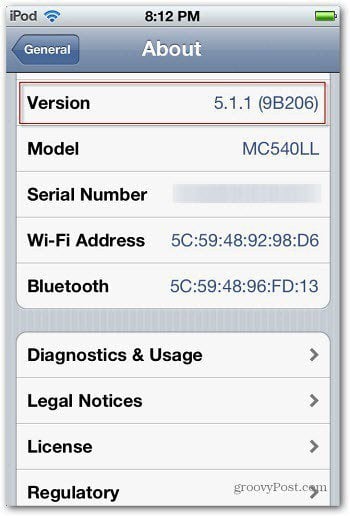
Note: I’m using an iPod touch (4th Gen) with iOS 5.1.1, which is the most current version of iOS at the time of this writing. I am also using the Windows version of iTunes on Windows 7. But you can jailbreak it with your Mac, too. Keep in mind that if you update your iDevice to a new version – iOS 6, for example, you’ll need to jailbreak it again.
Backup Your iDevice
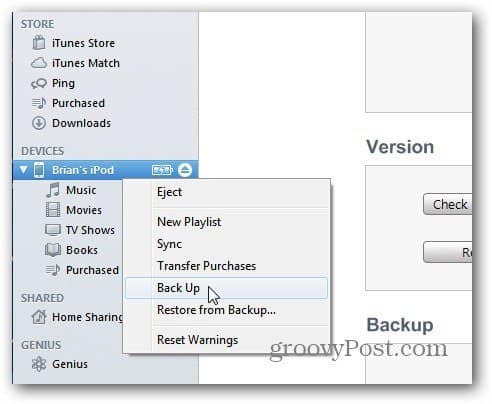
Before doing anything, you’ll want to create a backup of your device first. Plug it into your computer and launch iTunes. Right-click the device when it appears and select Back Up.
Then wait for the backup process to complete.

Erase Your iDevice
Now you’ll need to erase your device. Navigate to Settings >> General >> Reset >> Erase All Content and Settings.

Enter your Passcode if you have one set up.

Then tap Erase iPod and again when it asks to verify the Erasure.

Your device will reboot and when it comes back, you’ll need to go through the initial configuration steps you did when you upgraded to iOS 5.
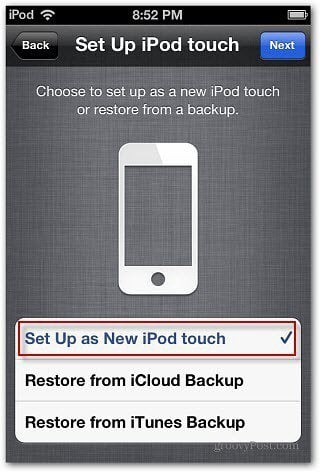
The most vital selection to make during this is when you get to the Set Up iPod touch screen, select Set Up as New iPod touch (or whichever iDevice you’re setting up).
Jailbreak Your iDevice
Now, go to the Greenposi0n Website and download the most recent version of Absinthe for the OS you’re using.

Extract the zip file to a convenient location like your desktop or Documents folder. Now run absinthe-win-2.0.4.exe.

You’ll see the following screen while absinthe extracts files. It can take a few minutes, just let it run until it’s finished.

When the extraction process is complete, you’ll see the absinth-win-2.0.4 folder it created during the extraction. Open that folder.

You’ll see three files and a data folder. Make sure your iDevice is plugged in and Double click on absinthe.exe.

After it detects your iDevice, click the Jailbreak button.

Now, wait while the new software is installed on your iDevice. You’ll see it reset itself during the process.

Congratulations! You now have a groovy jailbroken iPhone, iPad, or iPod touch. The process couldn’t be easier.

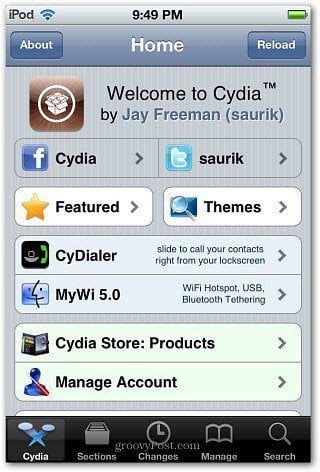
Disconnect your device and swipe it to the right and you’ll see the Cydia app. This provides a whole new world of apps, settings and features that aren’t available with an iDevice that isn’t jailbroken.
Launch the Cydia app and wait while it prepares the Filesystem.

After that’s complete, select whether you’re a User, Hacker, or Developer. Not all available apps are designed to be used by everyone. Select User unless you know you’re a Hacker or Developer.

Select User and tap Next. Then have fun enjoying a bunch of cool features and apps that you wouldn’t have access to from the iTunes store.
Finally, you’ll probably want to reload the data that you backed up in the first steps. Connect your Device, launch iTunes, right-click on the device, and select Restore. Select the most recent backup and let it run.

11 Comments
Leave a Reply
Leave a Reply





laj
June 28, 2012 at 4:07 am
Please Brian,
I would like you to help me in bypassing by Mac air password as i have forgotten the right password.
Now i can’t log in to my mac.
hammad
June 29, 2012 at 5:51 am
Hey Brian,
is this jailbreak tethered or untethered?
Brian Burgess
July 11, 2012 at 3:23 am
Tethered
Hammad
October 17, 2012 at 2:32 am
Absinthe 2.0 jailbreak is untethered
Mechman
June 30, 2012 at 12:07 am
great tutorial Brian, you explained everything clearly except the reason to jailbreak my phone. What “cool features” am I missing out on?
Brian Burgess
July 11, 2012 at 3:22 am
You can install apps that aren’t available in the iTunes Store for one. Another example is you can make Google or any other browser your default versus Safari — https://www.groovypost.com/howto/make-chrome-default-browser-ios/
Brian Burgess
July 11, 2012 at 3:25 am
You can add customized themes, add apps that aren’t available in the iTunes Store, or here’s an example…make Google Chrome you default browser versus Safari..https://www.groovypost.com/howto/make-chrome-default-browser-ios/
Dimitrios
July 12, 2012 at 10:16 am
I brought my iPhone 4 from Peru and went to T-Mobile to get it connected but they tell me that it is blocked, I paid full price for it and it is legally mine, how can I liberate it, I have 5.1.1 version and I read your note about Jaibrake for the latest version but will it work to get it connect here in Miami Fl ?.
I’m an ignorant old man in these matters, but since I read your post every day like I read a newspaper I even teach my children and grandchildren about the latest in smart phones and computers, you should get a prize for what you do,
Thank you
Brian Burgess
July 18, 2012 at 4:26 pm
Well, I wrote the article using the 5.1.1 version. So, it’s going to matter what time you arrive in FL. iOS 6 could break out at any time, so you would need to jailbreak again…provided you upgrade to the new version.
Steve Krause
July 18, 2012 at 4:49 pm
and provided there is a new jailbreak process that works for iOS6. Apple has a way of locking down phones to stop jailbreaking however it’s only a matter of time before a new hack is found to jailbreak most versions of ios.
Hammad
October 17, 2012 at 2:30 am
iOS 6 jailbreak on iPhone 4S/5 is not yet released (as far as i know). But you can jailbreak iPHone 4 running iOS 6.