How to Add Spell Check to Notepad++


If you’ve installed Notepad++ with default settings, you likely already have the Spell Check plugin installed. Here’s how to enable it.
Notepad++ is our favorite text editor and a must-have notepad replacement. Unfortunately, although it comes with a spell check tool, it doesn’t always have the dictionary files needed to run. Let’s set them up.
Click the Plugins menu and select Spell-Checker >> How to use…*
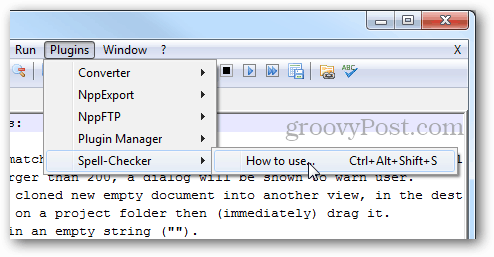
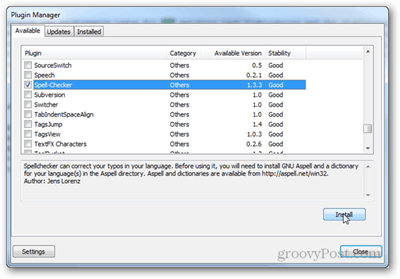
*If Spell Checker isn’t showing up on the list, open the Plugin Manager, check it from the Available tab, and click Install.
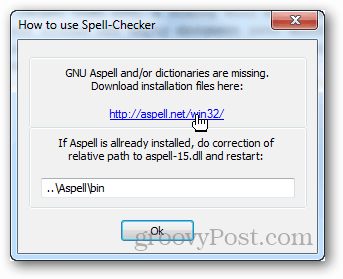
Now follow the link in the “How to use Spell-Checker” window to https://aspell.net/win32/
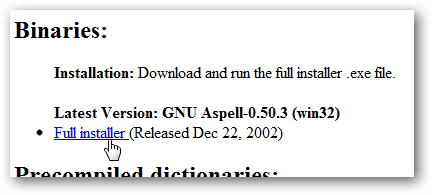
Here you’ll need two files. The first is the binary file for the library software.
The second is a pre-compiled dictionary (word list) in the language you prefer.
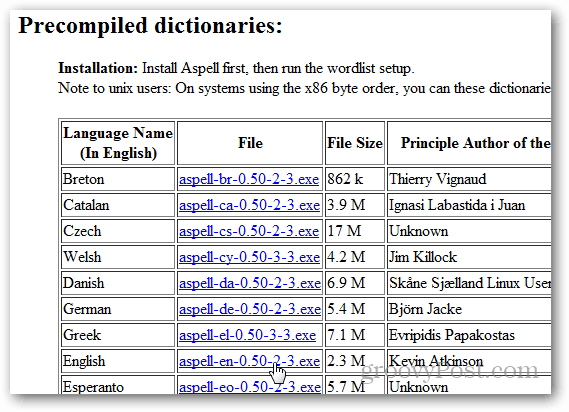
Run the first binary installer first, its full name should be Aspell-0-50-3-3-Setup.exe, and it should be 1,277KB in size. Installation is simple; click Next a bunch of times.
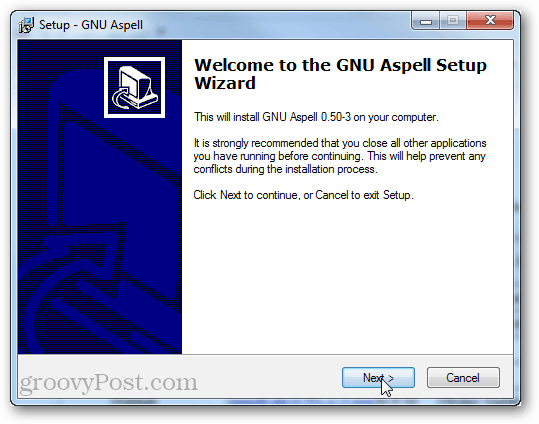
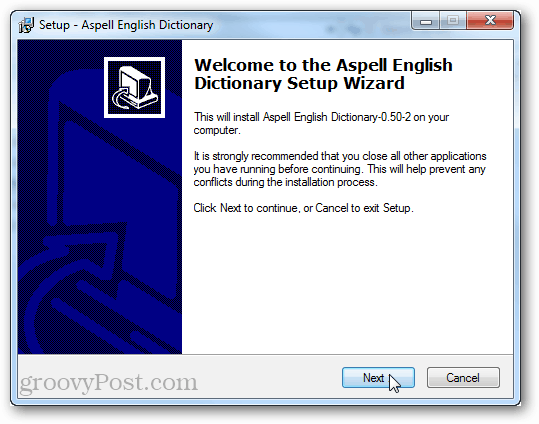
Next, install the dictionary file. It has the same type of setup; click next until it is done.
Now all you have to do is to exit and restart Notepad++.
The Spell-Checker tool from the Plugins menu should have different options. Click the Spell-Checker one to start checking for spelling. You can also use Ctrl + Alt + Shift + S as a shortcut for this.

An open spellcheck dialog works much like the “find” feature, except that spellcheck is automatically hunting down words that don’t match its dictionary.

That’s all there is to setting up Spell Check in Notepad++. If you’re not a user of Notepad++, give it a whirl as a notepad.exe replacement using Ninite — the free app which easily installs the best freeware on the net.
20 Comments
Leave a Reply
Leave a Reply







^^TnT^^
August 1, 2012 at 11:43 am
I was thinking about this today…. and then i stumbled on this one when i was looking for something else.. Thank you very much
buythiscomputer
November 4, 2012 at 3:38 am
Hello , I need some help :-)
Do you know if it’s possible to add Spellcheck to Notepad++ on Windows 8 ?
Thanks.
Steve Krause
November 4, 2012 at 9:58 am
Good question. I’ll have to install an test it.
naveen pg
January 16, 2013 at 4:49 am
how to pre compile the list? cos i am trying
it for my home language, pls reply asap. thanks
naveen pg
January 16, 2013 at 4:50 am
pls drop me a mail npg038@gmail.com thanks in adv
Jordy
February 27, 2013 at 10:48 am
Thanks for this. I’d gotten through installing the binary and wasn’t sure about the dictionary itself. I appreciate you posting these instructions.
Mike
May 1, 2013 at 5:03 am
I used Notepad++ forever. It’s really great. But, despite numerous attempts to install the spell checker, I was never able to install it, until when I found this article. It really helped. Following the clear instructions, I was able to install the spell checker successfully on the first shot.
Thank you very much!
Fogey
May 5, 2013 at 11:51 am
Ditto Mike!!
S.C.
May 7, 2013 at 4:33 am
Verry useful.
I attemped multiple times to install but alwalys failed.
Untill now.
Thank U!
Bob
June 16, 2013 at 11:10 pm
Unable to install dictionary. Instead of getting the Dictionary Installation Wizard I get , for lack of a better description, what I call a DOS screen
Bob
June 16, 2013 at 11:53 pm
I just answered my own question, I typed in ASPELL after rename, hit enter and the Wizard appeared. I now have the Dictionary
buythiscomputer
August 11, 2013 at 12:52 pm
Why are you still using the ridiculous notepad++ spellcheck when an “As you type” spellchecker for notepad++ is available ?
https://sourceforge.net/projects/squiggly
joebl
September 6, 2013 at 2:50 pm
Alas, the spell checker is not particularly useful for many of us since it seems to lack any option for North American English. Sorry, but no sale on the British English “corrections”, though I’ll take Canadian if they are available, eh :-P
Keith
July 2, 2014 at 8:47 am
To clarify, finally I hope. This is what worked for me on a 64 bit windows O/S
It didn’t like being installed in an x86 folder for some reason (64 bit windows 7 box), if the ASPELL installer (and you did remember to download the language for your country from the website as well didn’t you) placed itself into an c:\program files (x86)\aspell folder then copy this whole folder, subdirectories and all, to c:\program files\aspell and THAT is what you have to type into the Notepad++ screen where it talks about relative path to the aspell-15.dll when you launch the spell check plug in.
The whole path being..
c:\program files\aspell\bin
Don’t ask me any more, it just worked like that after half an hour of head scratching
Jake
October 17, 2015 at 1:35 pm
Thanks for this info Keith. I dug around quite a bit before I found your comment.
I completely removed Aspell and all associated dictionaries. Afterwards I reinstalled in the non (x86) directory and reinstalled the dspell plugin in Notepad ++. Once this was done everything was fine.
Hangup definitely seems to be related to Aspell being installed in the c:program files (x86) directory (which may make sense as it is an open source port to Windows, for a 32 bit box.
edward perry
January 7, 2016 at 3:18 pm
thanks a clear and concise explanation.
Fred
October 1, 2016 at 8:11 am
THANK YOU VERY MUCH!!!
sulbha
June 30, 2017 at 2:55 am
I downloaded Aspell>>gave the path. Then also it is not working.
Can anyone help me on this?
Kev Man
April 16, 2022 at 11:28 am
Does not work. I end up with the same error message that NCU Aspell and/or dictionaries are missing…..
what should i put in for the relative path, as in cut and paste, what goes in that box???
Ben Stockton
April 25, 2022 at 2:35 am
Hi Kev, thanks for your comment. We’re planning on updating this article shortly so hopefully we’ll be able to answer your question. Thanks!