

Although a little different from the Windows XP process, joining a Windows 7 or Windows Vista machine to a Windows AD Domain is pretty much the same, with just a few exceptions. Let’s jump right into it!
1. Click Windows Start Button, Right-Click Computer, Click Properties

2. Click Change Settings then Click Change


3. Click Domain Bullet then Type the name of your Windows Active Directory Domain you wish to join

4. Type the Domain\Username and Password of the Account which has PERMISSIONS in the AD Domain to add your machine to the domain; Click OK when done
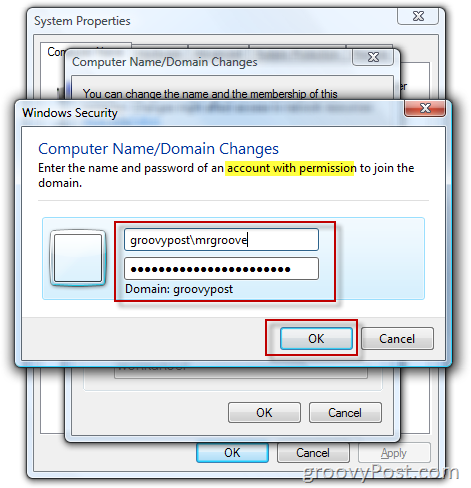
NOTE: Step 4 requires YOU to have the credentials (User/PW) to add machines to your AD Domain OR, your System Administrator (IT Guy/Geek) has staged your Workstation in AD along with your credentials which will allow you to add the machine to the domain. Either way, unless you’re the IT dept., you will need to get your IT Dept. involved to complete Step 4.
If everything goes well and you have the right credentials, you should get a box Welcoming you to the AD Windows Domain followed by a prompt to Reboot for a change to take effect.


Any issues, let me know in the Forums!
2 Comments
Leave a Reply
Leave a Reply







MrGroove
November 30, 2009 at 12:11 pm
Made a quick update in the post for Windows 7 as the process is pretty much the same for both. Any questions, drop a note here!
abhishek
October 7, 2011 at 4:16 am
i have problem in adding some windows 7 machine to ad………..that it does not able to contact dns sever