Fix IE Crash When Opening Documents in Sharepoint

A while back after upgrading to Office 2007, I ran into a problem with Internet Explorer 7 crashing EVERY TIME I tried to open a document in Sharepoint. The problem occurred for both Excel and Word documents no matter what I tried (document check-out, edit then click on a link, etc.) I found that if I saved the document locally, I could open the .xls or .doc but… obviously, I wasn’t necessarily looking for a workaround!
After working “around” the problem for a few days, I finally decided I needed a fix and fortunately found one in just a few minutes using Microsoft Office Diagnostics!
Before I detail the Step-By-Step, here’s a copy of my system config and a snip of the error I was getting:
Config is/was: Windows Vista SP1, Office 2007, IE7.
Here’s a snip of the error:

OK OK!! Let’s dig right into it!
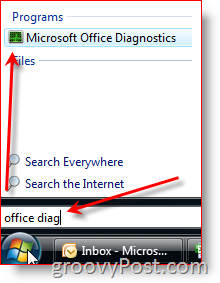
1: Click Start Button and Type Office Diagnostics into the search box. Click Microsoft Office Diagnostics
2: Click Continue to begin the scan. It might take several minutes to run, and as it scans your system, you should see results appear in real-time


3: FIXED! (Click Continue for a detailed report of the findings)
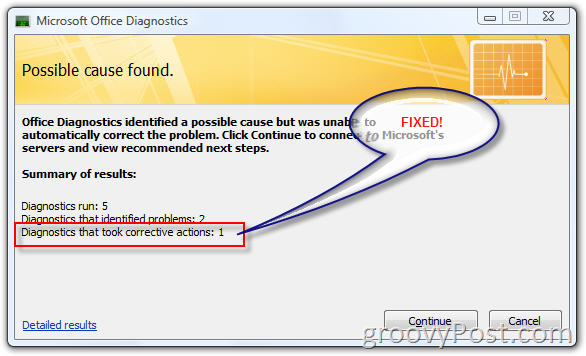
If you click on the Continue button above, you will be able to find out what was discovered and fixed via a Microsoft Office site that gives you detailed information. In my situation, a file had become corrupted. Thankfully, the Microsoft Office Diagnostics tool was able to fix it.
All in all, GROOVY Kudos to Microsoft on this one! Excellent tool!
22 Comments
Leave a Reply
Leave a Reply





AaronY
July 9, 2008 at 11:36 am
Fixed my problem 1st try! Thanks for the tip!
MrGroove
July 9, 2008 at 11:38 pm
Excellent! Welcome to the site!
geek
July 15, 2008 at 10:57 am
Sweet. Not only did this fix my problem with Sharepoint but I used it on my home box to fix another problem I was having unrelated. Never even knew the Office Diag. App even existed. Thanks for the FYI!
MrGroove
July 17, 2008 at 11:17 pm
@geek – Excellent! I’m glad to see you found the article handy!
Frodootje
August 7, 2008 at 1:53 am
I had the same problem. Thanks for the solution!
Donna
September 3, 2008 at 9:44 am
This solution works great is you have Office daig. We have some user running Office XP and this is not available. Do you know how to fix it if you are running Office XP?
shockersh
September 3, 2008 at 3:18 pm
Yeah,
Ebay.com, buy office 2007, uninstall office xp, problem solved! :)
MrGroove
September 4, 2008 at 10:35 am
@Donna – I actually don’t have an installation of Office XP on any of my boxes or Test systems however, you can try a few things.
I’ve read where the problem exists (IE Crashes when opening sharepoint documents) because of a duplicate owssupp.dll file is installed on the PC. This typically occurs when you install multiple copies of Microsoft Office (or it’s components) on a single PC. You should try to do a search for this DLL on your computer and delete the OLDER version.
Personally, what I would do is 1: Search for the dupe owssupp.dll file 2: Rename it to something else (rather than delete it). 3: Reboot and see if that fixes the problem.
You might also find more info here that might help: http://support.microsoft.com/kb/833714
Let us know!
Donna
September 8, 2008 at 5:19 am
We did do all of the above we have not unistall Office XP and Reinstall. I have been told that it would not make a diffrence. Is there a way to verify if an installtion of office xp has the SharePoint support component that is included in Office Tools. Also, at one point the affected users were able to edit the document. It appears that when some window updates that have been pushed through have altered their abilty to edit the document. i have noticed thi behavior before. When this happens with other users that have some office 2003 or 2007 components all we have to do is run Microsoft Diagnostic or reinstall the Microsoft SharePoint Support. It look like the some of the Office XP users do not have the component installed in there Office XP.
Reidar R
September 19, 2008 at 4:10 am
Great! Helped out my problem on a PC with Office 2003 and with OneNote from 2007. After a WSUS deployment IE crashed on opening files in Sharepoint by launching OneNote. This fixed the problem instantly.
Thanks!!
Donna
September 25, 2008 at 7:37 am
As an FYI our problem is fixed by a WSUS that was out on September 8. Interestingly enough the problem happened from a WSUS that was pushed out on August 8.
MrGroove
September 25, 2008 at 8:06 pm
@Donna – Hi. Sorry for not getting back to you earlier. It sounds from your last comment the problem was resolved by one of the latest patches from September 08. Do you remember which patch fixed your problems?
Joe
October 30, 2008 at 1:02 pm
If you have XP; download, run hotfix, and then restart your machine.
Problem Solved.
:)
http://support.microsoft.com/kb/938888
Joe
October 30, 2008 at 1:04 pm
Note: Hot fix says for office 2007 but it works for 2003 too.
Dan
December 3, 2008 at 6:44 pm
I found today this Sharepoint stuff on my pc – not a server. I don’t want and I want it gone. What do I have to uninstall?
MrGroove
December 3, 2008 at 7:35 pm
@Dan – It wont be Sharepoint installed on your PC, it is the OFFICE components which are installed on your PC. The office components are most likely conflicting with each other and that’s causing the crashes. Follow the steps in the Tutorial and you should be golden. If not, post your SPECIFIC problem in our Free Support Forum – https://www.groovypost.com/forum/ and we will work you through the issue.
Thanks and welcome to the site.
Greg
July 21, 2010 at 5:38 am
Groovypost,
Thank you very much for posting this blog entry. I had a client that was trying to edit any of his excel documents on their Sharepoint server and his IE 7 was crashing.
I followed your directions and the Office Diagnostics Tool worked like a charm. One thing to note this box was running XP so the first part of the instructions wasn’t the same. Just go directly to start – programs and find the Micrsoft Office folder.
Thanks again!!!
Greg
Corey
July 27, 2010 at 4:50 pm
Thanks for this, worked perfectly!
Ankit
August 3, 2010 at 11:06 pm
HI There
Thank you so much i do it after work has perfectly….
Thanks & Regards
Ankit moradiya
Ankit moradiya
August 3, 2010 at 11:07 pm
Hello All
I found today this Sharepoint stuff on my pc – not a server. I don’t want and I want it gone. What do I have to uninstall?
safe
December 20, 2011 at 10:06 pm
If you are not acquainted with the fundamentals of developing enterprise names. I recommend you study ahead of you go any further more.
register
February 29, 2012 at 1:56 pm
Seriously cheap domain name registration, web & email hosting, web design & SEO for the fashion conscious. Visit today to see how Fashionable Domains can help develop and grow your online business.