
 This How-To is a Quick and Simple tip which I use anytime I make a purchase or have something shipped to me.
Simply paste your UPS or FedEX Tracking Number into Google to get the link to the Shipment Tracking Page.
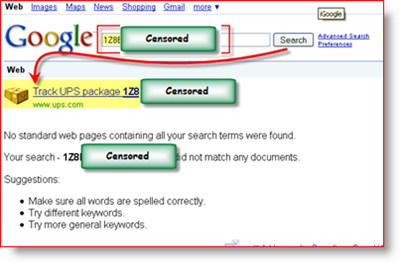
Now granted, although I’m mentioning Google specifically, the same process can also be used using all the major search engines – Live.com, Yahoo.com, etc.
For a twist, you can also get a graphical display of the package tracking information info over at https://boxoh.com/. Some groovy code using maps.google.com. It’s fun but for me, a little too flashy. Usually, all I want to know is “Where is my package!!!!”
Tags: quick-tip, fedex, ups, google, tracking
7 Comments
Leave a Reply
Leave a Reply







Joseph
January 2, 2009 at 10:25 am
This is why I’m a long-time reader! Great tip. I had no idea it was so easy.
Thnx
BTW – I tested this with ask.com and it works but it didn’t take me to the exact tracking site like Google and Yahoo did. just FYI
alexmvp
January 2, 2009 at 10:47 am
Cool tip! Didn’t know about this one. Time saver for sure.
Andrew Richter
January 9, 2009 at 2:31 pm
Just a note, in the screenshot you have the tracking number censored in the Google results, but not in the search box.
MrGroove
January 9, 2009 at 4:33 pm
@Andrew – Good stuff! Thanks for the FYI! Funny how I missed that “small” detail!
Jason
January 11, 2009 at 8:37 pm
I am always intrigued by the secrecy that people associate with tracking numbers. What are you afraid of happening? Especially with something that must have been delivered a while ago.
MrGroove
January 12, 2009 at 2:00 pm
@Jason – You are correct, there is nothing “Sensitive’ contained in the Tracking data from UPS. The only thing that “might” be sensitive is the City which UPS delivered the product.
Personally, I censored that information from the Article in order to prevent it from distracting from the Article itself. Judging from the comments, I’m not sure if that worked. (Grin)
New Mexico Suboxone Physicians
July 16, 2011 at 12:14 am
Good post. How long have you been running this blog? I need to work on mine a great deal!