How To Disable Ads on Kindle Fire HD


If you recently purchased a new Amazon Kindle Fire HD, you might be turned off by the special offer ads it displays on the Lock Screen. You can disable them by opting out with a one time payment of $15.
If you recently purchased a new Amazon Kindle Fire HD, you might be turned off by the special offer ads it displays on the Lock Screen. Amazon did this to subsidize the cost of the devices. After some “flip-flopping,” the company finally decided that users can opt-out of the ads with a one-time charge of $15.
Not only do ads appear on the Lock Screen, but they pop up in different places throughout the interface. Here’s a text ad on the home screen (for Amazon, of course).

It’s not obvious how to pay the fee for an ad-free Kindle, though. You can’t do it from the device, but instead, you need to go to Amazon’s site and log in to your account.
After logging in, click Manage Your Devices under the Your Kindle Account section on the left side of the screen.
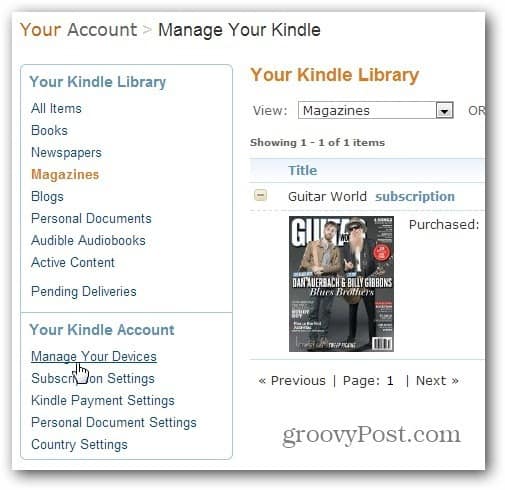
Then under Registered Kindles, you’ll see a list of the device(s) you own. Under the Special Offers column, click the Edit link next to Subscribed.

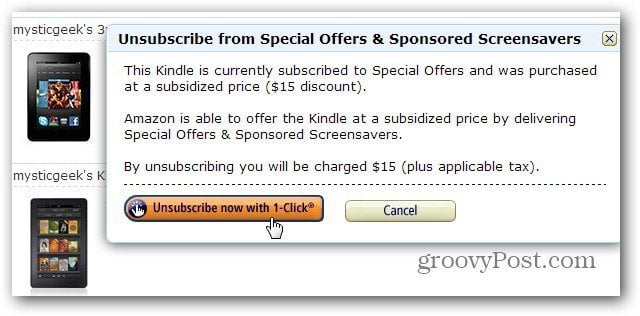
Then click to unsubscribe. Remember your credit card will be charged $15 to remove the Special Offers, but it’s only a one-time fee.
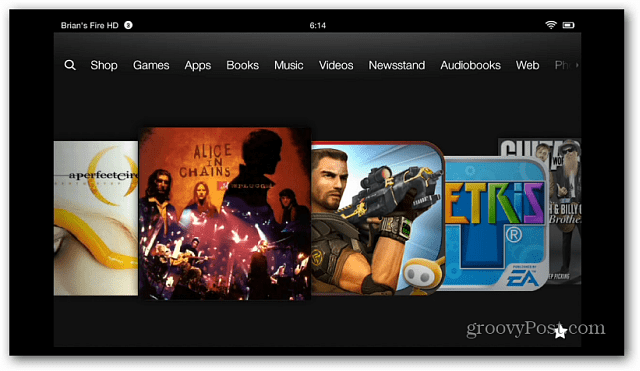
After you’ve unsubscribed from the special offer ads, turn on your device and ensure it’s connected to WiFi. Now your Lock Screen is ad-free and will display random high-quality backgrounds as it does on the first Kindle Fire.

And the text ads that appeared on the Home Screen are gone too.
Swipe from the top of the screen down to see your Notifications. One will say you’re device has been removed from Special Offers.

While the Lock Screen and various text ads are removed from your tablet, you’ll still see recommendations from other customers.

I didn’t have a problem with the special offer ads at first. Some of them are dumb, like credit card offers, but others show you new movies, books, and music on sale in the Amazon store. In fact, the other day, it displayed one that gave me a free $5 credit for the music store. But after opting out of them, the interface is a lot cleaner and nicer to use.
19 Comments
Leave a Reply
Leave a Reply





chrisp666
September 18, 2012 at 6:38 am
I think this is outrageous. I am glad that I bought a Google Nexus. I can see no point whatsoever in buying the Kindle Fire over the ad-free Nexus.
Austin Krause
September 18, 2012 at 10:09 am
The Nexus 7 is a better device from nearly all aspects. The Kindle Fire however gives you a bit more for free if you are an Amazon Prime subscriber, namely:
– Free books every month (Lending LIbrary)
– Tons of free movies / TV Shows (Prime Instant Videos)
The Kindle’s e-book reader is also the best I’ve seen. But, if none of those things interest you, I’d recommend the Nexus 7 any day over the Kindle Fire.
Brian Burgess
September 19, 2012 at 1:00 am
Yeah, there is no doubt the Nexus 7 is a far better choice for power users. But like Austin said, it’s a fabulous device if you’re heavily invested in Amazon streaming content and a Prime member. It’s a media consumption device and not meant to be a productivity tablet.
Plus, you can still get some work done on it .. email, web browsing, light document work.
And I have to say it does an awesome job for Video, Books and Music. It’s a significant improvement over the first one without a doubt.
Mister B
October 25, 2012 at 11:18 pm
Then why bother to comment on here? Enjoy your Nexus and don’t be a downer
Tiff
May 16, 2013 at 4:11 pm
So l purchased the device then have to pay again for an ad free experience? I could understand if I was using free software or programs like Facebook but Amazon makes money off the consumer, advertiser then the consumer again?!? #classactionlawsuit
Matt
November 10, 2013 at 6:25 pm
You purchase the device CHEAPER to begin with because it is subsidized by the ads. On Amazon’s site there is always an option to pay more on the purchase price for one with no ads. It is also clear that the ads will be there.
Steve
May 20, 2013 at 12:53 pm
To me, it is worth the $15 to turn off the ads – it does get old pretty quickly. However, to make back my money; I have decided not to buy anything from or through Amazon for a good long time…I usually am good for at least $100.00 a month.
Childish and Petty…sure! – will I really do it…Absolutely! Just tired of paying on top of paying…
Frank
October 24, 2013 at 2:30 pm
Some of the ads I actually like and find interesting to look into. Most of the ads I skip over. It takes about 0.5 seconds to skip any of the ads, especially with a stylus (tap, tap), so they don’t bother me in the least.
Pam
November 13, 2013 at 10:09 pm
If I pay the fee to unsubscribe, will the ads that pop up on downloaded apps (Yahoo for example) be blocked too? I find those ads extremely annoying.
Laraine Wilson
December 16, 2016 at 8:25 pm
Thats what I want to know. Some of the ads my 5 year old granddaughter doesn’t need to see. promotes to many questions for her age.
vivian
January 2, 2014 at 2:20 am
Hi, I contacted Kindle customer support and explained that some of the adverts were inappropriate for my 9 year old, e.g. Slimming world magazine subscription.
Within 30 seconds they removed all adverts from my daughter’s device, at no cost.
I am very impressed with the customer service, this was in the Uk.
Hope this helps others
Sue Anderson
October 20, 2015 at 1:39 am
Why am I still getting pop up adverts when I have paid to unsubscribe. I tried watching a video but kept getting adverts I am seriously considering beginning my kindle fire.
Paul Bridges
November 26, 2017 at 6:52 am
What a liberty! You buy a product and then get caught with adverts that you have to pay to have removed. No mention of this when you buy it. I hate them and it spoils the product. We should be able to request the cessation of them for free.
SigSputnik
November 29, 2017 at 9:07 pm
Yeah, I didn’t know about them. Seems stupid since the kindle is mainly an amazon store interface, anyway and I generally buy stuff off their site.
Geraldine McKenzie
October 7, 2018 at 6:36 am
I have four operating kindles. my husband purchased the last one
For my birthday.
I am 77years old and I have two great grand children living with me. They may pick up my Kindle and some of your ads are not for children.
Not only that but I read all the time. Constant ads on my reading page and also in my puzzles. If you also notice I rarely purchase anything from you anymore because I am bombarded with more ads telling me what I want to buy next. I am a long time user, but this is my last kindle. You invade my privacy too much. Truly a shame, I love my old kindles.
Vbailey
February 17, 2019 at 6:04 pm
I paid the $15 for an add free device. I STILL get tons of annoying adds! Every ti.e a click a icon, an add appears and I have to wait for it to run its course. VERY annoying t. I would have never purchased this device if I’d known about these annoying adds.
jobaardu
July 15, 2019 at 6:57 am
Does that mean that the $15 purchase to stop “special offers” only stops start screen ads? Are all the other app ads still popping up, like reading books or videos using Amazon apps?
Paul
August 18, 2019 at 11:27 am
After paying to get rid of the ads, instead of seeing random high-quality backgrounds, can I switch it so I see my own photos?
Ken in Az.
October 29, 2019 at 10:51 am
If I bought regular books I certainly wouldn’t have Ads throughout the books.
The point is these are my books, bought and paid for, this is an invasion of sorts.
Faye
November 17, 2023 at 4:10 pm
I’m about to throw this kindle in the garbage. I think it’s pure greed to make people pay another amount so they can actually enjoy what they bought. I thought it had a bug or something and now am reading these comments.