How To Find Your Local IP Address in Windows 7 or Vista


Finding your IP address under Windows 7 is a very simple process. The process is exactly the same whether you’re using Windows 7, Windows 10, or Windows 11.
In most circumstances, the majority of users don’t need to worry about their “IP Address” due to DHCP from your local network or ISP. For system administrators, knowing the IP address of your machine, server, or customer’s PC is imperative.
How To Find Your Local IP Address In Windows 7 Using CMD
Step 1
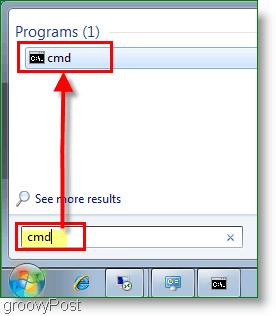
Click Start, in the search Type in cmd. Next, Click on the program cmd. This click will open the Command Prompt/Windows.
Step 2
The command prompt should open; now in the open line, you’ll need to type in ipconfig and press Enter
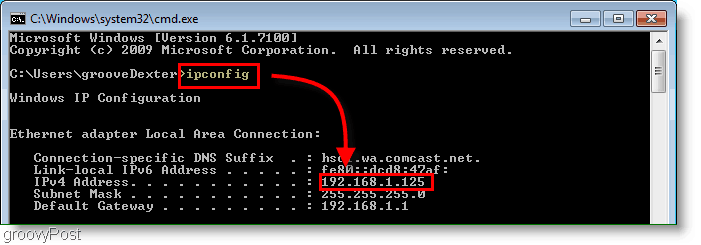
You’ll see your IP address listed right above the subnet mask. Usually, it will say IPv4 Address and follow the prefix 192.168.1.# or 192.168.0.# for home networks as shown in the screenshot above.
Step 3 (optional)
If you’re not looking for your LOCAL IP address but instead the IP address provided by your ISP to your Cable Modem or FIOS Router, just open your browser and go to https://whatismyip.org.
Please note – This is not the actual IP you’re using on your LOCAL computer as shown above in Step 2. This IP address is the one assigned to your Cable Modem/FIOS Router on the Internet.
Further reading
What is an IP Address?
- If you want to call someone, you use their Telephone or Mobile number, right? Well, an IP Address or Internet Protocol Address for a computer or network device is a phone number for your computer. That’s it. It’s pretty simple.
- Because no one knows the “Phone Number IP Address” for www.google.com, another technology was created to act as an Automatic Phonebook for IP Addresses. It’s called DNS. When you type www.groovypost.com into your browser, DNS will translate that into an IP Address and send you to the website. It’s all very simple once you understand it.
IPV6 Address?
- In a system or network that uses IPv6, you won’t see a Subnet mask, and the address will follow the fe80::## prefix. However, for most home users, IPv6 use is uncommon.
IPv4 Vs. IPv6?
- IPv4 is the old system we currently use to designate IP addresses across all of the public computers that are connecting to the internet. The problem with IPv4 is the address is only 32bit’s in length, which means there are not enough addresses to go around.
- IPv6 is 128 bits in length which should allow for more than enough addresses in the foreseeable future. The good news is most modern operating systems understand both, so when the times comes for the cutover, it should be invisible for most users.
Do You Have Any Groovy Questions or Comments? Drop your comment below, or join us in the groovyPost Free Tech Support Community.
28 Comments







ronie
July 27, 2010 at 7:28 pm
hello .. i want to use flatcast but i cant it says your port is close and i don not know i chance the ip address ………..
Pentium(R) Dual-core CPU ……. T4300 @2.1GHz Ram=4.00GB
model = PCG-7183M
SONNY
WINDOWS 7
Patricia DiGiacomo
November 26, 2019 at 6:58 pm
I keep getting a notice that pops up on my laptop saying someone else has the same UP address as I do. Said to get in touch with Windows 7. I ha and to come over and used my laptop. He set it up so I don’t get my WiFi hooked up. He set it for A different one and said that was Kim I asked him not to do that. Now every time I turn on my WiFi the other internet service comes on with my laptop using their internet conection. I have to delete that so I won’t get in trouble. It’s not right he SET MY LAPTOP UP LIKE THAT. I’M FURIOUS about that.
Ok this i Just came up that ” my Yahoo failed to log in. Someone is trying to get into my yahoo. What do I do??
giantfood
January 6, 2011 at 3:37 am
thanks man, i knew how to do it through my router options but i cant access school’s server. need it for multiplayer minecraft. and i dont feel like dealing with remote access if they cant access my server lol
Megan
March 4, 2011 at 11:01 am
Unfortunately this doesn’t work at all. Windows 7: when I type “ipconfig” or “ipconfig/all” into the cmd line I get only a physical addres or “media disconnected”. Fail.
Hogan
March 4, 2011 at 11:20 am
@Megan, it sounds like the computer you are attempting this on isn’t even connected to a network. Plug the computer into a network via an ethernet cord, or connect to a wireless network, or tether a connection using your phone. Then try it again.
On a side note, people are using the word Fail way too much, especially when it is actually they themselves who are the failure. This is what we call a UE, user error.
Preston
March 12, 2013 at 3:10 pm
Scroll up… Hogan was right. This is a simple case of PEBKAC.
(Problem exists between keyboard and chair)
Preston
March 12, 2013 at 3:11 pm
Scroll up… Hogan was right. This is a simple case of PEBKAC.
(Problem exists between keyboard and chair)
James
June 15, 2011 at 8:43 am
Didn’t work, I have Windows 7 and followed all instructions Hogan, you FAIL!
byron lochridge
July 19, 2011 at 3:25 pm
Does anyone know how to connect to a routers home page for setup using Windows 7. I tried this on three different routers without success. Works ok using XP. On Win 7 get unidentified network using DHCP or fixed IP address.
computer overclocking
November 13, 2011 at 5:01 am
Hi there very cool website!! Guy .. Beautiful .. Wonderful .. I’ll bookmark your site and take the feeds also?I’m satisfied to find so many useful info right here within the post, we want work out extra strategies in this regard, thanks for sharing. . . . . .
Free Premium Minecraft accounts
January 6, 2012 at 4:16 am
I’m no longer positive the place you are getting your info, but good topic. I needs to spend some time finding out more or figuring out more. Thank you for fantastic info I used to be looking for this information for my mission.
crabman
January 17, 2012 at 5:54 pm
thanks man, i now know how to check it. good job thanks for sharing
Prateeksha
February 12, 2012 at 8:12 pm
Thanks :)
cdog
March 1, 2012 at 4:36 pm
worked for me
Jai
July 28, 2012 at 7:34 am
thanks dude:-);-)
Steve Krause
July 28, 2012 at 8:41 am
Hi @Jai — glad the article helped you out!
Welcome to the site!
-Steve
Colby
November 4, 2013 at 7:26 am
Hi I wanna know how to make my IP address untraceable and private. Please advise your soonest thank you!
me
March 9, 2014 at 12:46 pm
this absolutely works. If it did not work for you you did something wrong. The instructions were laid out very simply.
Pal Trend
February 7, 2015 at 10:46 pm
you may consider this unknown web-app http://whatismylocalip.com
it displays both internal and public ip address for your desktop/mobile/tablet devices.
a very basic website.
Rakesh
April 10, 2015 at 8:43 pm
Nice article, i will never forget this method
david
May 30, 2015 at 8:06 am
why my system does not give ip address in cmd when i type ipconfig/all……..window7
Sherise Loper
July 11, 2015 at 12:40 am
Thank you very much for posting; I needed just this Powershell command for a college assignment!
Lisa M.
October 14, 2015 at 9:19 am
worked for me too!!
Thanks
JC
November 2, 2015 at 9:23 am
Hi. I see both an IPv4 and an IPv6 address on my command prompt and i’m confused as to which to use. When i click on http://whatismylocalip.com it gives me both addresses under local IP as well. So which should i use?
Daniel Sczepansky
November 2, 2015 at 11:15 am
Most likely you want to use the public IP address when you want to let somebody connect from an outside network (like the internet). You use the internal IP (something starting with 192… or 10… or 172…) when you want to connect to your PC from a device inside your network.
http://ipinfo.co shows both.
danish
December 28, 2015 at 1:36 am
thanks
John Mayer
February 20, 2016 at 9:49 pm
If you are on a Linux System for ex, Ubuntu, Fedora, Mint, RedHat etc, use ifconfig command instead ipconfig. That was pretty useful article though.
Judy Dunn
June 25, 2017 at 1:24 pm
Thanks, I found my IP address right away thanks to your directions. Now I just need to find what (Port) means and what the answer is so I can finish installing an app.