Fix Chrome Error Message: “Your profile can not be used because it is from a newer version of Google Chrome”

As you may know, there are a number of Early Access Release Channels for Google Chrome the let you test out new features that are still under development. For example, you could be using Google Chrome 9 right now, if you were so inclined and were prepared to put up with a few errors and instabilities now and then.
But what happens more often than not when a user switches to a beta channel or dev channel of Chrome is that they switch back to the stable channel after too many crashes. This is all well and good—it’s just a matter of reinstalling Chrome—but when you move from a newer version of Google Chrome to a previous version, you’ll get this error message upon launch:
Your profile can not be used because it is from a newer version of Google Chrome. Some features may be unavailable. Please specify a different profile directory or use a newer version of Chrome.

So, Chrome lays out the problem, and even the solution, but how the heck do you specify a different profile directory in Chrome? Search me. Personally, I think the easiest way to fix this is to just delete your profile and start from scratch. You won’t lose anything like saved form data, passwords or synced bookmarks, but it will get rid of this pesky error message telling you that your profile cannot be used. Here’s a quick fix.
Step One
Launch Windows Explorer. Navigate to C:\Users\YOURUSERNAME\AppData\Local\Google\Chrome\User Data\Default
Don’t forget to sub out your Windows user name for YOURUSERNAME.
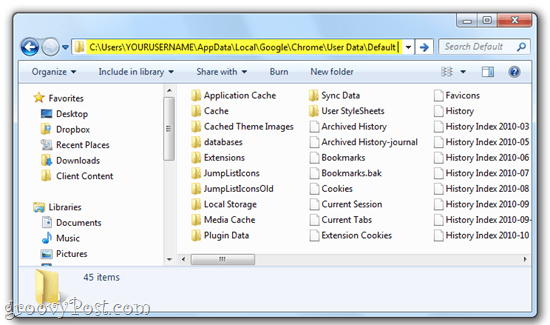
Note you may need to Show hidden files and folders to get here. Click Start and type Folder Options in the search bar and choose Folder Options. In the View tab, select Show hidden files, folders, and drives under Hidden files and folders.

Step Two
Locate the file called web data. Delete it.
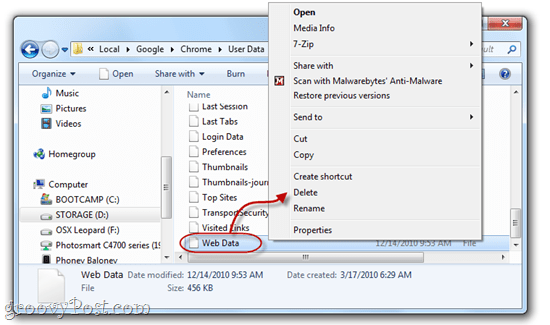
Note: If you’re nervous about doing this, you can simply rename it to “web data.bk” to save it as a backup. But deleting this shouldn’t have any adverse effects.
Step Three
Launch Google Chrome. The error message is gone!

That’s all there is to it. What a pesky error—luckily, it’s an easy fix.
80 Comments
Leave a Reply
Leave a Reply







ntcpqzflqh
December 16, 2010 at 11:26 am
Thank you very much, this is just what I needed! I wish they had anticipated this (probably common) downgrade cycle.
Gregory
January 1, 2011 at 6:35 pm
Thank you so much. Wish I had checked here earlier, would have saved myself some time. Again, thank you so much.
kumar
January 8, 2011 at 11:49 am
Can you please give instructions for the mac.
MaryAnn
November 15, 2011 at 5:14 pm
I need mac instructions too.
Jason
January 8, 2012 at 8:48 am
Go to your user home folder -> Library -> application support -> Google -> Chrome -> default -> delete the web data file. Hope that helps :)
Feico
January 25, 2012 at 11:52 am
Thanks, works 100%
dave
May 26, 2014 at 1:13 pm
This solution worked for me at first but after opening and closing chrome a few times, the issue returns and I have to delete the same two files once again.
katie
February 13, 2011 at 7:28 pm
Thank you very much! It worked like a charm.
supa
February 23, 2011 at 7:10 am
thanks you … you saved my day
supa1
February 23, 2011 at 7:10 am
thanks you … you saved my day
Carpii
March 2, 2011 at 3:58 am
Thanks, this worked great
For anyone else on a Mac, the file to nuke is in
~/Library/Application Support/Google/Chrome/Web Data
Andrei B
March 11, 2011 at 7:38 am
Thank you very much, it worked! :)
Harem
March 27, 2011 at 11:58 am
wouldn’t this delete all of the bookmarked pages in my Firefox?
hinata
April 24, 2011 at 5:13 pm
i cannot find C:\Users\YOURUSERNAME\AppData\Local\Google\Chrome\User Data\Default in window 7 plszz help
zogmeister
May 11, 2011 at 12:39 am
C:\Users\YOURUSERNAME\AppData\Local\Google\Chrome\User Data\Default
should be
C:\Users\YOURUSERNAME\AppData\Local\Google\Chrome\Default
groovinJackman
May 11, 2011 at 4:29 am
That’s odd. I dbl-checked in the 32-bit and 64-bit ver and it’s C:\Users\YOURUSERNAME\AppData\Local\Google\Chrome\User Data\Default for me on both.
zogmeister
May 15, 2011 at 11:24 am
Ok. Try using explorer to search for file “web data” in your USER folder “My Documents” (or whatever the f*** it is on Windows 7). Then delete it.
Robert Phillips
May 15, 2011 at 8:24 am
I have no “Web Date” file!!
zogmeister
May 15, 2011 at 11:25 am
Thta’s because it’s “web data” <– check speeelling
Jason
June 5, 2011 at 4:50 pm
Thanks, works like a charm !!!!!
Ebony
June 10, 2011 at 12:06 am
OMG!!! Thank you sooooo much!!!! Awesome
newbee
July 19, 2011 at 11:53 pm
This is gr8..thanks for post m8..!!
jim shady
August 19, 2011 at 6:26 pm
AMAZING, U saved my life!!! not really, but made it not suck as much. thanks a million
baddu
September 1, 2011 at 4:28 am
thanks alot dude…ur amazing…keep it up
Al
September 7, 2011 at 9:52 am
After a pretty severe corruption and default restore of my Windows 7 user profile I had this problem. You’re method repaired my problem. Thanks
Steve Krause
July 3, 2012 at 1:01 pm
Awesome @0f0af1582d87be686d1a84ea70ae323e:disqus glad it worked out!
asdfsd
September 20, 2011 at 11:19 pm
cant find app data in my user?
Manish
October 23, 2011 at 8:32 am
This fix causes another problem.
Can’t see history items anymore. The history tab is blank now. I sensed it before I tried the recommended fix, but knew no other way to fix the error message (which was more annoying).
Any fix for this issue, or did this happen only on my PC?
PS: OS = Windows 7
purna
November 15, 2011 at 12:07 pm
Thanks man it really helped made my chrome error free .Thanks again
Marcus
December 16, 2011 at 6:17 am
You rock, Jack Busch! One of the few step-by-steps that matches what I ended up seeing on my screen. So easy. Thanks.
stallon
December 17, 2011 at 7:56 am
hi
thanx. for srware iron browser it is netlog.mayb it could help someone.
meToo
December 18, 2011 at 12:47 pm
Thank you thank you, exactly as you said it should be. How often does that happen?
Scindia
January 3, 2012 at 3:03 am
Thanks a lot….. It worked very well.
terri
January 5, 2012 at 3:37 pm
worked great thank you
iblistobat
January 16, 2012 at 5:45 pm
thanks, u really clearly helpful ..
Zahid
January 20, 2012 at 7:19 am
I can’t find ‘web data’ on my pc plz anyone help me
shotokan1965
August 8, 2013 at 7:21 am
No one will help you, and you will be ignored, because this is a problem NO ONE knows the answer to. I have the same problem. I get the error, and “BINGO!” No freakin’ “web data” file to delete. Windows 7 Pro
hardik
January 21, 2012 at 9:11 pm
Thanks a lot. Its working..
Fadzil
January 28, 2012 at 3:11 pm
its work.. thank bro..
RacerX
February 4, 2012 at 8:47 pm
Thanks man. Worked like a charm!
JohnMiller
February 12, 2012 at 1:52 pm
My thanks too! Having the screenshots made it very clear!
Fola Tai
February 22, 2012 at 12:51 am
Hi, this is superb, i just want to say thank you.
Screendrip
March 4, 2012 at 8:30 am
Amazing. This had been really annoying me.
Anso
March 16, 2012 at 1:48 pm
Awesoooooomee!!!!!!!!!!! Thanks Buddy
Hayk
March 19, 2012 at 1:45 am
thankssss
Aaron
April 3, 2012 at 8:39 pm
Thank you.
Maureen
April 7, 2012 at 3:17 pm
I deleted the file and it was fine for 24 hours then I couldn’t get online so I
uninstalled Chrome and went back to Google Toolbar.
Will it affect my computer not having the deleted file?
Tanya
July 2, 2012 at 8:44 am
Thanks – seems to have worked :)
Steve Krause
July 3, 2012 at 1:01 pm
Awesome! Thanks for the comment.
Jason
July 2, 2012 at 6:58 pm
Worked for me as well;-)))))))))))))))
nelsadams
July 3, 2012 at 12:49 pm
Good job writing this fix – clear and complete. Thank-you!
Steve Krause
July 3, 2012 at 12:59 pm
You bet! Glad we could help and welcome to groovyPost!
Teresa Davis
July 8, 2012 at 6:45 am
The only problem with this fix is it’s not permanent. As soon as you restart you computer it happens all over again!!!!
Apollo
July 8, 2012 at 6:25 pm
not so, every time I restart my computer I still get the same eror message
Shobhit Bhatnagar
August 8, 2012 at 12:14 am
i have solved this problem by following these step but after that a new problem arise which i can,t explain videos on you tube not playing correctly with out this error message like RED LINE below the you tube video is crashing and CRACKING videos quacking every time actually this problem has been for many time when ever i instlall google chroom from opera with flash player this message arise (Your profile could not be used because its from a new version of chrome) but video plays this time correctly but when i download chrome from the main site message do not arise but videos not playing chorrectly actualy you tube videos not playing correctly either in Opere like Videos quacking every time red line below the video which run with the video is weirdly moving and broke up in the end please tell me the solution i have scan computer from anti virus but it does’t work
ken
August 22, 2012 at 10:30 am
i cant delete the wed data file.. when i delete it,, “the action cant be completed because the file is open in search settings”,,, what should i do..?
Fran
August 29, 2012 at 9:13 am
THANKYOU SO MUCH! this made it so much clearer and i’m so glad it finally worked :)
Shane Sparky
November 12, 2012 at 4:10 pm
Thanks works!
Kate
March 2, 2013 at 5:20 am
I had a major issue with Microsoft Office and then the “tech” from Microsoft deleted an important file that completely screwed up my entire computer. After I thought I had everything fixed, Google kept popping up with this message. Your blog was the ONLY one that gave an easy fix that didn’t require any major editing in the cache. Thank you!! I wish I could hug you, haha.
June
November 3, 2013 at 5:35 am
Thank you.
parastoo
January 10, 2014 at 9:32 am
I dont have the web data file! i did everything but I still have the issue!!!!! plz help me
Bigred
February 23, 2014 at 2:16 pm
THANK YOU!!! These are the best, easiest instructions anyplace on line. You don’t assume that I know where to find everything and even answer the questions that I didn’t know to ask (how to uncheck “hidden” stuff). After playing around unsuccessfully with other “help” sites, this was sooo perfect a solution.
PeterJames
February 26, 2014 at 9:51 am
Solution still works.
Thanks for a fix, for the pesky
google notifications that pop up without end :)
Pete
Steven Wilensky
March 21, 2014 at 10:34 pm
Just fixed this issue today for Windows 7, 1) Uninstalled Google Chrome. 2) Deleted Chrome Folder from Program Files (X86)\Google. 3) Deleted Chrome Folder from Users\user name\AppData\Local\Google. Now here was the extra missing fix. The computer was running AVG. Logged out and into safe mode then 4) Deleted Chrome Folder from Users\user name\AppData\Local\AVG Safeguard toolbar. Logged out back into regular mode and reinstalled Google Chrome. Works perfectly know.
I also think that this issue might have to do with changing from a Home Network to a Public Network. I noticed that the Google Chrome Icon had the Firewall Shield within it. Once I changed the computer from a Public Network to a Home Network and did as stated above, The Google Chrome Icon was without the Firewall Shield and everything was working perfectly.
Martin
March 25, 2014 at 6:57 am
Thanks. Saved me much time and irritation.
Nancy
May 25, 2014 at 8:08 am
Thank you! Great instructions. Keep up the good work.
Wish I knew where/how this problem came about. I’ve been using Google Chrome for a few years and never encountered this issue before.
jake
June 20, 2014 at 3:02 pm
Thank you,
i ws gonna remove chrome and then reinstall and wipe all the data, but no reason to do so now.
Totally solved the problem, no error, thanq
Dave
June 21, 2014 at 1:18 pm
The only permanent fix I was able to find for this issue was to remove chrome an use Firefox instead. For my case the “fix” listed above only worked temporarily and the issue reoccurred after a few browser sessions.
Mo
July 8, 2014 at 8:38 am
Hi There,
I went through all of your steps, thank you, and when I got to the last folder…
I do not have Webdata. I am running Win 7 X64.
I have the folder databases and Web Application.
Could this annoying pop up be in another folder on my computer?
Thanks!
Mo
Saeid
July 11, 2014 at 8:12 pm
I don’t have AppData folder on my pc at all !
costa
August 25, 2014 at 10:39 am
I use google chrome PORTABLE, can’t fix this issue
what must I do?
Kazuyuki
August 28, 2014 at 6:44 am
This article is OUTDATED; deleting the ‘web data’ file or “converting” it to a backup file—thus making Chrome creates a brand new ‘web data’ file—will CLEAN off all saved forms and passwords!
There was a trick I’ve used when a similar error (the issue with Preference file instead) which fixed the error without deleting anything, but I can’t recalled it for the time being. :(
—
Previous: Chrome v36
Now: Chrome v37 [28-Aug-14]
Reverting to v36 because of “lagging” tabs (CPU at 60-80% when normally it should be lower than 40%).
Kazuyuki
August 28, 2014 at 6:52 am
However, a solution to that is by SYNCING your saved data and forms with Google Account, as proposed here:
https://productforums.google.com/forum/#!topic/chrome/_7z1uOcnQtY%5B1-25-false%5D
Even there, it is stated that deleting/modifying the ‘web data’ file has a negative effect. Therefore, I’d like the author of this article to update it accordingly.
radhika
January 16, 2015 at 8:51 am
What about Ubuntu ?? Can you please help me with that as soon as possible ??
Joe
January 25, 2015 at 1:02 pm
THANK YOU!
I tried everything that a neophyte usually does. Restart, Restore. Then I couldn’t even get an internet connection. I read your directions on my cell and followed the simple directions.
IT WORKED.
THANKS!
krishna
February 4, 2015 at 4:48 am
It worked like a charm for Opera too! I got the right website to get this answer :D
jim
February 22, 2015 at 8:08 am
I’m getting this message on a chromebook….so how does one fix that?
joseph
May 18, 2015 at 10:56 pm
thaaaaaaaaaaaaaaaaank youuuuu! =)
Charvo Benjamin
September 27, 2015 at 11:37 pm
Hi,
i deleted the file web data. Chorme browser start working. after some day same issue is happening. is there any solution for this issue, rather than work around
Thnx,
Charvo Benjamin
Stan Li
November 23, 2016 at 12:13 pm
Please help!!!!!!!!!!!! Mine keeps popping out. I have deleted the web data countless times