
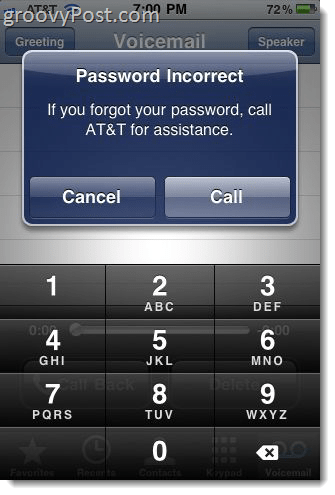
 Every time I restore my iPhone (i.e. after jailbreaking or if I just wipe it clean and re-sync it), I get this constant error message asking me to “enter voicemail password” over and over again. For some reason, I can never remember what to do in this situation—well, this time, I’m documenting the solution for me and for you. Most people who have this problem seem to say the same thing: “But I never set an iPhone voicemail password!” But you did, way back when you activated the phone in the store. The thing is that you never have to enter your password in order to check your visual voicemail, so you likely forgot it the day you set it. This is especially true if you’re a Google Voice user, like me.
At any rate, the Apple Store employee probably set it to your last four digits of your Social Security number, or 0000 or 1234 or 1111, so try those first. If those don’t fix your “password incorrect” error message, don’t fear—you can get this worked out without talking to customer support.
What you need to do is call 611 from your iPhone and go through the automated voicemail password reset menu (I promise, you won’t have to wait on hold or talk to any people). I think you have to hit 1 to confirm that you’re calling from the number with the voicemail issue. Then, press 3 to get voicemail help. Then hit 3 again to reset your voicemail password. You’ll have to enter your billing zip code to verify your identity. This will take about 30 seconds after you do so. Note that the menu options may be different for you. You can also reach this menu by hitting the little question mark that shows up in your Voicemail password incorrect error message box and touching “Call” and you’ll be connected to your cellular service provider.

In my case, AT&T texted me a new temporary iPhone voicemail password. It arrived before I was done with the call.

But it seems that was unnecessary, because they also rolled back my voicemail tab on my Phone app to look like this:

I could just enter in a new password as if nothing happened. Actually, this may have not been a long term solution, since it broke again shortly after resetting my password, so I did it again and used my temporary password as my new password and it seems to be working just fine now.
If you want to change your voicemail password after setting up your iPhone with your temporary password, touch Settings and choose Phone and touch Change Voicemail Password.
Anyway, a nice tip to keep in handy, so you don’t have to keep dismissing that obnoxious “Password Incorrect: Enter Voicemail Password” screen every time your unlock your iPhone.
(Note: I wrote these instructions using an AT&T iPhone 3GS in the U.S. Your instructions may be different depending on your phone and region.)
48 Comments
Leave a Reply
Leave a Reply





Nicki
January 27, 2011 at 5:58 am
Thank you so much! That message was driving me crazy!
Michael
December 2, 2014 at 9:43 am
Thank you so much. That message was killing me!!
prettyjuls
March 23, 2015 at 12:24 pm
NO. I cant get it.. its driving me nuts.
Sharon
May 20, 2015 at 5:27 pm
Thank you so much! The screen cleared as soon as I clicked on the ?
Lauren Wolsner
February 5, 2011 at 12:44 pm
Thank you so much! Your instructions are the only thing that have helped! :)
Conni Bishop
June 8, 2011 at 11:02 pm
Thanks a lot. I tried to call customer service. After having to put me on hold 3 times, telling me he was checking with the iphone 3GS manual, I finally hung up on him. This worked and I am now a happy iphone user again. Cheers!
MrGroove
June 9, 2011 at 12:02 pm
@Conni – Your welcome!
And don’t even get me started on customer service lines these days…… I’ve found TWITTER actually works the best for getting help from a company these days.
Jovette
June 17, 2011 at 2:30 pm
Thanks!!! It is not fixed!!! So far… =P
ljhatlga
July 24, 2011 at 11:06 am
Excellent assistance, thanks. Your advice was simple, detailed, and accurate. The entire process took me all of 45 seconds: problem solved.
Kate
July 25, 2011 at 8:46 am
Thanks so much I was ready to smash this phone!
Brent
August 10, 2011 at 9:24 am
For the love of God, FINALLY! Thank you!!!
Kelly
August 16, 2011 at 7:45 pm
Thank you!!!!!
Drew
October 16, 2011 at 9:31 am
Thanks it worked
Marie
October 21, 2011 at 9:32 am
Thank YOU , thank YOU, thank YOU!! I had to laugh as as I was reading your post that is EXACTLY what I said to myself…..I fixed but can’t remember how!! so glad you documented this so I didn’t have to! I liked your facebook! Hope to check out the rest of your site!
two days later………..I can now check my voice mail Again!
Linda
October 30, 2011 at 6:24 pm
Problem fixed. Thank you!!!
Ang
November 15, 2011 at 2:26 am
Super helpful. I can’t believe it was that easy. Neither AT&T or Apple could fix it.
Michael
November 16, 2011 at 11:13 pm
Great help. I saw this error message repeatedly after I upgraded to iOS 5. You solved the problem. Much gratitude!
Samir Bhatnagar
December 13, 2011 at 3:32 pm
Thanks…that message was driving me nuts! All taken care of now.
cat
December 23, 2011 at 10:58 am
Thank you sooooo much for this article!! It did the trick and I love the fact that I didnt have to speak to anyone to fix it. Thank you so much again.
Gramma
January 9, 2012 at 12:20 pm
Yahoo! Easy, peasy! worked like magic in less than a couple of minutes! THANKS
belk
February 28, 2012 at 3:25 pm
finally…thank u very much.
JackBNumble
May 5, 2012 at 1:21 pm
Isn’t it amazing how AT&T customer service is non-existent? Same is true for Microsoft and most other corporate companies. They seem to be great service when it comes to selling or taking payments.
connor
May 31, 2012 at 8:29 am
Wow! This has been an ongoing issue for me, and I feel really dumb for not knowing how to do it! Thank you so much for this blog!!
dawn
June 10, 2012 at 7:05 am
Thank you. Your instructions worked perfectly!!!
john
October 23, 2012 at 6:03 am
Iam currently using google voice on my iphone does antone know how to restore it back to factory voicemail ive already resetting the phone.
Anson Burtch
January 22, 2013 at 6:43 am
Thank you! This was very helpful information and it worked perfectly.
mds
January 24, 2013 at 3:40 pm
it’s now Then, press 5 to get voicemail help. Then hit 1 again to reset your voicemail password.
Bren
March 5, 2013 at 5:56 am
FINALLY!!! for 5 months. I talked to the customer service before regarding with these issue but no helped.
Brittany
March 6, 2013 at 3:41 am
Thank you for the help! Literally took 1 minute to call & fix =)
bsmit243
March 6, 2013 at 3:42 am
Thank you for the help! Literally took 1 minute to call & fix
JoeJoe
March 25, 2013 at 6:52 am
Thanks for the quick fix. Very informative. Worked like a charm.
Barb
May 14, 2013 at 10:59 am
Mine is on my screen and has frozen everything else. The question mark doesn’t work nor did the numbers you suggested they may have set the password to. I can’t use the phone to call. Is there a phone number I can call from another phone?
Janis
June 7, 2013 at 3:11 pm
i had the same issue today, phone was totally frozen and nothing including a hard restart would get that damned message off the screen. SO I did a restore to factory settings and then let it reset everything back on my phone from the most recent backup…that solved the problem…pain in the neck but at least the message is gone and it unfroze my phone.
Anna
May 19, 2013 at 3:27 pm
So helpful, it has been bugging me for months! Thank you!
Mel
September 18, 2013 at 7:36 am
Thank you. These instructions were so helpful. Something that had been driving me crazy was solved so easily thanks to you!
Tammy
September 18, 2013 at 4:28 pm
Thank you! This time I didn’t need my husband to fix it ;-)
Sunny
February 4, 2014 at 6:28 pm
Thanks! That helped me fix it so the annoying error message is gone.
Mindy
August 28, 2014 at 8:41 am
OMG! I have literally tried to ignore this mesg for like 6 months now! It seemingly popped up more and more. I can’t thank you enough!!!!!!! I wish I would have googled it before now. I give you the highest of high fives!
Lora
September 29, 2014 at 9:22 am
Thanks so much! You’re a lifesaver!
Seal
October 14, 2014 at 6:26 am
Thanks , this is the best help for this issue on the entire internet !!!!!!! Much appreciated
Melissa
March 17, 2015 at 8:09 am
Five years later and this advice still works. Thanks!
susan
March 18, 2015 at 3:35 pm
Thank you so much You very quickly solved my problem .. the last 4 or soc worked!!!!!
Richard
April 14, 2015 at 2:05 pm
Thanks! Worked like a charm all these years later. Hate VV, so nice to be able to forget it again.
Liz
April 29, 2015 at 12:51 pm
Thank you so much! Great advice, still works!
Judy Greenwald
July 22, 2015 at 1:51 pm
Thank you so much!!! Works just fine now.
Lorie
August 3, 2015 at 9:05 am
Thanks! They just sent me my password reset and it has not popped up anymore and I didn’t have to put it in.
Maggie Cromwell
November 16, 2015 at 8:02 pm
My i phone is locked with the message “Password Incorrect” call AT&T for assistance.
I can’t cancel, slide to unlock, take calls, or cancel. The above info is great but I can’t get my phone unlocked to carry out the steps to delete the message.
Any help?
Laura
June 11, 2017 at 10:07 am
This was great! Fixed the issue and now the voicemail is fine again. Thanks!!!