Android: How To Disable or Change SIM PIN Code


If you need to change the SIM code or disable it altogether on your Android device, here’s how to do just that.
There are people who just won’t use a PIN code on the SIM card. Maybe you’re one of those users, or maybe you just want to change your SIM card’s PIN code. Either way, we’ve got you covered.
Change SIM PIN Code on Android
Note: This article was written several years ago on an older version of Android. The steps for this will be much more different in today’s modern versions.
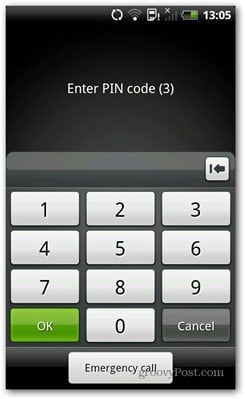
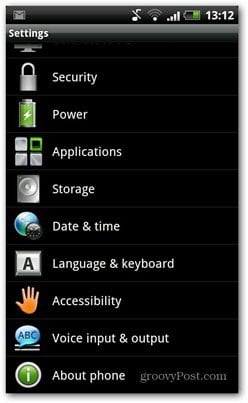
First, go to Settings in your Android device’s main menu.

In the Settings menu, choose Security, then Set up SIM card lock.
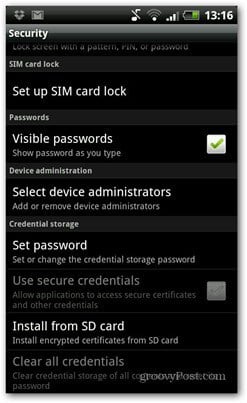
First, here’s how to disable the SIM card PIN. All you have to do is to uncheck the box next to “Lock SIM card” and then confirm the change by inputting the current PIN code. That’s it!

To change the PIN code, click Change SIM PIN. Then, you’ll have to input the current code, followed by the new code – twice, so that you’re sure it’s verified.
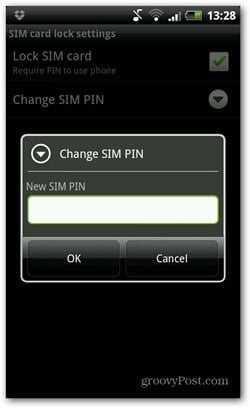
There you go. You’ve just changed your SIM PIN code. And in case you need to do so, here’s how to set up a screen lock on your Android device.
29 Comments
Leave a Reply
Leave a Reply







pakwing.com
July 19, 2012 at 10:52 am
this kind of tips are basic, and every body knows how to do this, do not post such type of posts, like how to clear android market history, how to check your android software version.
Brian Burgess
July 19, 2012 at 11:05 am
Thanks for reading pakwing!. Not ALL of our readers know how to do everything on Android. We have readers who are beginners and experts alike. We want to accommodate everyone.
Bogdan
July 19, 2012 at 2:47 pm
I actually wrote this tip after a couple of people asked me how to do it, so I guess not everybody knows how to do these things. Or maybe some people are just too lazy to look. In both cases, it could be helpful.
Bipbip
December 17, 2012 at 4:38 am
You aren’t right. I for one have forgotten how to remove the PIN-code request, and after a Google search found this post very useful.
Bogdan Bele
December 18, 2012 at 5:12 am
Thanks! Great to hear that!
spamless
October 25, 2022 at 5:24 am
I have managed IT departments. I didn’t know how to do this, though I did believe I would be able to figure it out on my own inside of a minute. Nevertheless, it made me feel better about it to check ahead of time. (I’m visiting an elderly friend who can no longer remember his SIM PIN.) Don’t be such a putz, Pakwing. Some of us grew up before there were smartphones. In my case, before there were four-function calculators. (Wanna have a go with my slide rule?)
Kai
May 16, 2013 at 4:54 pm
how to unlock it? i tried and it wont let me uncheck the box :/
Adi
May 30, 2013 at 6:57 pm
Same with mine Kai, my android suddenly locked sim card. Any sim card cannot be used to the android, and the simcard which locked in the android can be used in other phone.
Please, who ever know how to solve this problem ?
Bogdan Bele
May 31, 2013 at 12:17 am
If the card works in another phone, it must be something related to your Android device. You could try to master reset it and try after that (but you’ll lose all data in it).
Mark
July 21, 2015 at 6:49 am
I’ve got the same problem and tried your suggestion but it didn’t work
alex leong
February 13, 2014 at 7:35 pm
my tablet sim card lock setting need me to key in the old sim pin number, but i totally forgot and can’t remember the number before i can change the sim card lock to a new number,
can you show me the correct matter to track my old sim pin to correct it?
thank.
Bogdan Bele
February 14, 2014 at 8:18 am
Is the SIM locked with a PUK? You can get that from your mobile carrier if you enter a wrong PIN 3 times.
Name
February 14, 2014 at 8:44 am
Thanks dude, just googled it! useful info.
marco
June 30, 2014 at 12:49 am
I need to install a configuration message for the APN but it askes for a PIN.
Is it the SIM PIN or what ? because whatever I insert, it doesn’t work.
I also tried to remove the SIM PIN, to insert the old one, no way.
Bogdan Bele
June 30, 2014 at 12:26 pm
I honestly haven’t heard about anything like that before. Have you tried asking your carrier? Maybe it’s something related to that message.
marco
June 30, 2014 at 11:09 pm
I’ve read on the net that others had the same problem but didn’t find any solution. I’ll go to the shop and ask. When I bought the phone (Shengda SM-N900) all was ok, then I rooted it, installed some apps and started having problems with the phone calls, noisy. So I did a factory reset and from that moment I cannot send messages and cannot install configuration messages. I wanted to make a factory format but if I reboot the phone in download mode, it’s in Chinese and don’t understand a word.
Nirav
November 2, 2014 at 3:04 am
HI dear
I want Permanent disable sim lock, how ?
possibilis
February 11, 2015 at 10:25 am
What about loop problem? original Kitkat 4.4.2. Dual sim. Last picture you posted shows choose SIM option. Nothing works. Phone is good. Rooted. pressing option just makes screen reload.
Sergio
February 13, 2015 at 8:13 am
Thanks…its works
Ivan
May 31, 2015 at 1:33 am
Thanks!
Quick and simple.
Joseph Griffith
June 26, 2015 at 9:33 am
Change pin numerous for messages
PV
October 24, 2015 at 5:29 am
Thanks!
rio pilapil
January 1, 2016 at 6:47 pm
I forgot my current email how will I format it.
Thad
April 16, 2016 at 10:15 pm
I can’t remember my pin at all… Must have been drunk. I only have one try left… How do I find out what it is? Enabling the Sim pin is paramount at this time… Plz help
Bunny
February 3, 2017 at 5:29 am
Anyone know how to just shut the SMS messaging and all other SMS features off? I don’t have a pin number i never put one in and one day the phone asked if I wanted messaging tho go thru SMS so I clicked yes turn SMS on.. Now all messages go thru SMS, and all this other stuff is happening. Just want to turn it off.
Jan
May 18, 2018 at 1:05 am
I need help with my phone rejecting the new pin several times time, even if i enter the correct pin. i only have 4 attempts left!! am i screwed and going to have to factory reset my phone?
Dennis
April 21, 2019 at 11:54 pm
Thank you so much for your post! It’very useful! The last time I used mobile phones was about 10 years ago.. Now I have bought one again and man, it sure has changed a lot and there is so much to learn again :-)
Mark
May 19, 2019 at 7:42 am
My phone tells me my SIM PIN is incorrect when I try to disable the lock. I know it’s the right number as I can unlock the phone and I can change the number.
edgar omondi
August 10, 2022 at 6:50 am
Thanks a lot.The feature is hidden in an android phone.This really helped me.