How to Forward iPhone Calls to Another Number

iPhones have a great feature that allows you to easily forward calls to another number. This tutorial covers the steps including screenshots along the way.
Ever since I bought my first iPhone 3G back in 2008, the first thing I do when I get home is forward all calls from my iPhone to my home phone. Originally I did this because my house sits in a black hole, and AT&T service sucks. Although this particular issue is fixed with Wi-Fi calling, I still regularly forward my calls as it’s a nice way to drop the phone at the door and “unplug” without the worry of missing a call.
So, if you’re like me, and you still have a home phone… follow the simple steps below to forward your iPhone to any number. The steps are confirmed to work for the original iPhone as well as the iPhone X.
Although this tip is for iPhone users, the process is the same for Android users as well. That said, you can also use Carrier codes if you don’t want to screw around with your iPhone settings.
How To Forward iPhone Calls to Another Number
Step 1 – Tap Settings on your iPhone
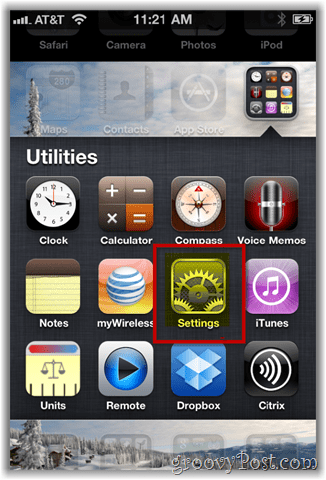
Step 2 – Tap Phone

Step 3 – Tap Call Forwarding
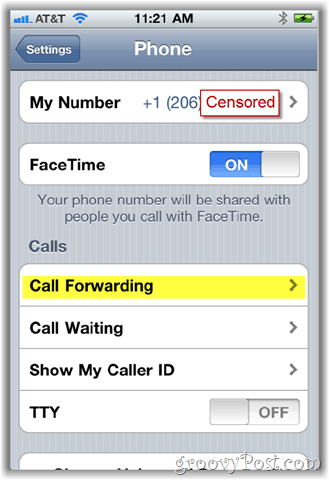
Step 4 – Tap Call Forwarding to toggle on (turn on) the feature
Note: To disable Call Forwarding later, return to this menu and toggle off.

After toggling on Call Forwarding, the Forward To option will appear and prompt you for the number to forward calls to. If you’ve already used this feature before, the previous # you forwarded your iPhone to will be displayed. If that’s the case, you’re done. If not, continue with Step 5.
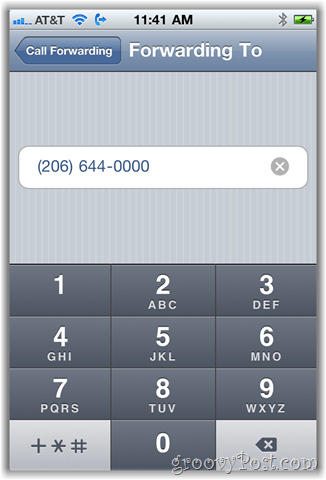
Step 5 – Tap Forward to choose a number to forward your phone to.

Step 6 – Input the phone number starting with Area Code. Tap Call Forwarding back button when done.
Once Call Forwarding is enabled, you will notice a new Phone Icon on the top bar of your iPhone Screen:

This icon means that your phone has been forwarded to another number. Don’t forget about this! I can’t tell you how many times my wife has texted me telling me my phone is still forwarded home. ; )
As I mentioned earlier, almost all phones on all carriers have the ability to forward calls to another number. For instance, AT&T, Verizon, and Sprint allow you to forward older model non-Smart Phones using *72 and the phone #. Example: *72 206 555 1212. This is actually how I always forwarded my old flip phone back in the day.
19 Comments
Leave a Reply
Leave a Reply







Kads
October 27, 2010 at 10:52 pm
Hi
I have tried that option, but once I return back to the page after keying in the no. # where I want the calls to be fwded, the ON key automatically switches off to OFF!!
Can any1 guide me how do I go about this?
-Kads
MrGroove
October 29, 2010 at 10:27 pm
Hi Kads – did you try a few different numbers? I noticed when I tried a bad #, the phone didn’t accept it.
Kads
October 30, 2010 at 11:25 pm
Hi Mr Groove!
I did try with other numbers! but it dint work!
My network provider does provide the option to forward calls .. so m sure there is no problem there!
M clueless!!!
jacks69
December 12, 2010 at 8:11 am
Call your carrier. I called mine and they told me exactly what to do.
chad
July 5, 2011 at 2:03 pm
Jacks69,
what did they tell you to do. I have the same problem, called ATT they transfered me to APPLE and neither could fix it.
I would like for you to tell me wha tyou did to get it to work.
thank you,
chad
Evan
November 23, 2011 at 11:27 am
You have to activate call forwarding on your plan or it will not work. Once you add this to your cell plan it will work fine
fatin
March 10, 2012 at 7:45 am
is it possible to forward a single call to some other number?
elividu
April 18, 2012 at 11:12 pm
I’m trying to follow your directions to forward calls from my iPhone to my home landline. Under phone in my settings window, I don’t have a call forwarding button. Is it somewhere else?
Veronica Vilder
July 2, 2012 at 2:59 pm
Tnx for the guide – but here in Sweden there are som ppl with a low ranked job that annoys your off time – phone vendors – books underwear soap and other crap spoiling your time.
i have on my phone made contact labled “commercial no answer”
but it would be a lot easier if i could do as a friend of mine on a samsung :
put a v-bug in a menu square –
redirect all calls from this contact
is this higly usable feature possible on an iphone – if so how ?
i would love to redirect these vendors to 911 – so they can tell them to get a real job.
grrrmf!
Fredy
June 13, 2015 at 1:41 pm
Hi Veronica, Here in the USA we have similar bothersome phone calls but we call them telemarketers.If we did that redirect to 911 we might be locked up for using 911 in a non-emergency situation! very good idea though,
Krishna
March 5, 2013 at 11:33 pm
I have tried as you shown and it did work before.BUt it’s not working anymore now.When i forward my number to another phone,if somebody rings me,my phone is busy…any idea please…
Hilmi
August 17, 2013 at 6:27 pm
Need to key in some code that not in the manual of the i-phone. there is 2-3 code that depend on what is u want, (to divert when unreachable/ busy)
Alex
November 13, 2013 at 12:18 pm
Oh yeah, thank you. So simple and so overlooked….
Mahnaz
November 19, 2014 at 2:53 pm
I have tried to delete forwarding number from my iphone When i forward my number to another phone,if somebody rings me,my phone is busy…any idea please…
bella
December 15, 2014 at 9:26 pm
how do i transfer one call from my iphone instead of all calls? is it possible for me to do that? can someone please help me…
Debra
July 20, 2015 at 8:59 am
Hi, can you tell me, if I forward to another number, is there a call record on my cell bill or on the number I transfer to?
Mario Canchis
July 21, 2015 at 9:14 am
For some reason, the Conditional Call Forwarding (CCF) code I normally used returned error messages. Being the first day of the new iPhone 6, I thought that perhaps AT&T’s system was overloaded. I tried a few times that day and still no luck. Being a Friday, I tried a few times again on Saturday and Sunday and thought for sure it would work. No luck at any of those times. Assuming it was a problem with my account, on Monday I went into my local AT&T store and figured they could “fix the glitch”. However, the knowledgable person I talked to said he was having the exact same problem with his new iPhone 6 as well. He said he believed it was a problem with iOS 8 and there was nothing he could do at the store to fix it. So off I went to do a little research on the Internet.
The first thing I found was an App, Divert Calls, that claimed it could set up Conditional Call Forwarding. I wondered if it could work around the problem I was having, so I downloaded the App and tested it. As it turns out, the App itself doesn’t actually change the CCF setting. It merely creates the code for you so you can paste it into the Phone App dialer and send it. Once I found that out, I thought I was dead in the water. However, Conditional Call Forwarding is actually three different settings. The code I had been using (which starts with **004*) changes all three settings at once. The Divert Calls App gives you three individual codes for CCF (*61*, *62*, and *67*) . So I went ahead and tested the first code. I was pleasantly surprised that it worked! I tried the other two codes and they worked as well! It was a little bit of a pain, but at least my Google Voice voicemail was operational again.
I did a little more research and found information that corroborated my findings (such as this forum thread for Google Voice). I also found out that you can call AT&T and have them set up Conditional Call Forwarding for you. So let me sum up what I know and don’t know:
The iPhone 6 and/or other iPhones running iOS 8 have a problem setting up Conditional Call Forwarding (CCF) on AT&T’s network using the usual **004* CCF code.
I am not sure if this problem exists on other wireless networks, such as Verizon, Sprint, or T-Mobile.
The problem can be worked around by setting up each individual call forwarding option (Unanswered, Unreachable, Busy), or calling AT&T and having them do it for you.
The codes can be generated by the Divert Calls App, but it is not necessary if you know how to generate the codes yourself.
I have no idea if AT&T and/or Apple are aware of this problem yet
For the record, here are the various Conditional Call Forwarding codes (replace 1234567890 with the number you are forwarding to):
Set all CCF options: **004*1234567890# <- This is the code that is currently NOT working with iOS 8 and/or the iPhone 6 on AT&T’s network
Call Forward if Unanswered: *61*1234567890#
Call Forward if Unreachable: *62*1234567890#
Call Forward if Busy: *67*1234567890#
If you have any further information on this issue or are experiencing it on other wireless networks, please comment below!
Update: If you are getting error messages with the three individual CCF codes, try turning off LTE and entering them again.
Regards
Mario
Steve Krause
July 29, 2016 at 1:23 pm
Give this article a read – I included all the carrier codes for US Mobile users.
https://www.groovypost.com/howto/mobile/how-to-foward-calls-any-phone-android/
Scott Koch
August 17, 2015 at 7:52 am
How do I turn off the CCF?